Unlock a world of possibilities! Login now and discover the exclusive benefits awaiting you.

- Qlik Community
- :
- All Forums
- :
- QlikView
- :
- Re: Sort order with year-month
- Subscribe to RSS Feed
- Mark Topic as New
- Mark Topic as Read
- Float this Topic for Current User
- Bookmark
- Subscribe
- Mute
- Printer Friendly Page

- Mark as New
- Bookmark
- Subscribe
- Mute
- Subscribe to RSS Feed
- Permalink
- Report Inappropriate Content
Sort order with year-month
Hello everyone,
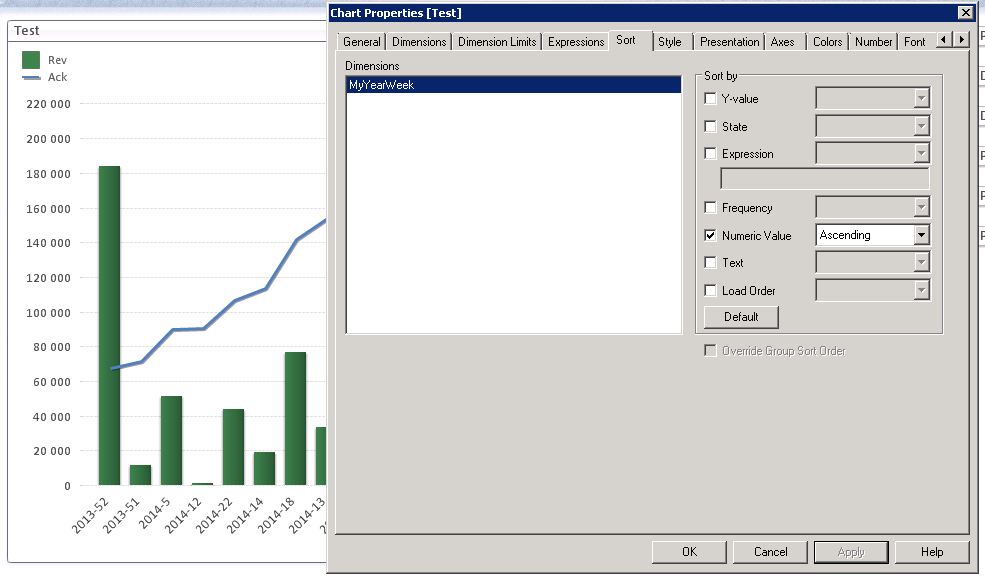
I have a problem with the sort order in a bar chart. On the x-axis I have a field, let's call it MyYearWeek, which contains the following values:
2013-51
2014-1
2014-12
2014-2
My problem is that I don't know how to sort it correctly, right now with my A->Z sorting the values presents as 2013-51, 2014-1, 2014-12, 2014-2 of course... I really do want to keep the 'YYYY-WW' formatting for my field values. How to sort it within the chart object sort tab, without changing my script below... Perhaps I could use the Year field and Week field seperately for sorting?
My script:
Year(MyDate) As MyYear,
Week(MyDate) As MyWeek,
Year(MyDate) & '-' & Week(MyDate) As MyYearWeek
Thanks in advance.
Regards,
Filip
- « Previous Replies
-
- 1
- 2
- Next Replies »
Accepted Solutions

 tresB
tresB
- Mark as New
- Bookmark
- Subscribe
- Mute
- Subscribe to RSS Feed
- Permalink
- Report Inappropriate Content
tresB
- Mark as New
- Bookmark
- Subscribe
- Mute
- Subscribe to RSS Feed
- Permalink
- Report Inappropriate Content
Try expression sort :
Expression: MyYear+MyWeek
- Mark as New
- Bookmark
- Subscribe
- Mute
- Subscribe to RSS Feed
- Permalink
- Report Inappropriate Content
Chart Properties -> Sort
remove all the sorting and then the date field select Number Ascending / Descending
tht will solve ur problm..
- Mark as New
- Bookmark
- Subscribe
- Mute
- Subscribe to RSS Feed
- Permalink
- Report Inappropriate Content
Your suggestion only sorts weeks, heres the result:
2014-1
2014-2
2014-12
2013-51
- Mark as New
- Bookmark
- Subscribe
- Mute
- Subscribe to RSS Feed
- Permalink
- Report Inappropriate Content
If you mean sort by 'Numeric Value' Ascending.... then it doesn't work at all.
I only have one dimension and using QV 11 if it helps in any way..
tresB
- Mark as New
- Bookmark
- Subscribe
- Mute
- Subscribe to RSS Feed
- Permalink
- Report Inappropriate Content
Right, my mistake.
try:
Expression: MyYear*100+MyWeek
- Mark as New
- Bookmark
- Subscribe
- Mute
- Subscribe to RSS Feed
- Permalink
- Report Inappropriate Content
.png "abeyphilip")
 abeyphilip
- Mark as New
- Bookmark
- Subscribe
- Mute
- Subscribe to RSS Feed
- Permalink
- Report Inappropriate Content
Hi Filip,
Try this in your chat sort expression:
num#(SubField(MyYearWeek,'-',1)&num(SubField(MyYearWeek,'-',2),'00'))
And then sort ascending or descending.
Regards,
Abey

 michael_maeuser
- Mark as New
- Bookmark
- Subscribe
- Mute
- Subscribe to RSS Feed
- Permalink
- Report Inappropriate Content
create a field year(mydate) and week(mydate) as xxx and sort by this field
- Mark as New
- Bookmark
- Subscribe
- Mute
- Subscribe to RSS Feed
- Permalink
- Report Inappropriate Content
Try loading like this
Year(MyDate) As MyYear,
Week(MyDate) As MyWeek,
Dual(Year(MyDate) & '-' & Week(MyDate), Num(Mydate)) As MyYearWeek
This way you tell Qlikview that MyYearWeek is a date, but the text formatting is YYYY-WW. Sorting will be based on the underlying numeric value
- « Previous Replies
-
- 1
- 2
- Next Replies »