Unlock a world of possibilities! Login now and discover the exclusive benefits awaiting you.

- Qlik Community
- :
- All Forums
- :
- QlikView
- :
- Re: Sort the month based on FinancialMonth
- Subscribe to RSS Feed
- Mark Topic as New
- Mark Topic as Read
- Float this Topic for Current User
- Bookmark
- Subscribe
- Mute
- Printer Friendly Page

- Mark as New
- Bookmark
- Subscribe
- Mute
- Subscribe to RSS Feed
- Permalink
- Report Inappropriate Content
Sort the month based on FinancialMonth
Dear All,
i want to sort the month based on financialmonth.(April,May,June ,,,,,,,,,,,,,,,,,,,,,,,,March)
i am able to sort it
.but on selection the selected month is moving to last right in the list box.
i don't want to move that month to last of the listbox.
find the attached sample.
Thanks,
Mukram.
Accepted Solutions

 IAMDV
IAMDV
- Mark as New
- Bookmark
- Subscribe
- Mute
- Subscribe to RSS Feed
- Permalink
- Report Inappropriate Content
Hi Mukram,
Sorry I misunderstood your requirement. You need to use this expression in sorting...
=only({1} FinancialMonth)
Attaching the same.
I hope this helps!
Cheers,
DV
IAMDV
- Mark as New
- Bookmark
- Subscribe
- Mute
- Subscribe to RSS Feed
- Permalink
- Report Inappropriate Content
Hi Mukram,
Please see attached. You need to add Sort by state as "Ascending". So that your selections won't change the position and still you can sort by your FinancialMonth.
I hope this helps!
Cheers,
DV
- Mark as New
- Bookmark
- Subscribe
- Mute
- Subscribe to RSS Feed
- Permalink
- Report Inappropriate Content
Dear Deepak.
Thanks for your reply.
when i did the sort state by 'Ascending' the selected Month is coming as first and order of month is changing.
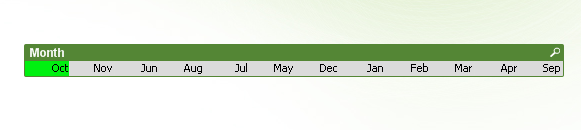
Thanks,
Mukram.
IAMDV
- Mark as New
- Bookmark
- Subscribe
- Mute
- Subscribe to RSS Feed
- Permalink
- Report Inappropriate Content
Hi Mukram,
Sorry I misunderstood your requirement. You need to use this expression in sorting...
=only({1} FinancialMonth)
Attaching the same.
I hope this helps!
Cheers,
DV
- Mark as New
- Bookmark
- Subscribe
- Mute
- Subscribe to RSS Feed
- Permalink
- Report Inappropriate Content
Dear Deepak.
Thank you.
it's working fine.
Thanks,
Mukram.