Unlock a world of possibilities! Login now and discover the exclusive benefits awaiting you.

- Qlik Community
- :
- All Forums
- :
- QlikView
- :
- Re: Sorting isssue
- Subscribe to RSS Feed
- Mark Topic as New
- Mark Topic as Read
- Float this Topic for Current User
- Bookmark
- Subscribe
- Mute
- Printer Friendly Page

- Mark as New
- Bookmark
- Subscribe
- Mute
- Subscribe to RSS Feed
- Permalink
- Report Inappropriate Content
Sorting isssue
I have a qlikview table that I want to sort according to the timestamp numeric value however I don't want to display that in my table. I want to display the 'user friendly' display of the month. I want to use the sort tab within the table properties to change the sort to be an expression using the column NUMFISCAL_TIMESTAMP however, the table isn't sorting the way I would expect it to. I would expect the table to sort according to the FISCAL_ACTUAL_BEGIN_DT (which the NUMFISCAL_TIMESTAMP column is based off of). Your assistance is greatly appreciated
- « Previous Replies
-
- 1
- 2
- Next Replies »
- Mark as New
- Bookmark
- Subscribe
- Mute
- Subscribe to RSS Feed
- Permalink
- Report Inappropriate Content
no, open the one you posted from here. I have not made any changes at all.
- Mark as New
- Bookmark
- Subscribe
- Mute
- Subscribe to RSS Feed
- Permalink
- Report Inappropriate Content
same sort order as I have posted previously. This is really strange, what setting of mine is different?
- Mark as New
- Bookmark
- Subscribe
- Mute
- Subscribe to RSS Feed
- Permalink
- Report Inappropriate Content
post a screenshot of your sort properties for the chart
- Mark as New
- Bookmark
- Subscribe
- Mute
- Subscribe to RSS Feed
- Permalink
- Report Inappropriate Content
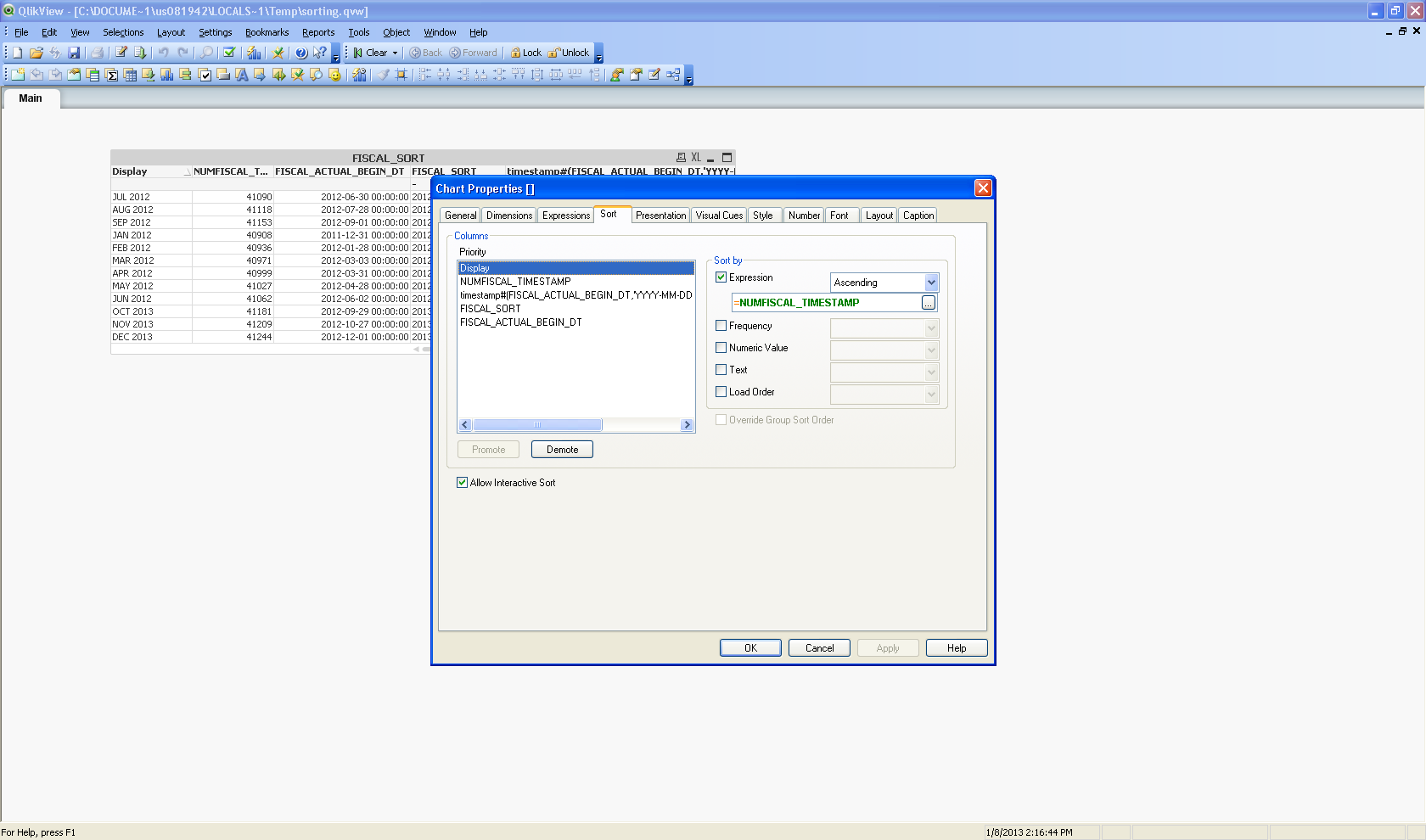
- Mark as New
- Bookmark
- Subscribe
- Mute
- Subscribe to RSS Feed
- Permalink
- Report Inappropriate Content
1st, i would try replacing your existing calculation with this:
= FISCAL_ACTUAL_BEGIN_DT
- Mark as New
- Bookmark
- Subscribe
- Mute
- Subscribe to RSS Feed
- Permalink
- Report Inappropriate Content
If that does not work, open a ticket with QlikView. Seems you have a bug.
- Mark as New
- Bookmark
- Subscribe
- Mute
- Subscribe to RSS Feed
- Permalink
- Report Inappropriate Content
Yeah, that didn't work. I had also tried that before. I will open a ticket. Thanks.
- « Previous Replies
-
- 1
- 2
- Next Replies »