Unlock a world of possibilities! Login now and discover the exclusive benefits awaiting you.

- Qlik Community
- :
- All Forums
- :
- QlikView
- :
- Re: To change the default color selection
- Subscribe to RSS Feed
- Mark Topic as New
- Mark Topic as Read
- Float this Topic for Current User
- Bookmark
- Subscribe
- Mute
- Printer Friendly Page

- Mark as New
- Bookmark
- Subscribe
- Mute
- Subscribe to RSS Feed
- Permalink
- Report Inappropriate Content
To change the default color selection
Hi,
I am having a scenario in which if i select a timeline(for Eg. selected month as Apr), the default Green color is for month dimension and for remaining dimension as light grey color.
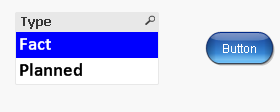
Now i would like to change the default color from Green to Blue, and the remaining unselected item as white. Is this possible in qlikview.
Please advise.
Thanks,
Rohit
Accepted Solutions


- Mark as New
- Bookmark
- Subscribe
- Mute
- Subscribe to RSS Feed
- Permalink
- Report Inappropriate Content
Simple Macro may be?
Sub MacrotoChangeColor()
Dim UserPrefs
set UserPrefs = _
ActiveDocument.GetApplication.GetUserPreferences
UserPrefs.CustomSelBgColor(1).PrimaryCol.Col = _
RGB (0,0,255) ' Blue
UserPrefs.CustomSelBgColor(5).PrimaryCol.Col = _
RGB (255,255,255) ' Light gray
ActiveDocument.GetApplication.SetUserPreferences _
UserPrefs
end sub
- Mark as New
- Bookmark
- Subscribe
- Mute
- Subscribe to RSS Feed
- Permalink
- Report Inappropriate Content
There is no Straight forward with out Macro. May be this?

 qlikview979
- Mark as New
- Bookmark
- Subscribe
- Mute
- Subscribe to RSS Feed
- Permalink
- Report Inappropriate Content
may be helpfull,
- Mark as New
- Bookmark
- Subscribe
- Mute
- Subscribe to RSS Feed
- Permalink
- Report Inappropriate Content
Simple Macro may be?
Sub MacrotoChangeColor()
Dim UserPrefs
set UserPrefs = _
ActiveDocument.GetApplication.GetUserPreferences
UserPrefs.CustomSelBgColor(1).PrimaryCol.Col = _
RGB (0,0,255) ' Blue
UserPrefs.CustomSelBgColor(5).PrimaryCol.Col = _
RGB (255,255,255) ' Light gray
ActiveDocument.GetApplication.SetUserPreferences _
UserPrefs
end sub
- Mark as New
- Bookmark
- Subscribe
- Mute
- Subscribe to RSS Feed
- Permalink
- Report Inappropriate Content
Hi,
I have applied the changes and it is working fine at the application level. But, when i have placed the same application into access point it is giving me the default color selection i.e. green not blue.
I do not know the exact issue.
Thanks in advance!!
Rohit
- Mark as New
- Bookmark
- Subscribe
- Mute
- Subscribe to RSS Feed
- Permalink
- Report Inappropriate Content
Is it, Can i know which client of Access point you are seeing?