Unlock a world of possibilities! Login now and discover the exclusive benefits awaiting you.

- Qlik Community
- :
- All Forums
- :
- QlikView
- :
- Re: Total Sum Expression
- Subscribe to RSS Feed
- Mark Topic as New
- Mark Topic as Read
- Float this Topic for Current User
- Bookmark
- Subscribe
- Mute
- Printer Friendly Page

 khaycock
- Mark as New
- Bookmark
- Subscribe
- Mute
- Subscribe to RSS Feed
- Permalink
- Report Inappropriate Content
Total Sum Expression
I am having a weird problem with the sum of many freight charges where the total sum of DEL_GBP_FREIGHT should be 20.00 as there is only 1 lot of 20.00 in the set of data, but the expression is calculation 40 and I have no idea why!! 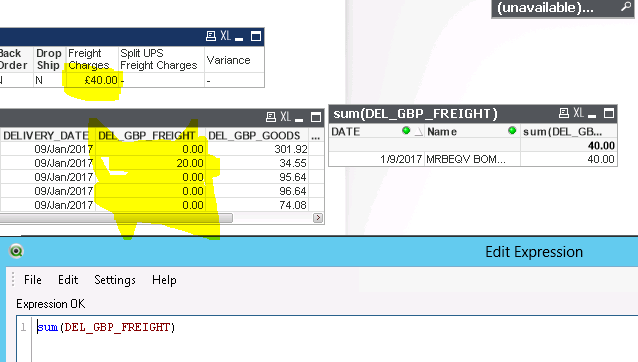
This might be something silly but I really can't figure it out. I think its having an effect on another expression too.
Any ideas?
- « Previous Replies
-
- 1
- 2
- Next Replies »
Accepted Solutions

 Frank_Hartmann
- Mark as New
- Bookmark
- Subscribe
- Mute
- Subscribe to RSS Feed
- Permalink
- Report Inappropriate Content

- Mark as New
- Bookmark
- Subscribe
- Mute
- Subscribe to RSS Feed
- Permalink
- Report Inappropriate Content
Hi
Upload sample data am using personal edition. I can't open the application.


- Mark as New
- Bookmark
- Subscribe
- Mute
- Subscribe to RSS Feed
- Permalink
- Report Inappropriate Content
Try to remove filter for Dealer Name and then look whether values are showing which is hide the 20 ??
 antoniotiman
- Mark as New
- Bookmark
- Subscribe
- Mute
- Subscribe to RSS Feed
- Permalink
- Report Inappropriate Content
Hi,
You have 2 rows

Regards,
Antonio
Frank_Hartmann
- Mark as New
- Bookmark
- Subscribe
- Mute
- Subscribe to RSS Feed
- Permalink
- Report Inappropriate Content
may be try:
sum( DISTINCT DEL_GBP_FREIGHT)
hope this helps
khaycock
- Mark as New
- Bookmark
- Subscribe
- Mute
- Subscribe to RSS Feed
- Permalink
- Report Inappropriate Content
But when I want to do a total sum in another chart of all the £20 charges, I can't DISTINCT it because it will return only 20 when it should actually be 60?
If i take out the DISTINCT I get the problem again...
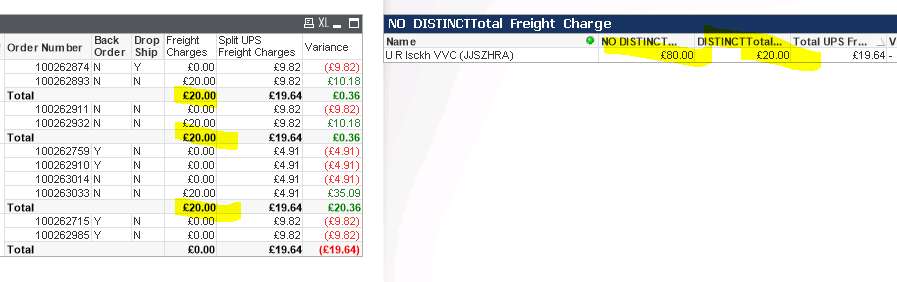
What could I do in this situation?
I'm also trying to get a sum of the Split UPS Charge but that seems impossible too 

 florentina_doga
- Mark as New
- Bookmark
- Subscribe
- Mute
- Subscribe to RSS Feed
- Permalink
- Report Inappropriate Content
you have 2 rows for order no.100262879
see attach
florentina_doga
- Mark as New
- Bookmark
- Subscribe
- Mute
- Subscribe to RSS Feed
- Permalink
- Report Inappropriate Content
lastscandatetime and consignment have different value
khaycock
- Mark as New
- Bookmark
- Subscribe
- Mute
- Subscribe to RSS Feed
- Permalink
- Report Inappropriate Content
Even if remove those rows from the script it is still saying 40..
florentina_doga
- Mark as New
- Bookmark
- Subscribe
- Mute
- Subscribe to RSS Feed
- Permalink
- Report Inappropriate Content
maiby
ItemDetail:
LOAD distinct ManifestDate,
// Consignment,
// AddressCode,
// Service,
// CustomerCode,
Name,
Address1,
Address2,
Address3,
Address4,
PostCode,
Country
// Package,
// Reference,
// From_Name,
// Route,
// Weight,
// LastScan,
// LastScanDatetime,
// Reference2,
// Reference3,
// Reference4
FROM
(biff, embedded labels, table is Items$);
- « Previous Replies
-
- 1
- 2
- Next Replies »