Unlock a world of possibilities! Login now and discover the exclusive benefits awaiting you.

- Qlik Community
- :
- All Forums
- :
- QlikView
- :
- Re: cascading list boxes
- Subscribe to RSS Feed
- Mark Topic as New
- Mark Topic as Read
- Float this Topic for Current User
- Bookmark
- Subscribe
- Mute
- Printer Friendly Page

- Mark as New
- Bookmark
- Subscribe
- Mute
- Subscribe to RSS Feed
- Permalink
- Report Inappropriate Content
cascading list boxes
Hi everyone,
I have two list boxes and i want that whenever i select something in the first list box and the values in the second list box should filter accordingly. Right now, I am seeing all the value in the second list box and the values which are not associated with the value selected in the first list box are greyed out. I want the unassociated values in the second list box to completely disappear.
How can i do that?

 Sokkorn
- Mark as New
- Bookmark
- Subscribe
- Mute
- Subscribe to RSS Feed
- Permalink
- Report Inappropriate Content
Hi,
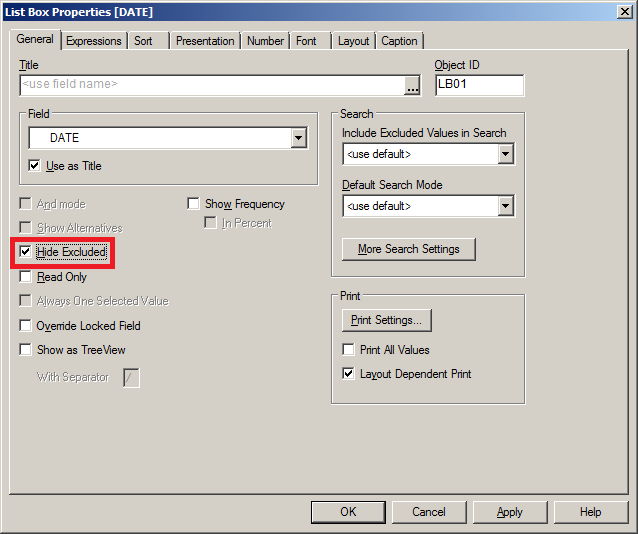
Go to ListBox properties -> General -> Check "Hide Exclude"
Regards,
Sokkorn
- Mark as New
- Bookmark
- Subscribe
- Mute
- Subscribe to RSS Feed
- Permalink
- Report Inappropriate Content
Thanks Sokkorn for the reply.
Can i do this thing for multi box also?
Sokkorn
- Mark as New
- Bookmark
- Subscribe
- Mute
- Subscribe to RSS Feed
- Permalink
- Report Inappropriate Content
Hi,
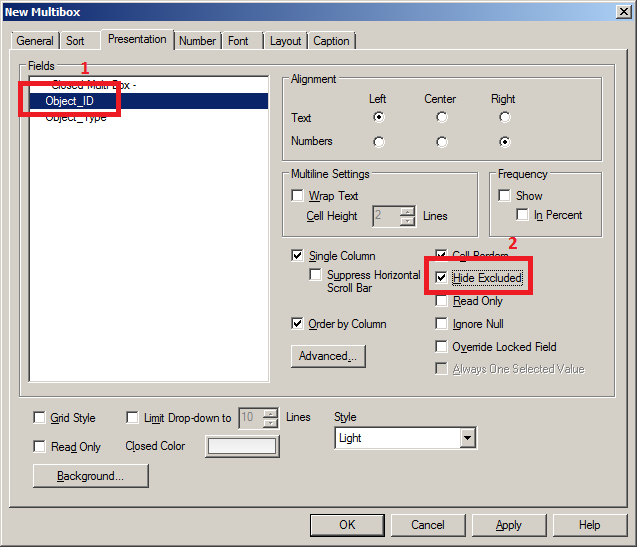
Yes we can. Add your field into multi box -> Presentation tab -> Select field -> Hide exclude
Regards,
Sokkorn