Unlock a world of possibilities! Login now and discover the exclusive benefits awaiting you.

- Qlik Community
- :
- All Forums
- :
- QlikView
- :
- Re: list box issue
- Subscribe to RSS Feed
- Mark Topic as New
- Mark Topic as Read
- Float this Topic for Current User
- Bookmark
- Subscribe
- Mute
- Printer Friendly Page

 manoranjan_d
- Mark as New
- Bookmark
- Subscribe
- Mute
- Subscribe to RSS Feed
- Permalink
- Report Inappropriate Content
list box issue
Hi all,
I have attached the sample for the list box what i need is if i select the IT in the list and if i select the sec1 in the section list, sec4 and sec5 are hiding i need that value.
i got successful on the section available for the specific dept such that unavailable section are getting hide for the specifc dept, but the
issue is when i select the section value in the list the other values are getting hide, so the value in the section should not hide how to acheive it
Accepted Solutions

 sunny_talwar
- Mark as New
- Bookmark
- Subscribe
- Mute
- Subscribe to RSS Feed
- Permalink
- Report Inappropriate Content

 adamdavi3s
- Mark as New
- Bookmark
- Subscribe
- Mute
- Subscribe to RSS Feed
- Permalink
- Report Inappropriate Content
Well your items are hiding as the list box is using an expression rather than simply using the field name.
I can't quite see why you would do this in this situation, but the simple issue is either:
1- just use the field name
2- alter your listbox expression to this:
=AGGR(Only({1}SECTION),SECTION)
Please remember to mark this as helpful or the correct answer if I have helped you or answered your question.
sunny_talwar
- Mark as New
- Bookmark
- Subscribe
- Mute
- Subscribe to RSS Feed
- Permalink
- Report Inappropriate Content
You need this?
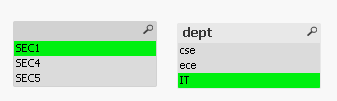
Try this:
=AGGR(Only({<SECTION>}SECTION),SECTION)
manoranjan_d
- Mark as New
- Bookmark
- Subscribe
- Mute
- Subscribe to RSS Feed
- Permalink
- Report Inappropriate Content
Thaks
sunny_talwar
- Mark as New
- Bookmark
- Subscribe
- Mute
- Subscribe to RSS Feed
- Permalink
- Report Inappropriate Content
No problem 
manoranjan_d
- Mark as New
- Bookmark
- Subscribe
- Mute
- Subscribe to RSS Feed
- Permalink
- Report Inappropriate Content
i need one more help
=aggr(only(DATE(created_date,'DD-MMM-YYYY')),created_date)
how to apply for this?
sunny_talwar
- Mark as New
- Bookmark
- Subscribe
- Mute
- Subscribe to RSS Feed
- Permalink
- Report Inappropriate Content
What are you trying to apply here? Just a pure guess here:
=Aggr(Only({<created_date>} Date(created_date,'DD-MMM-YYYY')), created_date)
