Unlock a world of possibilities! Login now and discover the exclusive benefits awaiting you.

- Qlik Community
- :
- All Forums
- :
- QlikView
- :
- Re: loaded dates appear as values
- Subscribe to RSS Feed
- Mark Topic as New
- Mark Topic as Read
- Float this Topic for Current User
- Bookmark
- Subscribe
- Mute
- Printer Friendly Page

 nevilledhamsiri
- Mark as New
- Bookmark
- Subscribe
- Mute
- Subscribe to RSS Feed
- Permalink
- Report Inappropriate Content
loaded dates appear as values
Hi
At times when data are loaded, dates are shown as values as shown below. I have given the date format in excel such as (mm/dd/yy). In otherwards, date was entered as 08/31/2017 1st the Month then the Date & Year after.
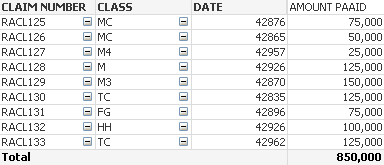
Thanks
Neville
Accepted Solutions

 vinieme12
- Mark as New
- Bookmark
- Subscribe
- Mute
- Subscribe to RSS Feed
- Permalink
- Report Inappropriate Content
Right click on chart >> properties>>go to Number tab >> select field from left pane >> select format to Date
That's is all
If a post helps to resolve your issue, please accept it as a Solution.
vinieme12
- Mark as New
- Bookmark
- Subscribe
- Mute
- Subscribe to RSS Feed
- Permalink
- Report Inappropriate Content
Right click on chart >> properties>>go to Number tab >> select field from left pane >> select format to Date
That's is all
If a post helps to resolve your issue, please accept it as a Solution.
vinieme12
- Mark as New
- Bookmark
- Subscribe
- Mute
- Subscribe to RSS Feed
- Permalink
- Report Inappropriate Content
if your query is resolved please close the thread by marking the response as correct
Qlik Community Tip: Marking Replies as Correct or Helpful
If a post helps to resolve your issue, please accept it as a Solution.

 sunny_talwar
- Mark as New
- Bookmark
- Subscribe
- Mute
- Subscribe to RSS Feed
- Permalink
- Report Inappropriate Content
It appears that you are using DATE as a dimension here.... I would suggest using a calculated dimension here...
Date(DATE)
sunny_talwar
- Mark as New
- Bookmark
- Subscribe
- Mute
- Subscribe to RSS Feed
- Permalink
- Report Inappropriate Content
Vineeth - isn't this too early for query resolution message? The OP might not have even seen your response yet ...
vinieme12
- Mark as New
- Bookmark
- Subscribe
- Mute
- Subscribe to RSS Feed
- Permalink
- Report Inappropriate Content
maybe and maybe not
Just checkout the number of threads the op has actually closed
If a post helps to resolve your issue, please accept it as a Solution.
sunny_talwar
- Mark as New
- Bookmark
- Subscribe
- Mute
- Subscribe to RSS Feed
- Permalink
- Report Inappropriate Content
Hahahaha ya I know that... I have been at the receiving end of this ....
