Unlock a world of possibilities! Login now and discover the exclusive benefits awaiting you.

- Qlik Community
- :
- All Forums
- :
- QlikView
- :
- Re: percentage, total and evolution
- Subscribe to RSS Feed
- Mark Topic as New
- Mark Topic as Read
- Float this Topic for Current User
- Bookmark
- Subscribe
- Mute
- Printer Friendly Page

- Mark as New
- Bookmark
- Subscribe
- Mute
- Subscribe to RSS Feed
- Permalink
- Report Inappropriate Content
percentage, total and evolution
Hello there,
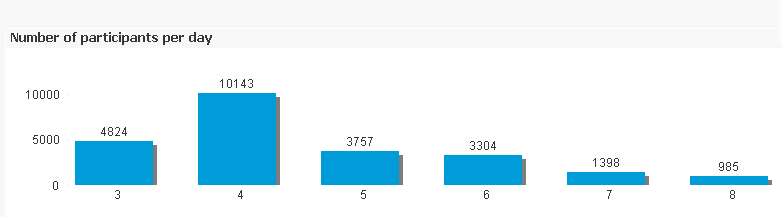
working on a draw i have that kind of graph
LOAD Nom,
Prénom,
[Adresse e-mail],
Status,
Langue,
[Champ libre 1],
[Champ libre 2],
Country,
subfield(Country,'-',1) as CorrectedCountry,
Date(Floor([Date de création])) as Date,
year([Date de création]) as year,
month([Date de création]) as month,
day([Date de création]) as day,
hour([Date de création]) as hour,
Time(Frac([Date de création])) as Time
this is my expression, quite simple 
=count(DISTINCT [Adresse e-mail])
the dimension is DAY
questions are the following...
TOTAL : i need to add another graph showing the evolution ...in my case 4824, first day, 14967 second day..... what would be the best expression to calculate and to show this.
PERCENTAGE : i need to add somewhere the evolution in percentage between day -1 and day+1 what do you recommend to use ?
EVOLUTION : last point, i need to do an estimation of the progression...meaning that i need to estimate the total number of participants knowing the fact that the draw will run 10 to 12 days...
Thanks for your help...quite simple question i know
UPDATE : Something strange happening look at the png file ...

- « Previous Replies
-
- 1
- 2
- Next Replies »
- Mark as New
- Bookmark
- Subscribe
- Mute
- Subscribe to RSS Feed
- Permalink
- Report Inappropriate Content
Hello
how to include the "DAY" data into your percentage
=(Above(count(DISTINCT [Adresse e-mail])) - count(DISTINCT [Adresse e-mail]))/Above(count(DISTINCT [Adresse e-mail]))
what would be interesting for my Dashboard is to had a figure showing what is the evolution in percentage between yesterday and today .
Best
JP
- Mark as New
- Bookmark
- Subscribe
- Mute
- Subscribe to RSS Feed
- Permalink
- Report Inappropriate Content
count(field name)/count(total field name)

 ashishkalia
- Mark as New
- Bookmark
- Subscribe
- Mute
- Subscribe to RSS Feed
- Permalink
- Report Inappropriate Content
Hey jphfavre,
- Take Dimension Day
- Total = count( {<Day ={ '<=$( = Max(Day) )' }>}DISTINCT EMAIL)
- Percentage = (count( {<Day ={ '<=$( = Max(Day) )' }>}DISTINCT EMAIL) - count( {<Day ={ '<$( = Max(Day) )' }>}DISTINCT EMAIL) ) / count( {<Day ={ '<=$( = Max(Day) )' }>}DISTINCT EMAIL)
- Not sure what you looking for third one.
Please tell if this is working or not.
- Mark as New
- Bookmark
- Subscribe
- Mute
- Subscribe to RSS Feed
- Permalink
- Report Inappropriate Content
Thanks
for the third is the following. Knowing that we still have 10 days of competion and knowing that each we increase the number of participants by X%, how many participants could we estimate at the end of the competition....40'000, 50'000, etcc...more ...
is that clearer ?
ashishkalia
- Mark as New
- Bookmark
- Subscribe
- Mute
- Subscribe to RSS Feed
- Permalink
- Report Inappropriate Content
Is it what you looking for:-
count( {<Day ={ '<=$( = Max(Day) )' }>}DISTINCT EMAIL)+( count( {<Day ={ '<=$( = Max(Day) )' }>}DISTINCT EMAIL)*vForcast/100 )
Where vForecast is a variable which you can assign to inputbox and let user decide the % of forecasting.
- Mark as New
- Bookmark
- Subscribe
- Mute
- Subscribe to RSS Feed
- Permalink
- Report Inappropriate Content
looking good but how to implement the fact that the competition will still run for 10 days...
- « Previous Replies
-
- 1
- 2
- Next Replies »