Unlock a world of possibilities! Login now and discover the exclusive benefits awaiting you.

- Qlik Community
- :
- All Forums
- :
- QlikView
- :
- Re: remove record that have same value
- Subscribe to RSS Feed
- Mark Topic as New
- Mark Topic as Read
- Float this Topic for Current User
- Bookmark
- Subscribe
- Mute
- Printer Friendly Page

- Mark as New
- Bookmark
- Subscribe
- Mute
- Subscribe to RSS Feed
- Permalink
- Report Inappropriate Content
remove record that have same value
Hi all,
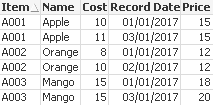
I have a table like this
| Item | Name | Cost | Record Date | Price |
|---|---|---|---|---|
| A001 | Apple | 10 | 01/01/2017 | 15 |
| A001 | Apple | 10 | 02/01/2017 | 15 |
| A001 | Apple | 11 | 03/01/2017 | 15 |
| A002 | Orange | 8 | 01/01/2017 | 12 |
| A002 | Orange | 10 | 02/01/2017 | 12 |
| A003 | Mango | 15 | 01/01/2017 | 18 |
| A003 | Mango | 15 | 02/01/2017 | 18 |
| A003 | Mango | 15 | 03/01/2017 | 20 |
I want to remove those records where Cost and Price is same as previous record (Line 2 and 7 in the table), do you have any idea on how to do that?
Thanks!

 antoniotiman
- Mark as New
- Bookmark
- Subscribe
- Mute
- Subscribe to RSS Feed
- Permalink
- Report Inappropriate Content
Hi Paddy,
Temp:
LOAD Item,
Name,
Cost,
[Record Date],
Price
FROM
"https://community.qlik.com/message/1294316"
(html, codepage is 1252, embedded labels, table is @1);
NoConcatenate LOAD Item,Name,Cost,Price,FirstValue([Record Date]) as [Record Date]
Resident Temp
Group By Item,Name,Cost,Price;
Drop Table Temp;
Regards,
Antonio

 MK_QSL
- Mark as New
- Bookmark
- Subscribe
- Mute
- Subscribe to RSS Feed
- Permalink
- Report Inappropriate Content
Load Item, Name, Cost, Date(Min([Record Date])) as [Record Date], Price Group By Item, Name, Cost, Price;
LOAD Item,
     Name,
     Cost,
     [Record Date],
     Price
FROM
[https://community.qlik.com/thread/265343]
(html, codepage is 1252, embedded labels, table is @1);
 effinty2112
- Mark as New
- Bookmark
- Subscribe
- Mute
- Subscribe to RSS Feed
- Permalink
- Report Inappropriate Content
Hi Paddy,
Without changing the script create this table with dims: Item,Name,Cost,Price and Record Date.
and the expression
if(Above(TOTAL Only(Cost))=Only(Cost) and Above(TOTAL Only(Price))=Only(Price),Null(),'Show')
| Item | Name | Record Date | Cost | Price | |
|---|---|---|---|---|---|
| A001 | Apple | 01/01/2017 | 10 | 15 | Show |
| A001 | Apple | 03/01/2017 | 11 | 15 | Show |
| A002 | Orange | 01/01/2017 | 8 | 12 | Show |
| A002 | Orange | 02/01/2017 | 10 | 12 | Show |
| A003 | Mango | 01/01/2017 | 15 | 18 | Show |
| A003 | Mango | 03/01/2017 | 15 | 20 | Show |
In the presentation tab hide the expression column to get:
| Item | Name | Record Date | Cost | Price |
|---|---|---|---|---|
| A001 | Apple | 01/01/2017 | 10 | 15 |
| A001 | Apple | 03/01/2017 | 11 | 15 |
| A002 | Orange | 01/01/2017 | 8 | 12 |
| A002 | Orange | 02/01/2017 | 10 | 12 |
| A003 | Mango | 01/01/2017 | 15 | 18 |
| A003 | Mango | 03/01/2017 | 15 | 20 |
Cheers
Andrew
 sunny_talwar
- Mark as New
- Bookmark
- Subscribe
- Mute
- Subscribe to RSS Feed
- Permalink
- Report Inappropriate Content
Another option if your data is correctly sorted
Table:
LOAD AutoNumber(Item&Cost&Price) as Key,
Item,
Name,
Cost,
[Record Date],
Price
FROM
[https://community.qlik.com/thread/265343]
(html, codepage is 1252, embedded labels, table is @1)
Where not Exists(Item) or not Exists(Cost) or not Exists(Price);
MK_QSL
- Mark as New
- Bookmark
- Subscribe
- Mute
- Subscribe to RSS Feed
- Permalink
- Report Inappropriate Content
By this way we are getting one line less.
| A002 | Orange | 10 | 02/01/2017 | 12 |
sunny_talwar
- Mark as New
- Bookmark
- Subscribe
- Mute
- Subscribe to RSS Feed
- Permalink
- Report Inappropriate Content
That makes sense... this will fix the problem
Table:
LOAD *
Where not Exists(Key);
LOAD AutoNumber(Item&Cost&Price) as Key,
Item,
Name,
Cost,
[Record Date],
Price
FROM
[https://community.qlik.com/thread/265343]
(html, codepage is 1252, embedded labels, table is @1);
 Kushal_Chawda
- Mark as New
- Bookmark
- Subscribe
- Mute
- Subscribe to RSS Feed
- Permalink
- Report Inappropriate Content
Data:
LOAD Item,
Name,
Cost,
Cost&Price as Cost_Price,
[Record Date],
Price
FROM
[https://community.qlik.com/thread/265343]
(html, codepage is 1252, embedded labels, table is @1);
New:
LOAD *
where Flag=0;
LOAD *,
if(Cost_Price=Previous(Cost_Price),1,0) as Flag
Resident Data
Order by Item,Name, [Record Date];
DROP Table Data;
DROP Fields Cost_Price,Flag;
