Unlock a world of possibilities! Login now and discover the exclusive benefits awaiting you.

- Qlik Community
- :
- All Forums
- :
- QlikView
- :
- Re: round date with time difference
- Subscribe to RSS Feed
- Mark Topic as New
- Mark Topic as Read
- Float this Topic for Current User
- Bookmark
- Subscribe
- Mute
- Printer Friendly Page

 userid128223
- Mark as New
- Bookmark
- Subscribe
- Mute
- Subscribe to RSS Feed
- Permalink
- Report Inappropriate Content
round date with time difference
I have 2 dates in table:
StartDate: 2017-01-20 00:01:25 345
EndDate: 2017-01-20 00:01:26 235
How can i get the difference between EndDate - StartDate & round it off to 2 decimals.
Thanks
Accepted Solutions

 kamal_sanguri
- Mark as New
- Bookmark
- Subscribe
- Mute
- Subscribe to RSS Feed
- Permalink
- Report Inappropriate Content
Hi,
Please find attached document where I have put same condition in script with Where clause to show records where difference of time is more than 30 sec (you can change as per your needs.
Data:
LOAD Time#(EndDate,'YYYY-MM-DD hh:mm:ss fff') as EndDate,
Time#(StartDate,'YYYY-MM-DD hh:mm:ss fff') as StartDate;
Load * Inline
[
StartDate,EndDate
2017-01-20 00:01:25 235,2017-01-20 00:02:56 235
2017-01-20 00:01:25 235,2017-01-20 00:01:26 235
2017-01-20 00:01:25 235,2017-01-20 00:11:26 235
2017-01-20 01:21:25 235,2017-01-20 01:31:26 235
2017-01-20 01:21:25 235,2017-01-20 01:31:29 235
];
NoConcatenate
NewData:
LOAD *
Resident Data
Where Time(EndDate-StartDate,'hh:mm:ss fff')>Time#('00:00:30:','hh:mm:ss');
DROP Table Data;

 antoniotiman
- Mark as New
- Bookmark
- Subscribe
- Mute
- Subscribe to RSS Feed
- Permalink
- Report Inappropriate Content
Hi,
SET TimestampFormat='YYYY-MM-DD hh:mm:ss fff';
= Interval(EndDate-StartDate,'ss,ff') -> 00,89
Regards,
Antonio
userid128223
- Mark as New
- Bookmark
- Subscribe
- Mute
- Subscribe to RSS Feed
- Permalink
- Report Inappropriate Content
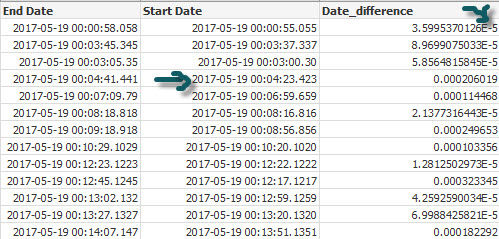
I am getting wierd results when i try below.
interval(EndDate - StartDate ,'ssss') as Date_difference;
it is not calculating seconds difference in some fields properly, I also get E-5 on many fields.
kamal_sanguri
- Mark as New
- Bookmark
- Subscribe
- Mute
- Subscribe to RSS Feed
- Permalink
- Report Inappropriate Content
Hi,
Please refer this document. Let me know in case you have any doubt.
userid128223
- Mark as New
- Bookmark
- Subscribe
- Mute
- Subscribe to RSS Feed
- Permalink
- Report Inappropriate Content
thanks for the script. how do i use to evaluate seconds that exceeds 30 or only show records when it exceeds 5 minutes based on your answer.
kamal_sanguri
- Mark as New
- Bookmark
- Subscribe
- Mute
- Subscribe to RSS Feed
- Permalink
- Report Inappropriate Content
try this:
=if (Time(EndDate-StartDate,'hh:mm:ss fff')>Time#('00:00:30:','hh:mm:ss'),Time(EndDate-StartDate,'hh:mm:ss fff'),'Less than 30 seconds not recorded.')
I have set it show when difference is more than 30 seconds, you can change it per your needs like for five minutes:
=if (Time(EndDate-StartDate,'hh:mm:ss fff')>Time#('00:05:00:','hh:mm:ss'),Time(EndDate-StartDate,'hh:mm:ss fff'),'Less than 30 seconds not recorded.')
userid128223
- Mark as New
- Bookmark
- Subscribe
- Mute
- Subscribe to RSS Feed
- Permalink
- Report Inappropriate Content
i am looking to do this in script with where clause.
kamal_sanguri
- Mark as New
- Bookmark
- Subscribe
- Mute
- Subscribe to RSS Feed
- Permalink
- Report Inappropriate Content
Hi,
Please find attached document where I have put same condition in script with Where clause to show records where difference of time is more than 30 sec (you can change as per your needs.
Data:
LOAD Time#(EndDate,'YYYY-MM-DD hh:mm:ss fff') as EndDate,
Time#(StartDate,'YYYY-MM-DD hh:mm:ss fff') as StartDate;
Load * Inline
[
StartDate,EndDate
2017-01-20 00:01:25 235,2017-01-20 00:02:56 235
2017-01-20 00:01:25 235,2017-01-20 00:01:26 235
2017-01-20 00:01:25 235,2017-01-20 00:11:26 235
2017-01-20 01:21:25 235,2017-01-20 01:31:26 235
2017-01-20 01:21:25 235,2017-01-20 01:31:29 235
];
NoConcatenate
NewData:
LOAD *
Resident Data
Where Time(EndDate-StartDate,'hh:mm:ss fff')>Time#('00:00:30:','hh:mm:ss');
DROP Table Data;
