Unlock a world of possibilities! Login now and discover the exclusive benefits awaiting you.

- Qlik Community
- :
- All Forums
- :
- QlikView
- :
- Re: set analysis (aggr)
- Subscribe to RSS Feed
- Mark Topic as New
- Mark Topic as Read
- Float this Topic for Current User
- Bookmark
- Subscribe
- Mute
- Printer Friendly Page

 adiarnon
- Mark as New
- Bookmark
- Subscribe
- Mute
- Subscribe to RSS Feed
- Permalink
- Report Inappropriate Content
set analysis (aggr)
hi i have this table-
| project | unit | actual | budget |
|---|---|---|---|
| A | aa | 9 | 0 |
| A | bb | 5 | 4 |
| B | aa | 5 | 2 |
| C | bb | 2 | 6 |
| C | ff | 4 | 0 |
| C | cc | 2 | 4 |
| D | bb | 0 | 0 |
| F | aa | 2 | 9 |
i need an taxt box that will count the number of projects that have at least one unit that have actual and dont have budget
in our case 2 projects - A,C
How should i write the expression?
adi
Accepted Solutions

 sunny_talwar
- Mark as New
- Bookmark
- Subscribe
- Mute
- Subscribe to RSS Feed
- Permalink
- Report Inappropriate Content
Without script manipulations, you can try this:
=Count(DISTINCT Aggr(If(Sum(actual) > 0 and Sum(budget) = 0, project), project, unit))

 karthickv
- Mark as New
- Bookmark
- Subscribe
- Mute
- Subscribe to RSS Feed
- Permalink
- Report Inappropriate Content
Hi Adi,
For your example with the below expression:
sum( aggr(if(sum(actuals)>0 and sum(budget)=0,1,0),Project,Unit))
Incase if there are more than one Unit with budget as zero and you still want to count only projects try to use the below:
sum(aggr( if(sum(aggr(if(sum(actuals)>0 and sum(budget)=0,1,0),Project,Unit) ))>0,1,0),Project))
Regards,
Karthick.
sunny_talwar
- Mark as New
- Bookmark
- Subscribe
- Mute
- Subscribe to RSS Feed
- Permalink
- Report Inappropriate Content
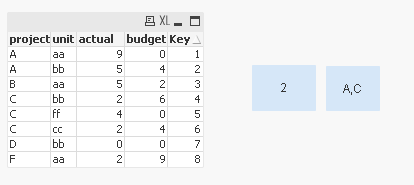
Try this script:
Table:
LOAD project,
unit,
actual,
budget,
AutoNumber(project&unit) as Key
FROM
[https://community.qlik.com/thread/219558]
(html, codepage is 1252, embedded labels, table is @1);
Text box expression:
=Count(DISTINCT {<Key = {"=Sum(actual) > 0 and Sum(budget) = 0"}>} project)
sunny_talwar
- Mark as New
- Bookmark
- Subscribe
- Mute
- Subscribe to RSS Feed
- Permalink
- Report Inappropriate Content
Without script manipulations, you can try this:
=Count(DISTINCT Aggr(If(Sum(actual) > 0 and Sum(budget) = 0, project), project, unit))
adiarnon
- Mark as New
- Bookmark
- Subscribe
- Mute
- Subscribe to RSS Feed
- Permalink
- Report Inappropriate Content
its working!
but the calculation taking a very long time
do you have any idea how can i do it more efficient? ( quickly)
adi

 antoniotiman
- Mark as New
- Bookmark
- Subscribe
- Mute
- Subscribe to RSS Feed
- Permalink
- Report Inappropriate Content
Hi Adi,
have You tried without Aggr(), simply
Count({<actual-={0},budget={0}>} DISTINCT project)
Regards,
Antonio
sunny_talwar
- Mark as New
- Bookmark
- Subscribe
- Mute
- Subscribe to RSS Feed
- Permalink
- Report Inappropriate Content
I did provide a quicker solution where you would have to create a Key field in the script. You should see performance benefits if you are able to and are willing to do it.
Best,
Sunny
