Unlock a world of possibilities! Login now and discover the exclusive benefits awaiting you.

- Qlik Community
- :
- All Forums
- :
- QlikView
- :
- Re: straight table
- Subscribe to RSS Feed
- Mark Topic as New
- Mark Topic as Read
- Float this Topic for Current User
- Bookmark
- Subscribe
- Mute
- Printer Friendly Page

 prma7799
- Mark as New
- Bookmark
- Subscribe
- Mute
- Subscribe to RSS Feed
- Permalink
- Report Inappropriate Content
straight table
Hi Experts,
Is it possible in straight table to show top 25 to 50 customers.
Thanks,
Prashant
Accepted Solutions
 jyothish8807
- Mark as New
- Bookmark
- Subscribe
- Mute
- Subscribe to RSS Feed
- Permalink
- Report Inappropriate Content
Yes it is possible.
Try in dimension,
if(Aggr(Rank(Sum(Sales)),Customer)>=25 and Aggr(Rank(Sum(Sales)),Customer)<=50 ,Customer)
in expression:
Sum(Sales)
This is just an example.
Regards
KC
KC
jyothish8807
- Mark as New
- Bookmark
- Subscribe
- Mute
- Subscribe to RSS Feed
- Permalink
- Report Inappropriate Content
Yes it is possible.
Try in dimension,
if(Aggr(Rank(Sum(Sales)),Customer)>=25 and Aggr(Rank(Sum(Sales)),Customer)<=50 ,Customer)
in expression:
Sum(Sales)
This is just an example.
Regards
KC
KC

 its_anandrjs
- Mark as New
- Bookmark
- Subscribe
- Mute
- Subscribe to RSS Feed
- Permalink
- Report Inappropriate Content
Hi,
Yes try the expression as calculated dimension or add the rowno90 field in the load script
RowNo(0 as row count
In chart
If( RowNo() >= 25 and Rowno() <= 50, [Customer Name])
Regards
Anand

 rajeshvaswani77
- Mark as New
- Bookmark
- Subscribe
- Mute
- Subscribe to RSS Feed
- Permalink
- Report Inappropriate Content
have expression in sort and then use dimension limits.
thanks,
Rajesh Vaswani
prma7799
- Mark as New
- Bookmark
- Subscribe
- Mute
- Subscribe to RSS Feed
- Permalink
- Report Inappropriate Content
Anand
I didn't get you ...
suppose I have data like below
LOAD * INLINE [
Empl, Sales
1, 10
2, 20
3, 30
4, 40
5, 50
6, 60
7, 70
8, 80
9,90
10,100
];
and I want to see 3 to 8 empl in straight table.
Thanks
Prashant
jyothish8807
- Mark as New
- Bookmark
- Subscribe
- Mute
- Subscribe to RSS Feed
- Permalink
- Report Inappropriate Content
try like this,
in Calculated Dimension:
if(EmpI>=3 and EmpI<=8,EmpI)
In Exp:
Sum(Sales)
Regards
KC
KC
 amit_saini
- Mark as New
- Bookmark
- Subscribe
- Mute
- Subscribe to RSS Feed
- Permalink
- Report Inappropriate Content
Hi,
Check this.
Thanks,
AS

- Mark as New
- Bookmark
- Subscribe
- Mute
- Subscribe to RSS Feed
- Permalink
- Report Inappropriate Content
Hi,
If you have two limits(Lower & Upper) use rank function like below:
Dimension Tab - Add Calculated dimension:
if(Aggr(Rank(Sum(Sales)),Empl)>=3 and Aggr(Rank(Sum(Sales)),Empl)<=8 ,Empl)
Expression Tab - Add new Expression:
Sum(Sales)
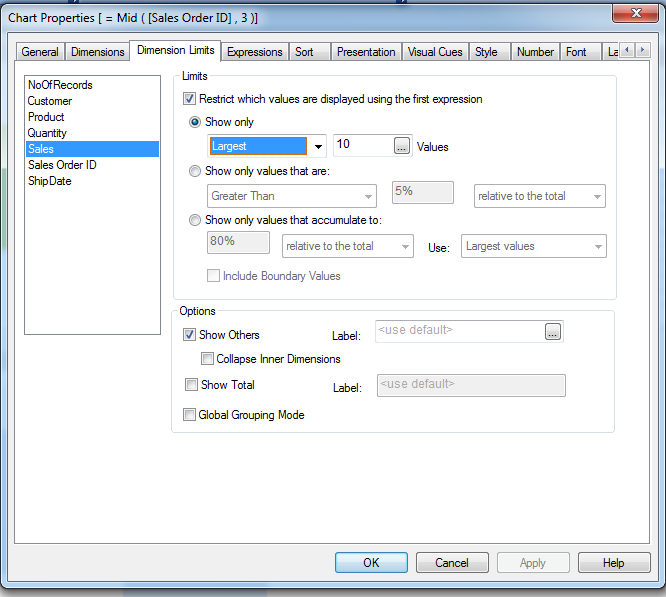
For only one limit(Upper or Lower) use Dimension limits tab:
Regards
Neetha