Unlock a world of possibilities! Login now and discover the exclusive benefits awaiting you.

- Qlik Community
- :
- All Forums
- :
- QlikView
- :
- Re: tough task?
- Subscribe to RSS Feed
- Mark Topic as New
- Mark Topic as Read
- Float this Topic for Current User
- Bookmark
- Subscribe
- Mute
- Printer Friendly Page

- Mark as New
- Bookmark
- Subscribe
- Mute
- Subscribe to RSS Feed
- Permalink
- Report Inappropriate Content
tough task?
Hi experts,
Date Format should be DD/MM/YYYY. Suppose there are n rows where row 2 and row 4 have different date formats
Row1 12/10/2014
Row2 12-10-2014
Row3 12/10/2014
Row4 12-10-2014
. .
.
.
.
Rown DD/MM/YYYY
During load I want to eliminate the rows with erroneous date format and convert into qvd. at the same time i want all the erroneous rows to be stored into a QVD called Error.Qvd.
how to store non erroneous dates in one qvd and at same time how to create qvd for erroneous data?
is it possible to create 2 qvds at a time ?
- Tags:
- new_to_qlikview
Accepted Solutions

 MarcoWedel
- Mark as New
- Bookmark
- Subscribe
- Mute
- Subscribe to RSS Feed
- Permalink
- Report Inappropriate Content
Hi,
one solution:
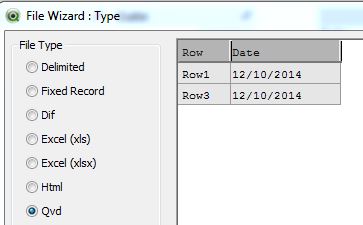
QVD correct dates
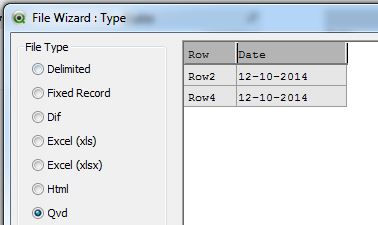
QVD incorrect dates
tabSource:
LOAD * INLINE [
    Row, Date
    Row1, 12/10/2014
    Row2, 12-10-2014
    Row3, 12/10/2014
    Row4, 12-10-2014
];

NoConcatenate

tabCorrectDates:
LOAD *
Resident tabSource
Where IsNum(Date);

NoConcatenate

tabIncorrectDates:
LOAD *
Resident tabSource
Where not IsNum(Date);

DROP Table tabSource;

STORE tabCorrectDates into tabCorrectDates.qvd (qvd);

STORE tabIncorrectDates into tabIncorrectDates.qvd (qvd);
hope this helps
regarsd
Marco

 antoniotiman
- Mark as New
- Bookmark
- Subscribe
- Mute
- Subscribe to RSS Feed
- Permalink
- Report Inappropriate Content
Hi,
Try
Load *
Where alt(Date#(Date,'DD/MM/YYYY'),0) > 0;
Load *
from Table;
You load only correct date.
Regards,
Antonio
- Mark as New
- Bookmark
- Subscribe
- Mute
- Subscribe to RSS Feed
- Permalink
- Report Inappropriate Content
for wrong date i need to create?
MarcoWedel
- Mark as New
- Bookmark
- Subscribe
- Mute
- Subscribe to RSS Feed
- Permalink
- Report Inappropriate Content
Hi,
one solution:
QVD correct dates
QVD incorrect dates
tabSource:
LOAD * INLINE [
    Row, Date
    Row1, 12/10/2014
    Row2, 12-10-2014
    Row3, 12/10/2014
    Row4, 12-10-2014
];

NoConcatenate

tabCorrectDates:
LOAD *
Resident tabSource
Where IsNum(Date);

NoConcatenate

tabIncorrectDates:
LOAD *
Resident tabSource
Where not IsNum(Date);

DROP Table tabSource;

STORE tabCorrectDates into tabCorrectDates.qvd (qvd);

STORE tabIncorrectDates into tabIncorrectDates.qvd (qvd);
hope this helps
regarsd
Marco
antoniotiman
- Mark as New
- Bookmark
- Subscribe
- Mute
- Subscribe to RSS Feed
- Permalink
- Report Inappropriate Content
For wrong date use
Where alt(..............) = 0;

 veidlburkhard
- Mark as New
- Bookmark
- Subscribe
- Mute
- Subscribe to RSS Feed
- Permalink
- Report Inappropriate Content
Hi manojqlik,
this Where clause gives you the incorrect data formats:
Load *
Where alt(Date#(Date,'DD/MM/YYYY'),0) = 0;
Load *
from Table;
(see QV Help, 'Conditional Functions', 'Alt')
Hope this helps
Burkhard
- Mark as New
- Bookmark
- Subscribe
- Mute
- Subscribe to RSS Feed
- Permalink
- Report Inappropriate Content
Hi Manoj.
Does this attachment help answer your question?
Regards
- Mark as New
- Bookmark
- Subscribe
- Mute
- Subscribe to RSS Feed
- Permalink
- Report Inappropriate Content
Hello manoj ,
Try like this