Unlock a world of possibilities! Login now and discover the exclusive benefits awaiting you.

- Qlik Community
- :
- Forums
- :
- Analytics & AI
- :
- Products & Topics
- :
- Reporting Service & Alerting
- :
- Reporting in Qlik Cloud : is it possible to hide i...
- Subscribe to RSS Feed
- Mark Topic as New
- Mark Topic as Read
- Float this Topic for Current User
- Bookmark
- Subscribe
- Mute
- Printer Friendly Page

 herard_bertrand
- Mark as New
- Bookmark
- Subscribe
- Mute
- Subscribe to RSS Feed
- Permalink
- Report Inappropriate Content
Reporting in Qlik Cloud : is it possible to hide it to users
Hello,
I've a simple question on Reporting function in Qlik Cloud :
I'd like to create a Reporting tasks that is not visible by users (I want the report to be calculated and sent once a month but automatically only, I don't want users to send it or to be able to see it).
Is it possible to do it ? If yes, how

Regards
- Tags:
- qlik cloud
- reporting
Accepted Solutions

 Frank_S
- Mark as New
- Bookmark
- Subscribe
- Mute
- Subscribe to RSS Feed
- Permalink
- Report Inappropriate Content
It does not appear to be possible to hide report task information for user that have access via permissions to access the specific space where the app lives.
However, if your requirement is to purely allow on demand reporting access to reporting apps, then the following the following like to Permissions should meet your requirement.
Permissions
To generate on-demand reports from a sheet in an app, you need the appropriate permissions in the space where the app is located.
Requirements for apps in shared spacesIn shared spaces, you need Can view or higher permissions in the space (or to the app) to generate on-demand reports.
For more information, see Managing permissions in shared spaces.
Requirements for apps in managed spacesIn managed spaces, you need Has restricted view or higher permissions in the space to generate on-demand reports. Non-space members with Can view, Can contribute, or Has restricted view access to the app can also generate on-demand reports.
For more information, see Managing permissions in managed spaces.
Requirements for apps in your personal spaceYou must have the Private Analytics Content Creator user role in the tenant to generate on-demand reports from an app in your personal space.
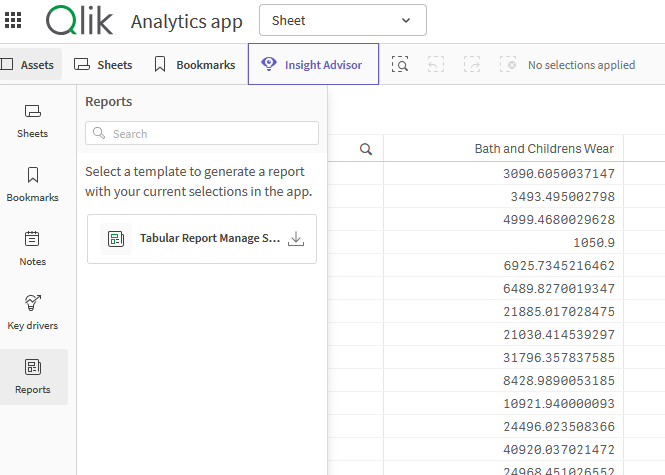
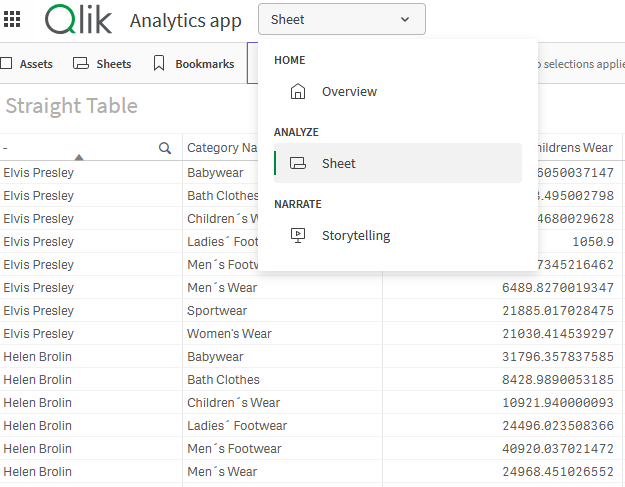
Left image, you see the user has access to on demand reports from the 'assets' panel but in the dropdown for the same app, there is no access to the 'reporting' area. This by following the Permissions mentioned above and one way to restrict users from seeing report tasks, recipients etc.
Otherwise if you have a specific requirement other than above, please feel free to write a feature request here:
Kind regards
 Ray_Strother
- Mark as New
- Bookmark
- Subscribe
- Mute
- Subscribe to RSS Feed
- Permalink
- Report Inappropriate Content
Hello ,
Have you review the report automation function?
Creating a report using Qlik Application Automation | Qlik Cloud Help
Frank_S
- Mark as New
- Bookmark
- Subscribe
- Mute
- Subscribe to RSS Feed
- Permalink
- Report Inappropriate Content
It does not appear to be possible to hide report task information for user that have access via permissions to access the specific space where the app lives.
However, if your requirement is to purely allow on demand reporting access to reporting apps, then the following the following like to Permissions should meet your requirement.
Permissions
To generate on-demand reports from a sheet in an app, you need the appropriate permissions in the space where the app is located.
Requirements for apps in shared spacesIn shared spaces, you need Can view or higher permissions in the space (or to the app) to generate on-demand reports.
For more information, see Managing permissions in shared spaces.
Requirements for apps in managed spacesIn managed spaces, you need Has restricted view or higher permissions in the space to generate on-demand reports. Non-space members with Can view, Can contribute, or Has restricted view access to the app can also generate on-demand reports.
For more information, see Managing permissions in managed spaces.
Requirements for apps in your personal spaceYou must have the Private Analytics Content Creator user role in the tenant to generate on-demand reports from an app in your personal space.
Left image, you see the user has access to on demand reports from the 'assets' panel but in the dropdown for the same app, there is no access to the 'reporting' area. This by following the Permissions mentioned above and one way to restrict users from seeing report tasks, recipients etc.
Otherwise if you have a specific requirement other than above, please feel free to write a feature request here:
Kind regards
