Unlock a world of possibilities! Login now and discover the exclusive benefits awaiting you.

- Qlik Community
- :
- Forums
- :
- Analytics & AI
- :
- Products & Topics
- :
- Reporting Service & Alerting
- :
- Re: can I create a cc: in a burst report?
- Subscribe to RSS Feed
- Mark Topic as New
- Mark Topic as Read
- Float this Topic for Current User
- Bookmark
- Subscribe
- Mute
- Printer Friendly Page

 mikecrengland
- Mark as New
- Bookmark
- Subscribe
- Mute
- Subscribe to RSS Feed
- Permalink
- Report Inappropriate Content
can I create a cc: in a burst report?
I've created a burst report using tabular reporting. There are about a dozen external recipients, but the ops manager would like to be copied on them. Is that possible?
thanks
Accepted Solutions

 banderson735
- Mark as New
- Bookmark
- Subscribe
- Mute
- Subscribe to RSS Feed
- Permalink
- Report Inappropriate Content
@mic -
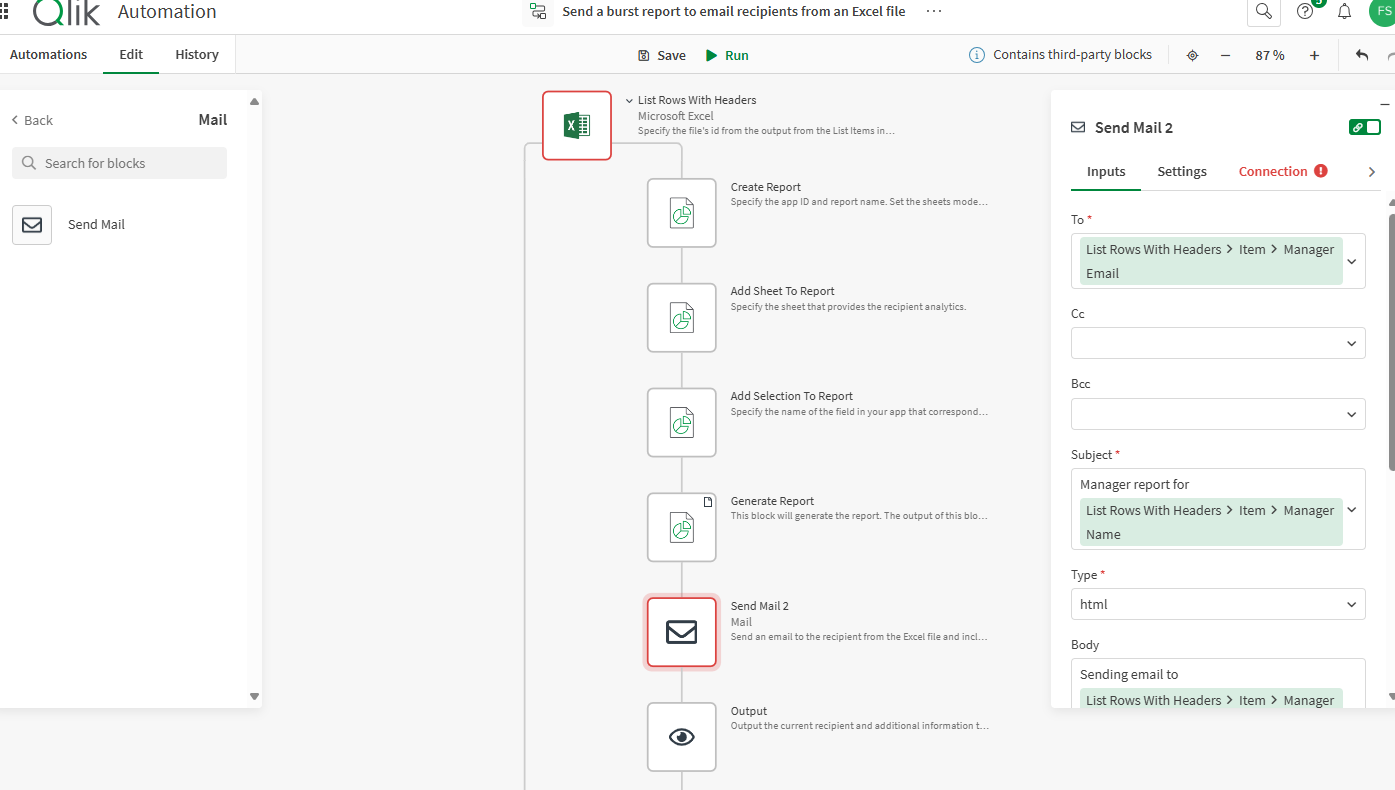
You currently cannot cc in report tasks, but I believe you can achieve your desired outcome using Qlik App Automate. You could try a similar concept to what @Andrew_Kruger describes at the bottom of a recent blog: https://community.qlik.com/t5/Reporting-Service-Alerting/Conditional-Report-Task-Execution/td-p/2521... .
Essentially, you could replicate the burst report task in QAA and cc or bcc recipients in the send mail block. High-level overview that I supplemented from Andrew's post:
- Source recipient list and execute via looping (there's a standard template available to everyone that you could start with called 'Send a burst report to email recipients from an Excel file')
- Building a temp bookmark for each recipient to replicate the report filters
- Requesting the corresponding report using the Tabular and PixelPerfect blocks in Qlik Automate
- Emailing the attached report to each recipient and cc/bcc others

 Frank_S
- Mark as New
- Bookmark
- Subscribe
- Mute
- Subscribe to RSS Feed
- Permalink
- Report Inappropriate Content
As per @banderson735
banderson735
- Mark as New
- Bookmark
- Subscribe
- Mute
- Subscribe to RSS Feed
- Permalink
- Report Inappropriate Content
@mic -
You currently cannot cc in report tasks, but I believe you can achieve your desired outcome using Qlik App Automate. You could try a similar concept to what @Andrew_Kruger describes at the bottom of a recent blog: https://community.qlik.com/t5/Reporting-Service-Alerting/Conditional-Report-Task-Execution/td-p/2521... .
Essentially, you could replicate the burst report task in QAA and cc or bcc recipients in the send mail block. High-level overview that I supplemented from Andrew's post:
- Source recipient list and execute via looping (there's a standard template available to everyone that you could start with called 'Send a burst report to email recipients from an Excel file')
- Building a temp bookmark for each recipient to replicate the report filters
- Requesting the corresponding report using the Tabular and PixelPerfect blocks in Qlik Automate
- Emailing the attached report to each recipient and cc/bcc others
Frank_S
- Mark as New
- Bookmark
- Subscribe
- Mute
- Subscribe to RSS Feed
- Permalink
- Report Inappropriate Content
As per @banderson735
