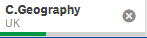
Data Selections should surface Master Dimension Names
The data selections that appear in the selections bar are those of the underlying field-level data model.
However a business analyst may often not always have the time ( whether via Data Manager or Script Editor ) to alias poorly named fields, often inherited from database tables or spreadsheet cell headers.
It is frustrating that when time is taken to create a library of master dimensions, and they are used in filter panes, the selection still surfaces the field names. It is even worse if the field names have been qualified ( manually or using qualify * ).
Can the selections bar be improved so that if a master dimension value is selected it is that which is shown ?
The same behaviour is exhibited in the selections tool - where the default list of only master dimensions results in a selected value of the field.
@Patric_Nordstrom is this a feature that is on the RoadMap? I mean, the selection bar, showing the master item label, or the master item name (in case label it is not provided).
NOTE: Upon clicking this link 2 tabs may open - please feel free to close the one with a login page. If you only see 1 tab with the login page, please try clicking this link first: Authenticate me! then try the link above again. Ensure pop-up blocker is off.