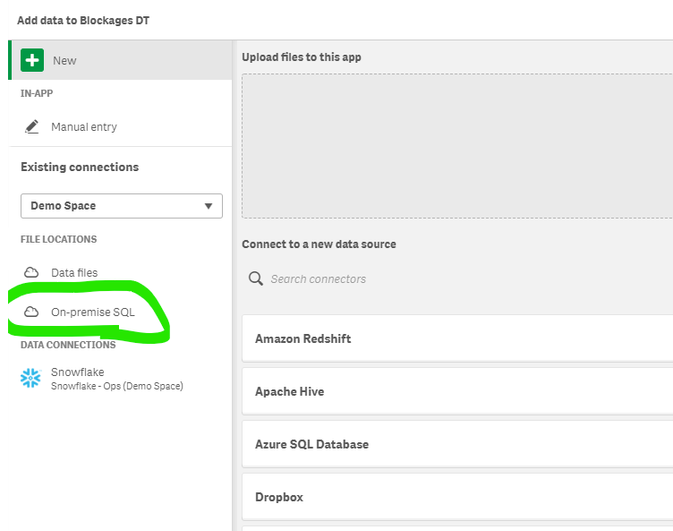
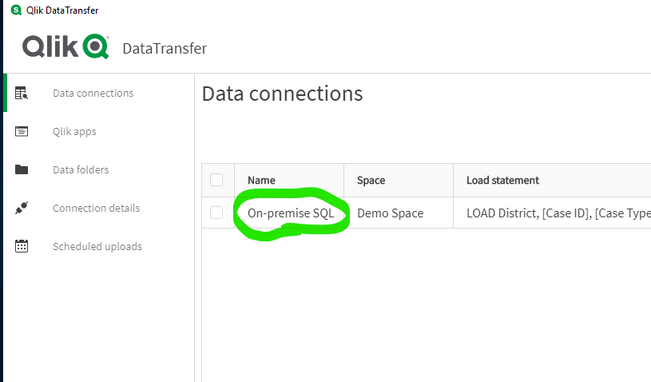
It would great to see the ability to support either/and:
a) folders in Qlik Sense SaaS (similar to the way Qlik Sense Enterprise Client-Managed works on the WIndows file system)
Current Example: Adding a '/' to signify a folder just adds this to the filename, doesn't create a directory
b) when configuring a connection via Qlik Data Transfer, use the 'Name' field of the Data connection as another option under 'Data Files' in the data manager (and thus the Data load editor)
Current Example: The current method stores everything within a single folder per space - when dealing with large amounts of data/synced QVDs from databases through Qlik Data Transfer, this can be very off-putting by the user - especially lacking the 'wildcard' ability client-managed has
Hello @Ian_Crosland . Thanks for the reactivity. What I meant is to traverse the File System in the content library which is, as of today, only one level. Sorry for the off-topic.
Adding folders is still in the backlog, but will be added sometime later this year. However, some overlapping capabilities have already been delivered with the integration of the data catalog in Qlik Sense SaaS. Currently you can add searchable tags and also filter on space, owner, and creator. When adding data from the data catalog you can select multiple datasets in one go, adding to the load script or load directly into your app.
These cataloging capabilities will continue to expand and be implemented consistently across the Qlik cloud platform, regardless where you are exploring and adding data sources.
@P-O_Davidson, @Ian_Crosland any updates on this? This 'gap' will make it difficult for us to adopt SaaS. We have teams that produce hundreds of QVDs that would sit in a single space. The current data catalog is of limited use as it requires retrospective tagging of app-generated (via STORE commands) QVDs to make them searchable.
Hi @P-O_Davidson, @Ian_Crosland@Thomas_Hopp, I can see this feature was added to the roadmap in Sept 2020, has slipped from a delivery in Q1 2021 to "will be added sometime later this year". "Searchable tags" won't help have multiple times the same file name in the same space, like content coming from Development, Quality or Production in different folders.
I have plenty of business examples if you need them.
Just imagine if your C drive on your laptop had no option to organize your files into folders, but also each file name had to be unique... just imagine 🙂 File tags won't help, even if they are still nice to have.
_________________________________________________________________ The lack of space folders is a massive roadblock in our efforts to migrate from client-managed to Qlik Cloud. _________________________________________________________________
Here is what we have tried: - Space read/write access speed is the best, but we CANNOT organize files in folders.
Folders can be managed with: - Azure Storage, but it is 10 times slower when reading/writing files. - SharePoint O365, but it is also 10 times slower when reading/writing files. - AWS S3, not tried yet, we need to figure out the integration with Azure AD first.
Worth noting as well that both Azure Storage and SharePoint O365 connectors will load the entire file before the wizard lets us select fields. If we change a delimiter, or any drop-down value, Azure Storage and SharePoint O365 connectors will load the entire file again. Sometimes it takes over 10 minutes for a CSV file. Then, if we want to select a different delimiter, then embedded labels, we may need 30 minutes in total... not usable.
If the same CSV file is stored in a Space, it only takes 1 second to load the first rows and select the right parameters from the wizard. Brilliant!
I am available if you need more details, as always 🙂