Improved response message when customer exceeds Export to Excel limitations
Qlikview, November 2017 and beyond allows the QlikView administrator to impose limitations in the settings.ini for either the timelimit or the memory consumed for the Export
QvExportTimeLimitSec
QvExportMemoryLimitMB
This is certainly helpful for the QlikView Administrators.
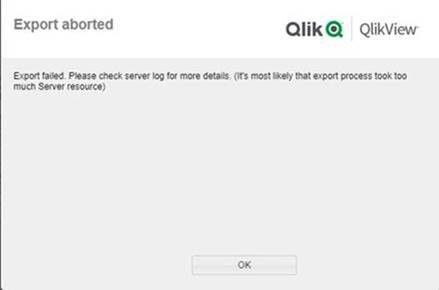
The customer sees the following when they have hit a limit imposed:
The customer is not normally one that would be able to "check the logs" and the message promotes the idea there is an overall Qlikview "system" issue.
Could the error message be a bit more "User-centric" such as "The export has exceeded the limits imposed by the QlikView Administrator"
I am getting this same error but there are no settings for the following:
QvExportTimeLimitSec
QvExportMemoryLimitMB in the C:\ProgramData\QlikTech\QlikViewServer\settings.ini file. Should I add them in? What are the values that these need to be set to?
Note: I am able to export to a csv but the user wants to export to Excel directly. There are around 450 000 rows that they are trying to export.
NOTE: Upon clicking this link 2 tabs may open - please feel free to close the one with a login page. If you only see 1 tab with the login page, please try clicking this link first: Authenticate me! then try the link above again. Ensure pop-up blocker is off.