Qlik Sense - Line Chart areas transparency/opacity effects
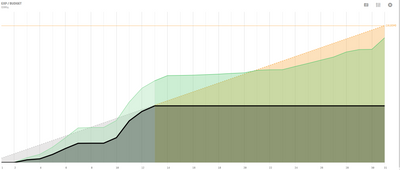
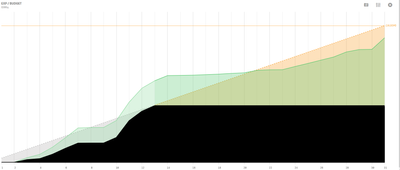
Hi all, working on a customer project I've been asked many times if it is possible to force areas on overlapping measure lines to have the prevalence of the color of a specific on top of others that might render as current style (semi-transparent). Or have the possibility to adjust the transparency / opacity of the area below the line.
This way it could be easier to highlight some data on top of other data and not have ambiguous colors on the charts. might look better like this:
Thank you for your feedback on ways to improve our product. While this is something we understand would be useful, it's not on the short-term roadmap. Please continue to show your support for this idea.
The transparency is there so the areas can distinguished but setting could be nice.
It is of course possible to mimic no transparency by using the stacked mode and "removing" the overlaps with calculations in the expressions.
Independently of stacked mode, an option to control area transparency 0-100% it would be great.
Having that option in stacked mode, with transparency set to 0 %, the areas would be same color than line and this would be great because legend colors would be both line and area color. As of now, the legend shows the line color and areas are lighter that it.
NOTE: Upon clicking this link 2 tabs may open - please feel free to close the one with a login page. If you only see 1 tab with the login page, please try clicking this link first: Authenticate me! then try the link above again. Ensure pop-up blocker is off.