Unlock a world of possibilities! Login now and discover the exclusive benefits awaiting you.


 Sonja_Bauernfei
- Subscribe to RSS Feed
- Mark as New
- Mark as Read
- Bookmark
- Subscribe
- Printer Friendly Page
- Report Inappropriate Content
We are excited to introduce tabular reporting from Qlik Cloud. Now customers can address common, centrally managed, tabular report distribution requirements from within a Qlik Sense Application! With tabular reporting, report developers can create custom and highly formatted XLS documents from Qlik data and Qlik visualizations; Governed Report Tasks can burst reports to any stakeholder, ensuring that the Qlik platform is the source for operational decisions, customer communications and more.
Some feature highlights:
- Report template creation, using data and visualizations from a Qlik Sense App, all with the familiarity of Microsoft Office 365 using Add-in technology
- Qlik Cloud governed report task control from within a Qlik Sense App
- In app distribution list management to support burst report distribution to any stakeholder (internal or external)
- Execution of Qlik NPrinting authored XLS report templates uploaded to Qlik Cloud
- Powered by the Qlik Reporting Service, reports are delivered from a scalable cloud service that solves complex enterprise reporting jobs
Want to get started with your first Tabular Report?
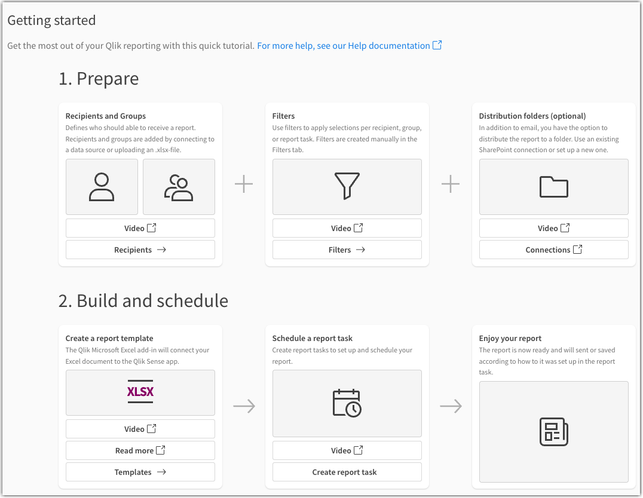
Access our Getting Started section in your Qlik Cloud app (available for users with Can Edit permissions). Open your app, (a) choose your activity, and select (b) Reporting.

From here, you can begin with our introductory videos and configuration instructions:
Want to know more about Qlik’s Tabular Reporting feature?
- See the Tabular Reporting introductory videos
- To get started see Tabular reporting in Qlik Cloud Analytics
- (new!) The future of Qlik Cloud Reporting: STT - Qlik Cloud Reporting Evolution
- To access and discuss the Qlik NPrinting Technical Preview, go to Qlik's Technical Previews
- The Qlik Excel add-in can be deployed and installed for compatible web and desktop versions of Microsoft Excel within Microsoft 365 see Deploying and installing the Qlik add-in for Microsoft Excel and speak with your Office 365 administrator if you wish to deploy the capability
- Generating tabular reports in Qlik Cloud Analytics is a value-add Qlik Reporting Service capability. Check with your service account owner about your Qlik Cloud subscription's included capacities. Please be aware that overage will be monitored and capped starting in 2024.
- Adopting customers should familiarize themselves with guardrails and limits see Qlik Reporting Service specifications and limitation
Thank you for choosing Qlik,
Qlik Support
You must be a registered user to add a comment. If you've already registered, sign in. Otherwise, register and sign in.