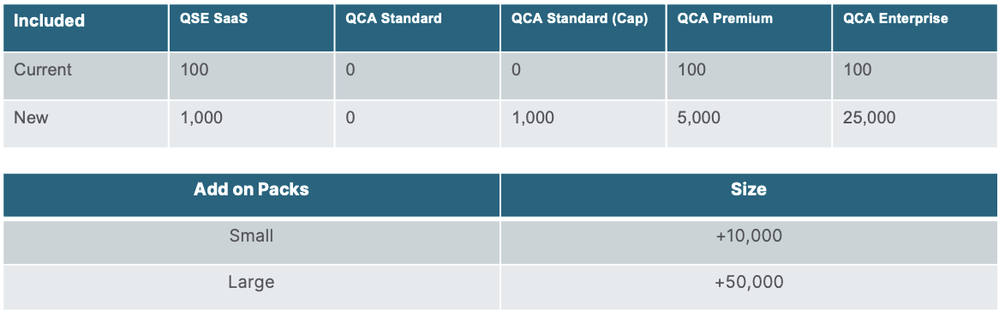
We’ll be replacing the multiple tiers with simple ‘Small and Large Add-On Packs’, alongside standardized limits for easier management.
Our new Standard, Premium and Enterprise customers using our Capacity Model, will have reporting entitlements included in their package. Customers on our User Based Model will have 1000 reports included and available to them.
All customers can purchase our add-on packages when needed.
Depending on your product package, you will be automatically placed in the standardized limits above. Those who already have paid tiers will continue-on their current tier until their contract ends.
If you’re expecting to exceed your standard limit, be sure to contact sales to purchase our add-on packages to prevent future overages.
This is a great move towards greater adoption of this useful functionality. 100 was always too limiting - especially since previewing during development counts!
Do these new allowances apply to existing customers as well as new ones? I checked a few customer tenants and could only see 100 allowed, although our partner tenant showed 1,000...
a “Report” means a unique file generated by a Qlik Reporting Services call. Examples of how a Qlik Reporting Services call may be executed include:
via an API call to the Qlik Reporting Service (request type: composition-1.0 or sense-excel-template-1.0);
using the Generate Report block in Qlik Application Automation;
as a preview from an O365 add-in; and
via a Report Task execution. If multiple Reports are created by a single Report Task, each Report will be counted against the subscribed Qlik Reporting Service tier maximum. For example, Section Access and/or use level filters designated in a Report Task will generate multiple Reports.
I understand that to mean that if you send the same file as part of the same task execution to multiple users, this would be one "report". So would each preview, so would each time you call the generate report block in App Automation...
With report tasks, 1 report is the generation of a single unique report file with a unique set of 0 or more filter applied from a single report task execution. 1 template execution in a single report task execution to 100 recipients with no filters is 1 report. 1 template execution in a single report task execution to 100 recipients each with a unique recipient filter (say filtering on employee ID) is 100 reports. 1 template execution in a single report task execution to 100 recipients with a section access enabled app producing unique selection states per recipient (say row level section access on employee ID) is 100 reports. Rerunning the task execution creates a whole new volley of reports. Shared recipient filters or shared section access profiles are not double counted. Unique preview executions from the plugin are also counted as individual reports. API calls also count.
Hello @t_schueller This will be updated; I have forwarded the feedback.
As for the second question: This applies to existing User-based subscriptions. For existing capacity customers, this will not be applicable. I am contacting Alex for a more in-depth investigation regarding the limit of 100 he is seeing.