Unlock a world of possibilities! Login now and discover the exclusive benefits awaiting you.

- Qlik Community
- :
- Forums
- :
- Analytics & AI
- :
- Products & Topics
- :
- Visualization and Usability
- :
- Re: Add text before Number ??
- Subscribe to RSS Feed
- Mark Topic as New
- Mark Topic as Read
- Float this Topic for Current User
- Bookmark
- Subscribe
- Mute
- Printer Friendly Page

 DipeshVadgama
- Mark as New
- Bookmark
- Subscribe
- Mute
- Subscribe to RSS Feed
- Permalink
- Report Inappropriate Content
Add text before Number ??
Hi All,
I am using Qlik Sense 1st time. I am trying to add text before number, which is not working.
I did tried Dual & right (Field -1) or
Text & right (Field -1). But I am getting out put as "-".
field1
T1000
T2000
T3000
T4000
I want output as Field2
T999
T1999
T2999
T3999
.......
 shraddha_g
- Mark as New
- Bookmark
- Subscribe
- Mute
- Subscribe to RSS Feed
- Permalink
- Report Inappropriate Content
try
Text(left(Field,1))&text(right(Field,len(Field)-index(Field,'T',1))-1)

 mdmukramali
- Mark as New
- Bookmark
- Subscribe
- Mute
- Subscribe to RSS Feed
- Permalink
- Report Inappropriate Content
Dear Dipesh,
you can use string functions.
LOAD *,
Left(field1,1)&''&(Mid(field1,2)-1) as field2
Inline
[
field1
T1000
T2000
T3000
T4000
]
;
 jonathandienst
- Mark as New
- Bookmark
- Subscribe
- Mute
- Subscribe to RSS Feed
- Permalink
- Report Inappropriate Content
Something like (this will preserve the first character
Left(field1, 1) & (Num(KeepChar(field1, '0123456789')) - 1)
or
Left(field1, 1) & (Num(Mid(field1, 2, len(field1))) - 1)

 its_anandrjs
- Mark as New
- Bookmark
- Subscribe
- Mute
- Subscribe to RSS Feed
- Permalink
- Report Inappropriate Content
Try this also
LOAD *,
left(field1,1)&Text(right(field1,4)-1) as Newfield1;
LOAD * INLINE [
field1
T1000
T2000
T3000
T4000
];
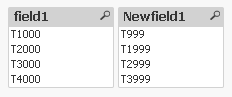
Regards
Anand
DipeshVadgama
- Mark as New
- Bookmark
- Subscribe
- Mute
- Subscribe to RSS Feed
- Permalink
- Report Inappropriate Content
This work perfectly, Thanks 
