Unlock a world of possibilities! Login now and discover the exclusive benefits awaiting you.

- Qlik Community
- :
- Forums
- :
- Analytics & AI
- :
- Products & Topics
- :
- Visualization and Usability
- :
- Re: Adjusting decimal places for TrendChart
Options
- Subscribe to RSS Feed
- Mark Topic as New
- Mark Topic as Read
- Float this Topic for Current User
- Bookmark
- Subscribe
- Mute
- Printer Friendly Page
Turn on suggestions
Auto-suggest helps you quickly narrow down your search results by suggesting possible matches as you type.
Showing results for

 cteruya
Contributor
2021-11-30
08:11 PM
- Mark as New
- Bookmark
- Subscribe
- Mute
- Subscribe to RSS Feed
- Permalink
- Report Inappropriate Content
Adjusting decimal places for TrendChart
Hello All,
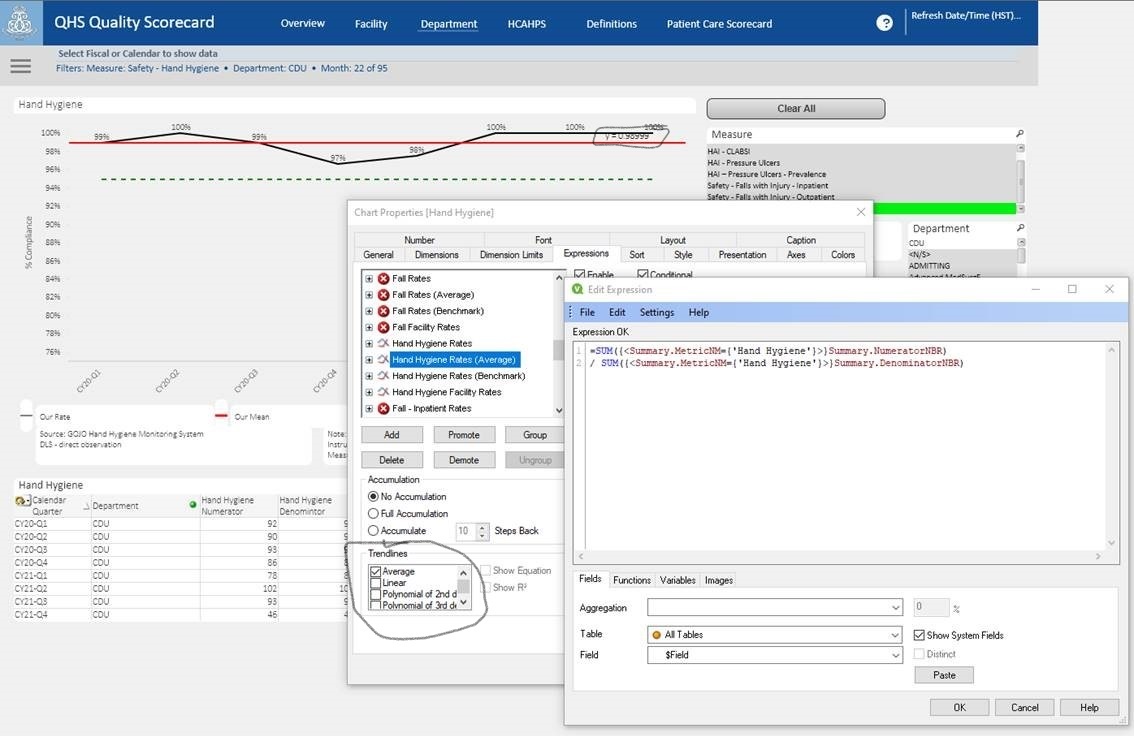
How do you adjust the decimal places for the Trendlines (see Pic)? I want to display the thousandths place (.0989) versus the Millionths place (.0989811) .
Expression:
=SUM({<Summary.MetricNM={'Hand Hygiene'}>}Summary.NumeratorNBR)
/ SUM({<Summary.MetricNM={'Hand Hygiene'}>}Summary.DenominatorNBR)
1,178 Views
2 Replies

 NitinK7
Specialist
2021-12-01
04:31 AM
- Mark as New
- Bookmark
- Subscribe
- Mute
- Subscribe to RSS Feed
- Permalink
- Report Inappropriate Content
Using the number tab you can adjust your number representaion

1,105 Views
cteruya
Contributor
2021-12-01
12:54 PM
Author
- Mark as New
- Bookmark
- Subscribe
- Mute
- Subscribe to RSS Feed
- Permalink
- Report Inappropriate Content
Hi NitinK7,
I tried that but it still doesn't adjust the number representation. any other ideas?
thanks
1,060 Views
