Unlock a world of possibilities! Login now and discover the exclusive benefits awaiting you.

- Qlik Community
- :
- Forums
- :
- Analytics & AI
- :
- Products & Topics
- :
- Visualization and Usability
- :
- Alternate dimension in Pivot
- Subscribe to RSS Feed
- Mark Topic as New
- Mark Topic as Read
- Float this Topic for Current User
- Bookmark
- Subscribe
- Mute
- Printer Friendly Page

- Mark as New
- Bookmark
- Subscribe
- Mute
- Subscribe to RSS Feed
- Permalink
- Report Inappropriate Content
Alternate dimension in Pivot
Hi,
In charts we can have alternate dimensions and change the dimension with a dropdown.
How to achieve the same in QlikSense?
A few suggest to use qsVariable.
If it the only way please share the steps.
Regards,
Arun
Accepted Solutions

 OmarBenSalem
- Mark as New
- Bookmark
- Subscribe
- Mute
- Subscribe to RSS Feed
- Permalink
- Report Inappropriate Content
What I would suggest, let's assume you have 3 dimensions you want to work with, and depends on the selection; you'll have the dimension shown in your pivot table.
In that case do as follow:
1) in the script, add an inline table:
load * inline [
DimID, Dim
1, dim1
2, dim2
3, dim3
];
2) Now, add the new Dim field as a List Selection in your sheet
3) In your pivot table, as dimension (line or column , depends in what you want):
Pick(DimID, yourDimension1,yourDimension2,yourDimension3)
Per analogy :
my dimension :
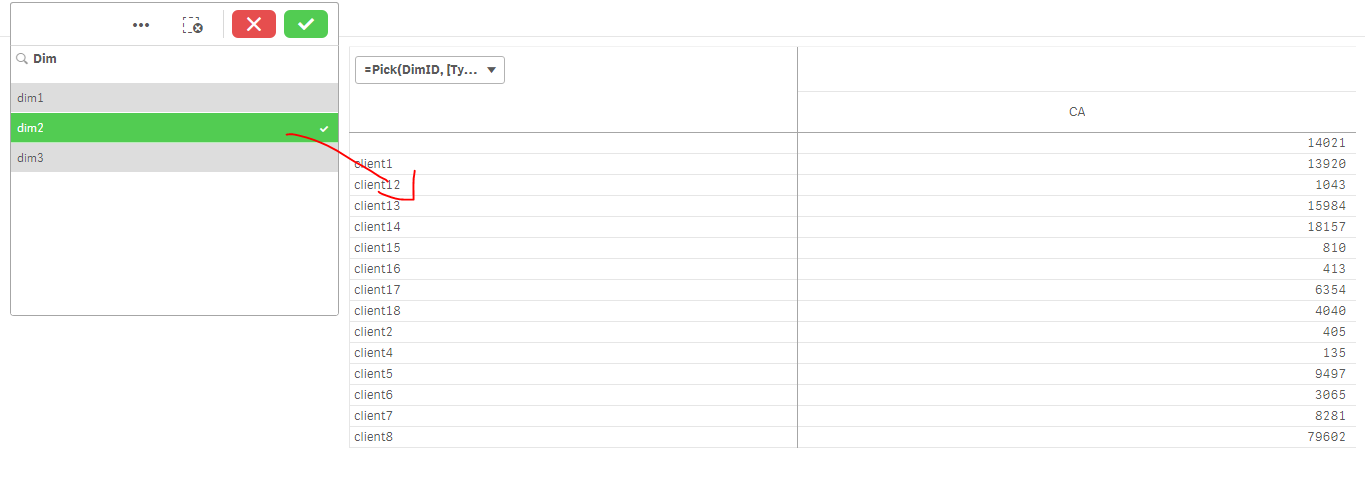
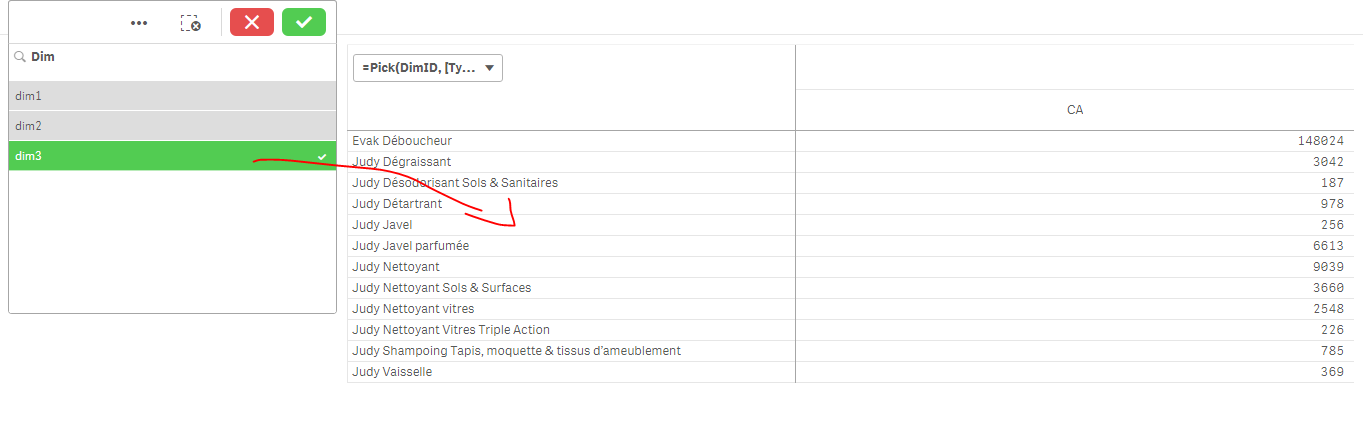
=Pick(DimID, [Type Article Judy],[Client Judy],[Article Judy])
result (name dim1 dim2 and dim3 like your real dimensions to make it clear)

OmarBenSalem
- Mark as New
- Bookmark
- Subscribe
- Mute
- Subscribe to RSS Feed
- Permalink
- Report Inappropriate Content
What I would suggest, let's assume you have 3 dimensions you want to work with, and depends on the selection; you'll have the dimension shown in your pivot table.
In that case do as follow:
1) in the script, add an inline table:
load * inline [
DimID, Dim
1, dim1
2, dim2
3, dim3
];
2) Now, add the new Dim field as a List Selection in your sheet
3) In your pivot table, as dimension (line or column , depends in what you want):
Pick(DimID, yourDimension1,yourDimension2,yourDimension3)
Per analogy :
my dimension :
=Pick(DimID, [Type Article Judy],[Client Judy],[Article Judy])
result (name dim1 dim2 and dim3 like your real dimensions to make it clear)
- Mark as New
- Bookmark
- Subscribe
- Mute
- Subscribe to RSS Feed
- Permalink
- Report Inappropriate Content
Thanks Omar. Very clear.