Unlock a world of possibilities! Login now and discover the exclusive benefits awaiting you.

- Qlik Community
- :
- Forums
- :
- Analytics & AI
- :
- Products & Topics
- :
- Visualization and Usability
- :
- Re: Bar Chart
Options
- Subscribe to RSS Feed
- Mark Topic as New
- Mark Topic as Read
- Float this Topic for Current User
- Bookmark
- Subscribe
- Mute
- Printer Friendly Page
Turn on suggestions
Auto-suggest helps you quickly narrow down your search results by suggesting possible matches as you type.
Showing results for

 rtr13
rtr13
Contributor III
2019-09-30
12:44 PM
- Mark as New
- Bookmark
- Subscribe
- Mute
- Subscribe to RSS Feed
- Permalink
- Report Inappropriate Content
Bar Chart
Hi Everyone,
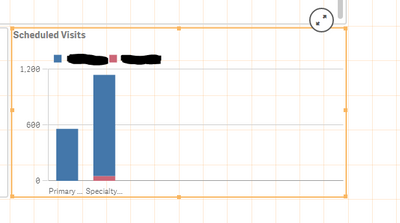
I'm pretty new to Qlik Sense, but I have a few questions in regards to bar charts. I am currently trying to create a bar chart and am having spacing issues. I included a screen shot below. Is there anyway to have the bars take up the entire space provided? Currently it is cutting off my labels and there is a ton of not needed white space, is there any way to fix this?
Thanks,
Rose
1,481 Views
1 Solution
Accepted Solutions

 NZFei
NZFei
Partner - Specialist
2019-09-30
11:29 PM
- Mark as New
- Bookmark
- Subscribe
- Mute
- Subscribe to RSS Feed
- Permalink
- Report Inappropriate Content
1,448 Views
2 Replies

 prabhu0505
Specialist
2019-09-30
06:33 PM
- Mark as New
- Bookmark
- Subscribe
- Mute
- Subscribe to RSS Feed
- Permalink
- Report Inappropriate Content
try horizontal bar chart (as workaround)
Apperance -> Presentation -> Horizontal
Apperance -> Presentation -> Horizontal
1,462 Views
NZFei
Partner - Specialist
2019-09-30
11:29 PM
- Mark as New
- Bookmark
- Subscribe
- Mute
- Subscribe to RSS Feed
- Permalink
- Report Inappropriate Content
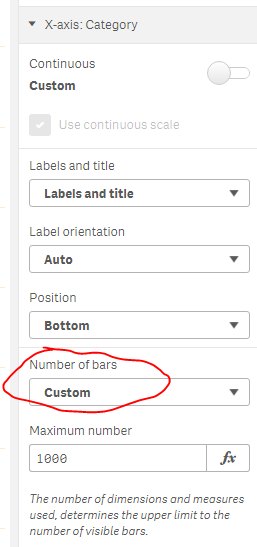
Change this from auto to custom under appearance:
1,449 Views
