Unlock a world of possibilities! Login now and discover the exclusive benefits awaiting you.

- Qlik Community
- :
- Forums
- :
- Analytics & AI
- :
- Products & Topics
- :
- Visualization and Usability
- :
- Re: Bar chart in qliksense
- Subscribe to RSS Feed
- Mark Topic as New
- Mark Topic as Read
- Float this Topic for Current User
- Bookmark
- Subscribe
- Mute
- Printer Friendly Page

 suvechha_b
- Mark as New
- Bookmark
- Subscribe
- Mute
- Subscribe to RSS Feed
- Permalink
- Report Inappropriate Content
Bar chart in qliksense
How to get the below report in qliksense ?
How to calculate premium for 2 years and display in monthwise.
See sample image.
Thanks

Accepted Solutions

 chrislemm
- Mark as New
- Bookmark
- Subscribe
- Mute
- Subscribe to RSS Feed
- Permalink
- Report Inappropriate Content
Choose a barchart. Add the month as dimension (num(month) for the numbers instead of Jan. Feb. etc.). Add a measure:
sum( {<Year = {'2019'}>}sales)
and another:
sum( {<Year = {'2018'}>}sales)
This is called set analysis (you'll find a lot of ressources in the community). Basically it pre-filters your measure.
Replace the years with some kind of year(today()) or inyeartoday/lastyeartoday logic if you don't want to change the expressions every year.
Greetings.
 jfkinspari
- Mark as New
- Bookmark
- Subscribe
- Mute
- Subscribe to RSS Feed
- Permalink
- Report Inappropriate Content
Use two expressions that each calculates the premium for each year using set analysis
chrislemm
- Mark as New
- Bookmark
- Subscribe
- Mute
- Subscribe to RSS Feed
- Permalink
- Report Inappropriate Content
Choose a barchart. Add the month as dimension (num(month) for the numbers instead of Jan. Feb. etc.). Add a measure:
sum( {<Year = {'2019'}>}sales)
and another:
sum( {<Year = {'2018'}>}sales)
This is called set analysis (you'll find a lot of ressources in the community). Basically it pre-filters your measure.
Replace the years with some kind of year(today()) or inyeartoday/lastyeartoday logic if you don't want to change the expressions every year.
Greetings.
suvechha_b
- Mark as New
- Bookmark
- Subscribe
- Mute
- Subscribe to RSS Feed
- Permalink
- Report Inappropriate Content
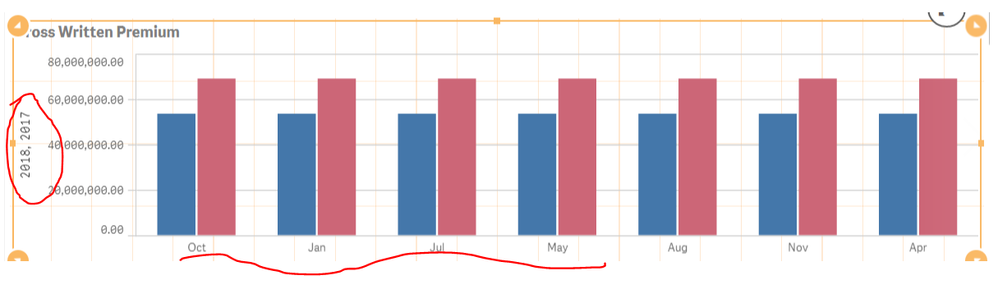
Thanks the expression work. But I am struggling to get this below

and sorting of months in qliksense. Please assist.
My output results is below.
chrislemm
- Mark as New
- Bookmark
- Subscribe
- Mute
- Subscribe to RSS Feed
- Permalink
- Report Inappropriate Content
Go to sheet edit mode -> select your barchart -> options (right side) -> Sorting -> Sort Month numeric.
