Unlock a world of possibilities! Login now and discover the exclusive benefits awaiting you.

- Qlik Community
- :
- Forums
- :
- Analytics & AI
- :
- Products & Topics
- :
- Visualization and Usability
- :
- Re: Bargraph: Shows all data 100%
- Subscribe to RSS Feed
- Mark Topic as New
- Mark Topic as Read
- Float this Topic for Current User
- Bookmark
- Subscribe
- Mute
- Printer Friendly Page

 berryandcherry6
- Mark as New
- Bookmark
- Subscribe
- Mute
- Subscribe to RSS Feed
- Permalink
- Report Inappropriate Content
Bargraph: Shows all data 100%
Hi,
i have bar Graph, where i Need to put graph for Q1 and Q2,
where Q1 has many options, but i need to show count for only 'Agree' and 'Strongly Agree'.
where Q2 has many options, but i need to show count for only 'Agree' and 'Strongly Agree'.
If i put graph it shows all 100%, Please find attached qvf file.
Dimension 1:
if(match(question_id,'Q1','Q2'),if(question_id='Q1','GOOD IMPRESSION',if(question_id='Q2','SUCCESSFUL IN EDUCATING')))
Diemnsion 2:
if(match(answer_text,'Strongly Agree','Agree'),answer_text)
Expression:
count({$<answer_text={'Agree','Strongly Agree'}>}distinct lender_offer_id)/count(distinct lender_offer_id)
Please help me on this
Accepted Solutions

 OmarBenSalem
- Mark as New
- Bookmark
- Subscribe
- Mute
- Subscribe to RSS Feed
- Permalink
- Report Inappropriate Content
My bad:
count(distinct lender_offer_id)/count(distinct{<question_id={'Q1','Q2'}>} total lender_offer_id)
We need to only divide by total for question Q1 and Q2:

 danansell42
- Mark as New
- Bookmark
- Subscribe
- Mute
- Subscribe to RSS Feed
- Permalink
- Report Inappropriate Content
Hi
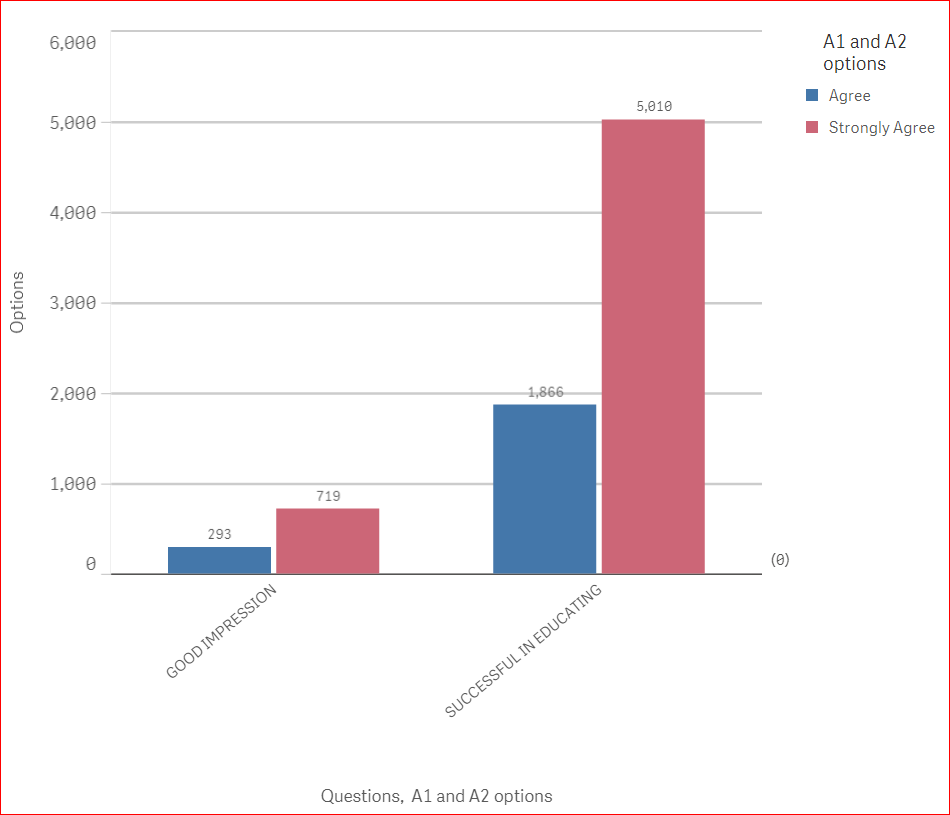
Is this what you are wanting?
All i done was change expression to:
count( lender_offer_id)
However maybe you wanted count(DISTINCT lender_offer_id)
OmarBenSalem
- Mark as New
- Bookmark
- Subscribe
- Mute
- Subscribe to RSS Feed
- Permalink
- Report Inappropriate Content
Try to add Total in your expression and then format it as %:
count({$<answer_text={'Agree','Strongly Agree'}>}distinct lender_offer_id)/count(distinct TOTAL lender_offer_id)
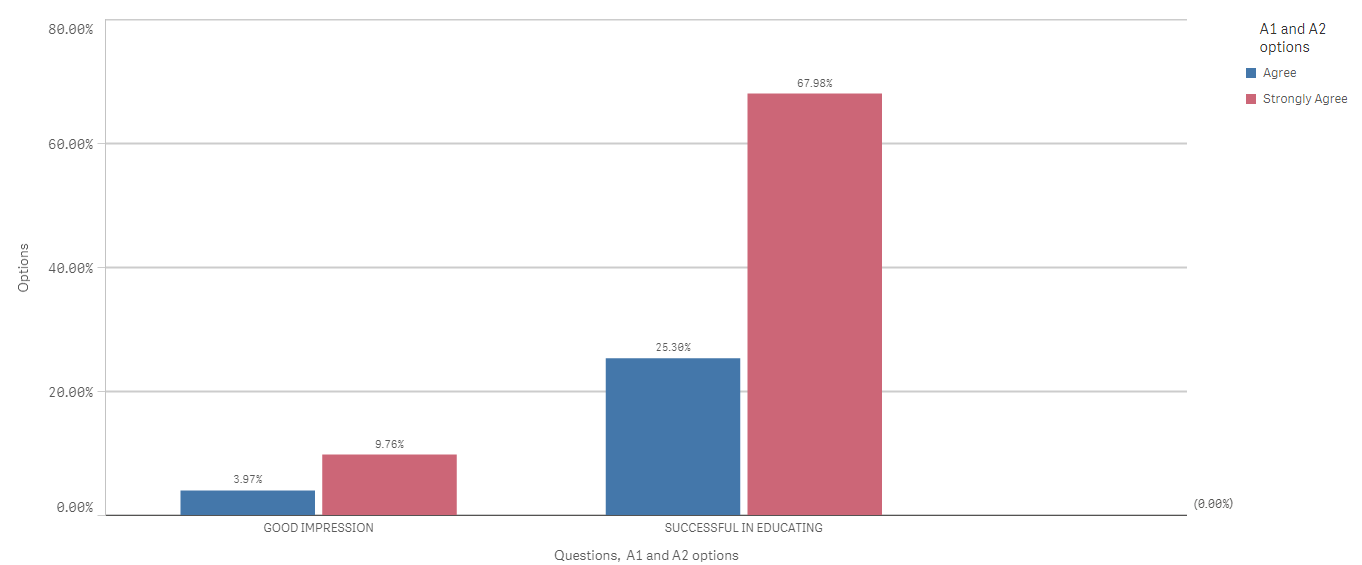
ps : you do not need this part {$<answer_text={'Agree','Strongly Agree'}>} since you're already aggregating your expression by this 2 values (Agree and strongly agree); these are you're dimension already.
So, count(distinct lender_offer_id)/count(distinct TOTAL lender_offer_id) will have the same effect
berryandcherry6
- Mark as New
- Bookmark
- Subscribe
- Mute
- Subscribe to RSS Feed
- Permalink
- Report Inappropriate Content
Hi Omer,
Thanks its working now.
But i have issue in Percentage it is Showing.
For Q1, For options Agree = 292, strongly Agree = 718
For Q1, For all options i have 6922
so For Agree, 292/6922 = 4.21%. Then why is it showing 3.97% in graph?.
OmarBenSalem
- Mark as New
- Bookmark
- Subscribe
- Mute
- Subscribe to RSS Feed
- Permalink
- Report Inappropriate Content
My bad:
count(distinct lender_offer_id)/count(distinct{<question_id={'Q1','Q2'}>} total lender_offer_id)
We need to only divide by total for question Q1 and Q2:
berryandcherry6
- Mark as New
- Bookmark
- Subscribe
- Mute
- Subscribe to RSS Feed
- Permalink
- Report Inappropriate Content
Thanks it works, Can you explain the use of TOTAL in here?
OmarBenSalem
- Mark as New
- Bookmark
- Subscribe
- Mute
- Subscribe to RSS Feed
- Permalink
- Report Inappropriate Content
Yes of course, if our expression is :
count(distinct lender_offer_id)/count(distinct lender_offer_id)
without the total, and we have as a dimension: Agree and strongly agree and Q1, Q2 as in your case:
that means count(distinct lender_offer_id) = count ids for our dimensions;
Now if you wanna count the TOTAL of the IDs no matter the dimension, we add the TOTAL; then add the Q1 and Q2 to force it again to only count the total IDs for our 2 questions.
result:
count(distinct lender_offer_id)/count(distinct{<question_id={'Q1','Q2'}>} total lender_offer_id)
berryandcherry6
- Mark as New
- Bookmark
- Subscribe
- Mute
- Subscribe to RSS Feed
- Permalink
- Report Inappropriate Content
Hi omar,
i have one more thing here where i have stuck
you mentioned no need to use second dimension,instead can use in expression itself. like below
count(distinct lender_offer_id)/count(distinct{<question_id={'Q1','Q2'}>} total lender_offer_id)
Now, what if i am not aware of question_id , and need to display for all question_id's ?
OmarBenSalem
- Mark as New
- Bookmark
- Subscribe
- Mute
- Subscribe to RSS Feed
- Permalink
- Report Inappropriate Content
I don't really get what you're willing to do; but if want to divide by count lender_offer_id for all the question ids;
you need to do this:
count(distinct lender_offer_id)/count(distinct{<question_id=>} total lender_offer_id)
