Unlock a world of possibilities! Login now and discover the exclusive benefits awaiting you.

- Qlik Community
- :
- Forums
- :
- Analytics & AI
- :
- Products & Topics
- :
- Visualization and Usability
- :
- Re: Bookmark/Standard Filter to include all FY Per...
- Subscribe to RSS Feed
- Mark Topic as New
- Mark Topic as Read
- Float this Topic for Current User
- Bookmark
- Subscribe
- Mute
- Printer Friendly Page

 holymosfet
- Mark as New
- Bookmark
- Subscribe
- Mute
- Subscribe to RSS Feed
- Permalink
- Report Inappropriate Content
Bookmark/Standard Filter to include all FY Periods
Hi all,
I'm working on an app where I want a standard filter to be applied when opened.
I guess a standard bookmark would be the right way but I just can't get it work:
I use the field below and I want all periods up to the current period to be included in the filter.
Let's say we are in period 6, period 01 to 06 should be included.

The current period is calculated with a variable vCP since our fiscal year starts in October. I refer to the newest order date in the loaded data.
vCP=pick(month(max([Order date])),4,5,6,7,8,9,10,11,12,1,2,3)
Does anyone know how to do it? I found this video but it seems like it doesn't work for me since I filter for a variable...
<=$(vCP) doesn't find anything.
Thank you in advance!
- Tags:
- dynamic bookmark
Accepted Solutions

 Or
Or
- Mark as New
- Bookmark
- Subscribe
- Mute
- Subscribe to RSS Feed
- Permalink
- Report Inappropriate Content
I've tried to replicate what you're doing and I seem to be getting the correct selection, near as I can tell. Note that as a shortcut I've pulled the order month as a direct number instead of grabbing the month from a date, but that shouldn't change anything. What I am a bit suspicious about is that your numbers seem to have a leading 0, so perhaps they're getting treated as text rather than numbers which is breaking the comparison?
Load * INLINE [
OrderMonth
6];
Load * INLINE [
Month
1,
2,
3,
4,
5,
6,
7,
8,
9,
10,
11,
12
];
=Month<=pick(max([OrderMonth]),4,5,6,7,8,9,10,11,12,1,2,3)

I am not aware of any alternative for default selections other than using a dynamic default bookmark, at least in native Qlik Sense.
Or
- Mark as New
- Bookmark
- Subscribe
- Mute
- Subscribe to RSS Feed
- Permalink
- Report Inappropriate Content
Have you tried filtering directly on the expression contained within the variable?
=Period<=pick(month(max([Order date])),4,5,6,7,8,9,10,11,12,1,2,3)
holymosfet
- Mark as New
- Bookmark
- Subscribe
- Mute
- Subscribe to RSS Feed
- Permalink
- Report Inappropriate Content
Yes I tried a lot. None of them gives me a match:
=Period<=pick(month(max([Order date])),4,5,6,7,8,9,10,11,12,1,2,3)
<=pick(month(max([Order date])),4,5,6,7,8,9,10,11,12,1,2,3)
=Period<=$(vCP)
<=$(vCP) / vCP / $('vCP') ...
Is there an alternative to get the same result? This dynamic bookmark thing feels a little clumsy
Or
- Mark as New
- Bookmark
- Subscribe
- Mute
- Subscribe to RSS Feed
- Permalink
- Report Inappropriate Content
I've tried to replicate what you're doing and I seem to be getting the correct selection, near as I can tell. Note that as a shortcut I've pulled the order month as a direct number instead of grabbing the month from a date, but that shouldn't change anything. What I am a bit suspicious about is that your numbers seem to have a leading 0, so perhaps they're getting treated as text rather than numbers which is breaking the comparison?
Load * INLINE [
OrderMonth
6];
Load * INLINE [
Month
1,
2,
3,
4,
5,
6,
7,
8,
9,
10,
11,
12
];
=Month<=pick(max([OrderMonth]),4,5,6,7,8,9,10,11,12,1,2,3)
I am not aware of any alternative for default selections other than using a dynamic default bookmark, at least in native Qlik Sense.
holymosfet
- Mark as New
- Bookmark
- Subscribe
- Mute
- Subscribe to RSS Feed
- Permalink
- Report Inappropriate Content
You made my day!🎉
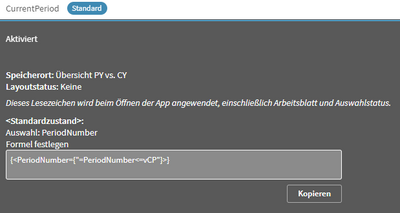
This was the Problem. Added a field [PeriodNumber] where the period is interpreted as a number. This even works with the mentioned variable dynamically:
=PeriodNumber<=vCP
Thanks a lot
