Unlock a world of possibilities! Login now and discover the exclusive benefits awaiting you.

- Qlik Community
- :
- Forums
- :
- Analytics & AI
- :
- Products & Topics
- :
- Visualization and Usability
- :
- Re: Bucket intervals
- Subscribe to RSS Feed
- Mark Topic as New
- Mark Topic as Read
- Float this Topic for Current User
- Bookmark
- Subscribe
- Mute
- Printer Friendly Page

 sivaboggarapu20
- Mark as New
- Bookmark
- Subscribe
- Mute
- Subscribe to RSS Feed
- Permalink
- Report Inappropriate Content
Bucket intervals
Hi Team,
I have Field called Bucket which is contain values like 1 to 10000
I want to make it as 1 to 999 as 1stBucket
1k to 2.9k as 2nd Bucket
3k to 5k as 3rd Bucket
I want to display like above. Can anyone help me to get above
Thanks,
Siva
 bwisealiahmad
- Mark as New
- Bookmark
- Subscribe
- Mute
- Subscribe to RSS Feed
- Permalink
- Report Inappropriate Content
Hi,
I would probably do this with an IF statement in the script unless you want exact intervals. Then you can use the Class Function - https://help.qlik.com/en-US/sense/June2018/Subsystems/Hub/Content/Scripting/ConditionalFunctions/cla...
Script Example:
Temp:
LOAD * INLINE [
Number, Value
A, 100
B, 2000
C, 500
D, 250
E, 7500
F, 300
];
Fact:
LOAD
*,
IF(Value <= 250,'1st Bucket',
IF(Value <= 500,'2nd Bucket',
'3rd Bucket')) AS Buckets
// Above you can define how you want them to be divided in the IF Statement.
Resident Temp;
Drop Table Temp;
Gives you this:
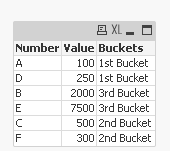
Best,
Ali A

 agigliotti
- Mark as New
- Bookmark
- Subscribe
- Mute
- Subscribe to RSS Feed
- Permalink
- Report Inappropriate Content
what's your expected output ?
Follow me on my LinkedIn | Know Gamma Informatica at gammainformatica.it

 BalaBhaskar_Qli
- Mark as New
- Bookmark
- Subscribe
- Mute
- Subscribe to RSS Feed
- Permalink
- Report Inappropriate Content
Create like this in script or chart:
IF(Bucket >= 1 and Bucket < 999, '1st Bucket',
IF(Bucket >= 1000 and Bucket < 2999, '2nd Bucket',
IF(Bucket >= 3000 and Bucket < 5000, '3rd Bucket',
'4th Bucket'))) as Bucket
Now create a chart
Dimension
Range
Expression
COUNT(Distinct Bucket)
 Chanty4u
- Mark as New
- Bookmark
- Subscribe
- Mute
- Subscribe to RSS Feed
- Permalink
- Report Inappropriate Content
Have a look
