Unlock a world of possibilities! Login now and discover the exclusive benefits awaiting you.

- Qlik Community
- :
- Forums
- :
- Analytics & AI
- :
- Products & Topics
- :
- Visualization and Usability
- :
- Button won't work
- Subscribe to RSS Feed
- Mark Topic as New
- Mark Topic as Read
- Float this Topic for Current User
- Bookmark
- Subscribe
- Mute
- Printer Friendly Page

 Breezy
- Mark as New
- Bookmark
- Subscribe
- Mute
- Subscribe to RSS Feed
- Permalink
- Report Inappropriate Content
Button won't work
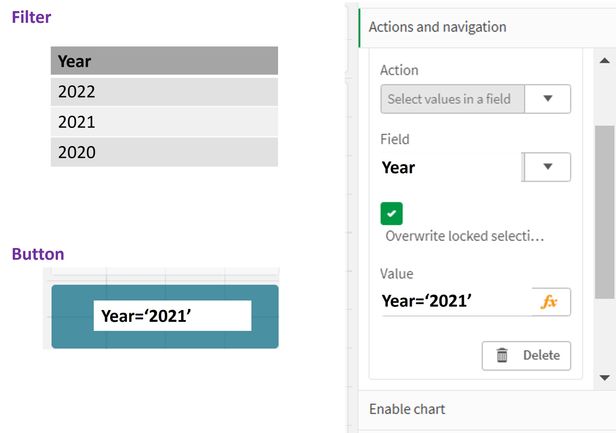
I'm adding a button but it won't work. My expectation is that I click the blue button and then it selects 2021 from the filter. I thought this would be really easy. What am I missing? I have a workaround, making a bookmark for this purpose. However, then I have to make multiple bookmarks and I'd rather use an fx field.
Using Qlik Sense
Accepted Solutions
 N30fyte
- Mark as New
- Bookmark
- Subscribe
- Mute
- Subscribe to RSS Feed
- Permalink
- Report Inappropriate Content
Try setting the value to just
='2021'
You also seem to have typed 'smart' typographical quotes in the Value field. Not sure if that makes a difference...
N30fyte
- Mark as New
- Bookmark
- Subscribe
- Mute
- Subscribe to RSS Feed
- Permalink
- Report Inappropriate Content
Try setting the value to just
='2021'
You also seem to have typed 'smart' typographical quotes in the Value field. Not sure if that makes a difference...
Breezy
- Mark as New
- Bookmark
- Subscribe
- Mute
- Subscribe to RSS Feed
- Permalink
- Report Inappropriate Content
Thanks! That was a really quick fix 😃
