Unlock a world of possibilities! Login now and discover the exclusive benefits awaiting you.

- Qlik Community
- :
- Forums
- :
- Analytics & AI
- :
- Products & Topics
- :
- Visualization and Usability
- :
- Calculate Timestamp
- Subscribe to RSS Feed
- Mark Topic as New
- Mark Topic as Read
- Float this Topic for Current User
- Bookmark
- Subscribe
- Mute
- Printer Friendly Page

 hannibal2395
- Mark as New
- Bookmark
- Subscribe
- Mute
- Subscribe to RSS Feed
- Permalink
- Report Inappropriate Content
Calculate Timestamp
Hi All,
I need to calculate the time difference. I have following table
| TR | Registered Date | Triggering Date |
| 1 | Oct 1, 2018 11:07:59 PM | Oct 2, 2018 5:00:00 PM |
| 2 | Oct 1, 2018 11:08:03 PM | Oct 2, 2018 5:00:00 PM |
| 3 | Oct 1, 2018 11:08:02 PM | Oct 2, 2018 5:00:00 PM |
| 4 | Sep 28, 2018 11:08:03 AM | Sep 28, 2018 5:00:00 PM |
| 5 | Sep 28, 2018 11:08:03 AM | Sep 28, 2018 5:00:00 PM |
| 6 | Sep 28, 2018 11:08:03 AM | Sep 28, 2018 5:00:00 PM |
| 7 | Sep 28, 2018 11:08:06 PM | Oct 1, 2018 5:00:00 PM |
| 8 | Sep 28, 2018 11:08:06 PM | Oct 1, 2018 5:00:00 PM |
| 9 | Sep 28, 2018 11:08:06 PM | Oct 1, 2018 5:00:00 PM |
| 10 | Sep 28, 2018 11:08:06 PM | Oct 1, 2018 5:00:00 PM |
I have field "Registered Date" and according to time stamp of it i need to have Triggering Date. The calculation scenario is
1.If my Registered Date time is before the 12:00:00 PM then it should have Triggering Date of same day but at 05:00:00 PM
2. If my Registered Date time is after the 12:00:00 PM then it should have Triggering Date of next day at 05:00:00 PM
3. If my day is Friday and time is after 12:00:00 PM then it should have manual hold of next Monday 05:00:00 PM in this case in above table 28th Sep 2018 is Friday and time is after 12:00:00 PM so Triggering Date is 1st Oct 2018 05:00:00 PM.
How can i achieve this?
Thanks in advance.
Accepted Solutions

 sunny_talwar
- Mark as New
- Bookmark
- Subscribe
- Mute
- Subscribe to RSS Feed
- Permalink
- Report Inappropriate Content
How about this?
"TR Auto Hold Date/Time (local)",
TimeStamp(If(Frac("TR Auto Hold Date/Time (local)") < 0.5,
Floor("TR Auto Hold Date/Time (local)") + MakeTime (17),
LastWorkDate(Floor("TR Auto Hold Date/Time (local)"), 2) + MakeTime(17)), 'MM/DD/YYYY hh:mm:ss TT') as "Triggering Date"
sunny_talwar
- Mark as New
- Bookmark
- Subscribe
- Mute
- Subscribe to RSS Feed
- Permalink
- Report Inappropriate Content
Try this
Table:
LOAD TR,
	 TimeStamp#([Registered Date], 'MMM D, YYYY hh:mm:ss TT') as [Registered Date],
	 TimeStamp(If(Frac(TimeStamp#([Registered Date], 'MMM D, YYYY hh:mm:ss TT')) < 0.5,
	 	Floor(TimeStamp#([Registered Date], 'MMM D, YYYY hh:mm:ss TT')) + MakeTime (17),
	 	LastWorkDate(Floor(TimeStamp#([Registered Date], 'MMM D, YYYY hh:mm:ss TT')), 2) + MakeTime(17)), 'MMM D, YYYY hh:mm:ss TT') as [Triggering Date];
LOAD * INLINE [
    TR, Registered Date
    1, "Oct 1, 2018 11:07:59 PM"
    2, "Oct 1, 2018 11:08:03 PM"
    3, "Oct 1, 2018 11:08:02 PM"
    4, "Sep 28, 2018 11:08:03 AM"
    5, "Sep 28, 2018 11:08:03 AM"
    6, "Sep 28, 2018 11:08:03 AM"
    7, "Sep 28, 2018 11:08:06 PM"
    8, "Sep 28, 2018 11:08:06 PM"
    9, "Sep 28, 2018 11:08:06 PM"
    10, "Sep 28, 2018 11:08:06 PM"
];
hannibal2395
- Mark as New
- Bookmark
- Subscribe
- Mute
- Subscribe to RSS Feed
- Permalink
- Report Inappropriate Content
Hi Sunny,
Thanks for quick reply.
Really appreciate your efforts.
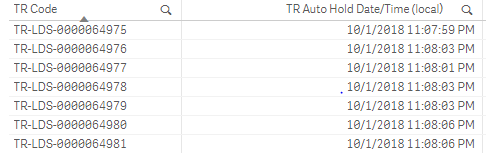
But my date format is "M/D/YYYY hh:mm:ss " which i changed in your expression but still it is showing null values.
sunny_talwar
- Mark as New
- Bookmark
- Subscribe
- Mute
- Subscribe to RSS Feed
- Permalink
- Report Inappropriate Content
Not exactly sure what you have done incorrectly, can you share an image of the script and the date field so that I can see the format?
hannibal2395
- Mark as New
- Bookmark
- Subscribe
- Mute
- Subscribe to RSS Feed
- Permalink
- Report Inappropriate Content
Hi,
This is the script modified by me:
TimeStamp#("TR Auto Hold Date/Time (local)", 'MM/DD/YYYY hh:mm:ss TT') as "TR Auto Hold Date/Time (local)",
TimeStamp(If(Frac(TimeStamp#("TR Auto Hold Date/Time (local)", 'MM/DD/YYYY hh:mm:ss TT')) < 0.5,
Floor(TimeStamp#("TR Auto Hold Date/Time (local)", 'MM/DD/YYYY hh:mm:ss TT')) + MakeTime (17),
LastWorkDate(Floor(TimeStamp#("TR Auto Hold Date/Time (local)", 'MM/DD/YYYY hh:mm:ss TT')), 2) + MakeTime(17)), 'MM/DD/YYYY hh:mm:ss TT') as "Triggering Date"
Screenshot is also attached for format.
 sunny_talwar
- Mark as New
- Bookmark
- Subscribe
- Mute
- Subscribe to RSS Feed
- Permalink
- Report Inappropriate Content
How about this?
"TR Auto Hold Date/Time (local)",
TimeStamp(If(Frac("TR Auto Hold Date/Time (local)") < 0.5,
Floor("TR Auto Hold Date/Time (local)") + MakeTime (17),
LastWorkDate(Floor("TR Auto Hold Date/Time (local)"), 2) + MakeTime(17)), 'MM/DD/YYYY hh:mm:ss TT') as "Triggering Date"
hannibal2395
- Mark as New
- Bookmark
- Subscribe
- Mute
- Subscribe to RSS Feed
- Permalink
- Report Inappropriate Content
Hi Sunny,
Thanks for your help.
It worked fine.
