Unlock a world of possibilities! Login now and discover the exclusive benefits awaiting you.

- Qlik Community
- :
- Forums
- :
- Analytics & AI
- :
- Products & Topics
- :
- Visualization and Usability
- :
- Change date format M(m)YYYY
- Subscribe to RSS Feed
- Mark Topic as New
- Mark Topic as Read
- Float this Topic for Current User
- Bookmark
- Subscribe
- Mute
- Printer Friendly Page

 Newsense2020
- Mark as New
- Bookmark
- Subscribe
- Mute
- Subscribe to RSS Feed
- Permalink
- Report Inappropriate Content
Change date format M(m)YYYY
Hello experts,
once again I need some help. I have the following problem:
| Field | Goal |
| 122020 | 12-2020 |
| 12020 | 1-2020 |
| 22020 | 2-2020 |
The field is giving a time in the format: M(M)YYYY. So my current problem is, that the month at the front is given in 1 or 2 signs.
Through the following:
Mid([Field],Index([Field]),'20')) as [Field_year],
subfield([Field],'20',1) as [Field_month],
I was able to get each seperatly, but was not able to combine it to the outcome shown in column 'goal'.
Does anybody have a smart idea for that?
Accepted Solutions

 sergio0592
- Mark as New
- Bookmark
- Subscribe
- Mute
- Subscribe to RSS Feed
- Permalink
- Report Inappropriate Content
Hi,
Try with :
=if(len(Field) =6,Date(Date#(Field,'MMYYYY'),'MM-YYYY'), Date(Date#(Field,'MYYYY'),'MM-YYYY'))- Mark as New
- Bookmark
- Subscribe
- Mute
- Subscribe to RSS Feed
- Permalink
- Report Inappropriate Content
Hi,
Try with :
=if(len(Field) =6,Date(Date#(Field,'MMYYYY'),'MM-YYYY'), Date(Date#(Field,'MYYYY'),'MM-YYYY')) Durgadevikumar
- Mark as New
- Bookmark
- Subscribe
- Mute
- Subscribe to RSS Feed
- Permalink
- Report Inappropriate Content
Hi,
Can you please try this,
load your date field,
And use Replace function to get the correct format in both front end or script,
=Replace(Field,2020,'-2020')
Sample Workout which i did,
A:
load * inline
[
Field
122020
12020
22020];
Join(A)
B:
load Field,
Replace(Field,2020,'-2020') as Goal
Resident A;
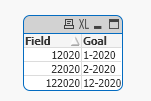
Hope it is helpful.
Regards,
DurgadeviKumar
Newsense2020
- Mark as New
- Bookmark
- Subscribe
- Mute
- Subscribe to RSS Feed
- Permalink
- Report Inappropriate Content
@sergio0592 Thanks a lot. That solution is working!
