Unlock a world of possibilities! Login now and discover the exclusive benefits awaiting you.

- Qlik Community
- :
- Forums
- :
- Analytics & AI
- :
- Products & Topics
- :
- Visualization and Usability
- :
- Climber Card Extension says incomplete visualizati...
- Subscribe to RSS Feed
- Mark Topic as New
- Mark Topic as Read
- Float this Topic for Current User
- Bookmark
- Subscribe
- Mute
- Printer Friendly Page

 PoojaPrasad
- Mark as New
- Bookmark
- Subscribe
- Mute
- Subscribe to RSS Feed
- Permalink
- Report Inappropriate Content
Climber Card Extension says incomplete visualization
Hello,
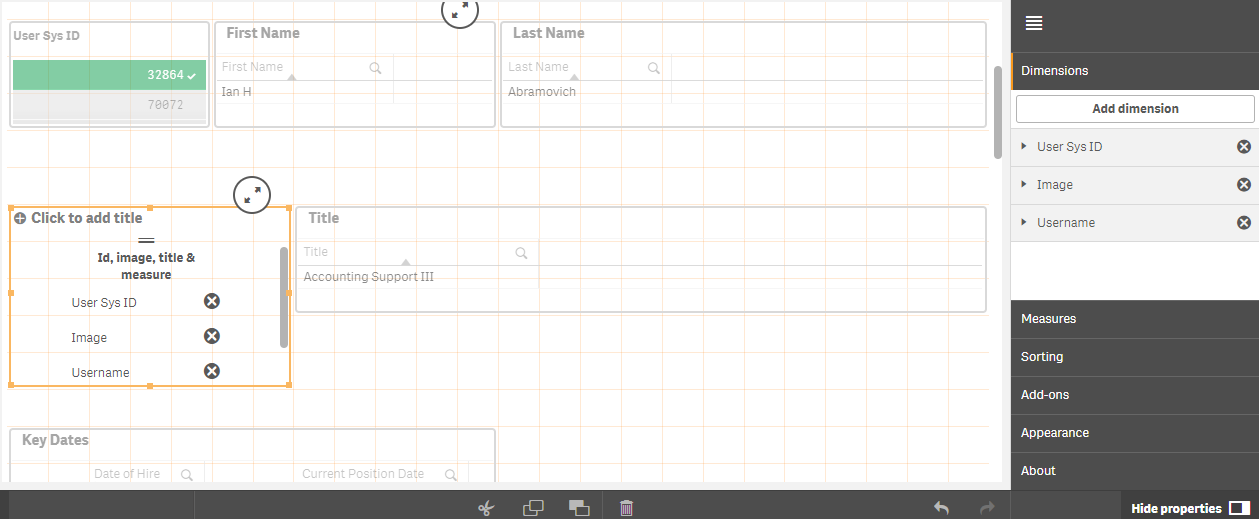
I am using climber cards extension version 1.3.1 to include the image of the employee in the report. The requirement is if the employee user sys id is selected, his/her image will show up on the report.
I have provided unique column - user sys id as id, image column where the path to the image is present as image and username as title as 3 dimensions in the climber cards. I have not given anything in measures. After I save, the extension says incomplete visualization. The screenshot is attached. I am guessing it is expecting some value in measure. Any help will be appreciated.
Thank you in advance.
Accepted Solutions

 JordyWegman
- Mark as New
- Bookmark
- Subscribe
- Mute
- Subscribe to RSS Feed
- Permalink
- Report Inappropriate Content
Hi Pooja,
You can put them for example on a site like Tumblr, but I don't know if you want this with personal images. Then you will have an URL with the image. You can also put this on a webserver, but you probably need IT for this.
Jordy
Climber
JordyWegman
- Mark as New
- Bookmark
- Subscribe
- Mute
- Subscribe to RSS Feed
- Permalink
- Report Inappropriate Content
Hi Pooja,
Is the image available online? Because the image can't be on a disk.
Jordy
Climber
PoojaPrasad
- Mark as New
- Bookmark
- Subscribe
- Mute
- Subscribe to RSS Feed
- Permalink
- Report Inappropriate Content
Hello Jordy,
The images are in folder on qlik sense shared services. Do I need to put them somewhere else? Can you kindly guide me how to make them online.
Thank you.
JordyWegman
- Mark as New
- Bookmark
- Subscribe
- Mute
- Subscribe to RSS Feed
- Permalink
- Report Inappropriate Content
Hi Pooja,
You can put them for example on a site like Tumblr, but I don't know if you want this with personal images. Then you will have an URL with the image. You can also put this on a webserver, but you probably need IT for this.
Jordy
Climber
PoojaPrasad
- Mark as New
- Bookmark
- Subscribe
- Mute
- Subscribe to RSS Feed
- Permalink
- Report Inappropriate Content
Okay, I will check on both the options. Thank you.
I have 2 more questions but on 2 different extensions.
1. Qlik Sense Simple Image : In image path blank, I am giving the path '/content/default'. The images are stored in this location with name as Emp_id.jpg. In Image file blank, I am trying to giving [Emp_Id].jpg because I want the images to dynamically get changed depending on the Emp Id selected on the app. I dont want any image title. I am not sure what to provide in Image link blank.
Basically I am trying to display employee images based on which all employee ids are selected on the app.
2. sense-images-links-extension: I tried using this extension for the same purpose but all I can see is image logo but I dont see the actual image.
I followed the dynamic image change blog but I am not able to replicate the solution in my case.
JordyWegman
- Mark as New
- Bookmark
- Subscribe
- Mute
- Subscribe to RSS Feed
- Permalink
- Report Inappropriate Content
Good, let me know what comes out.
I don't have any experience with these two extensions, so I can't really help you here. Maybe you can contact the developer(s) via GitHub?
Jordy
Climber
PoojaPrasad
- Mark as New
- Bookmark
- Subscribe
- Mute
- Subscribe to RSS Feed
- Permalink
- Report Inappropriate Content
I have posted some random images on tumblr and used the image addresses as values in one column. When I am using that column as dimension, I am able to view all the images and also image specific to particular selected row. So this serves my purpose. I now have to find out secured web server location to put the images for actual work.
Thank you for your suggestion. It worked putting images online.
