Unlock a world of possibilities! Login now and discover the exclusive benefits awaiting you.

- Qlik Community
- :
- Forums
- :
- Analytics & AI
- :
- Products & Topics
- :
- Visualization and Usability
- :
- Re: Color by Expression (Green - Red - Yellow)
- Subscribe to RSS Feed
- Mark Topic as New
- Mark Topic as Read
- Float this Topic for Current User
- Bookmark
- Subscribe
- Mute
- Printer Friendly Page

- Mark as New
- Bookmark
- Subscribe
- Mute
- Subscribe to RSS Feed
- Permalink
- Report Inappropriate Content
Color by Expression (Green - Red - Yellow)
Hello,
I have a color expression:
ColorMix2( (rank(total column(1))/(noofrows(TOTAL)/2))-1 ,green(), lightred(),yellow())
And it gives me the following (which I want):
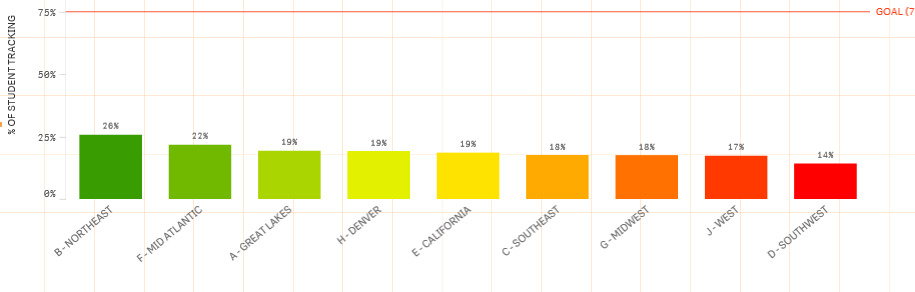
But this is a drill-down and it's possible they'll keep clicking until there is only one bar. When there is only one bar - it defaults to the color red.

I don't want them to think that they were red so why did they change to red. Is there a way to write in the expression to default to a certain color with the drill-down?
- Tags:
- expression color
- « Previous Replies
-
- 1
- 2
- Next Replies »

 sunny_talwar
- Mark as New
- Bookmark
- Subscribe
- Mute
- Subscribe to RSS Feed
- Permalink
- Report Inappropriate Content
How about this as your color expression:
ColorMix2((Rank(TOTAL
RangeSum(
Count({1<[LEVEL 0 COMPLETION]={"Y"}, [LEVEL 1 COMPLETION]={"Y"}, [LEVEL 3 COMPLETION]={"Y"}, [Position Code]={12,42}>}SID),
Count({1<[Sales Manager$.LEVEL 0 COMPLETION]={"Y"}, [Sales Manager$.LEVEL 1 COMPLETION]={"Y"}, [Sales Manager$.LEVEL 3 COMPLETION]={"Y"}, [Sales Manager$.Position Code]={04,41}>}[Sales Manager$.SID]),
Count({1<[Service Advisor$.LEVEL 0 COMPLETION]={"Y"}, [Service Advisor$.LEVEL 1 COMPLETION]={"Y"}, [Service Advisor$.LEVEL 3 COMPLETION]={"Y"}, [Service Advisor$.Position Code]={13,14,27,40}>}[Service Advisor$.SID]),
Count({1<[Service Manager$.LEVEL 0 COMPLETION]={"Y"}, [Service Manager$.LEVEL 1 COMPLETION]={"Y"}, [Service Manager$.LEVEL 3 COMPLETION]={"Y"}, [Service Manager$.Position Code]={08,09,17,32,33,35}>}[Service Manager$.SID])) /
RangeSum(
Count({1<[Position Code]={12,42}>}SID),
Count({1<[Sales Manager$.Position Code]={04,41}>}[Sales Manager$.SID]),
Count({1<[Service Advisor$.Position Code]={13,14,27,40}>}[Service Advisor$.SID]),
Count({1<[Service Manager$.Position Code]={08,09,17,32,33,35}>}[Service Manager$.SID]))
)/(NoOfRows(TOTAL)/2))-1, Green(), LightRed(), Yellow())
- Mark as New
- Bookmark
- Subscribe
- Mute
- Subscribe to RSS Feed
- Permalink
- Report Inappropriate Content
That worked - Because there is the {1< does that mean all of the other BC will have to stay at the bottom when filtered on?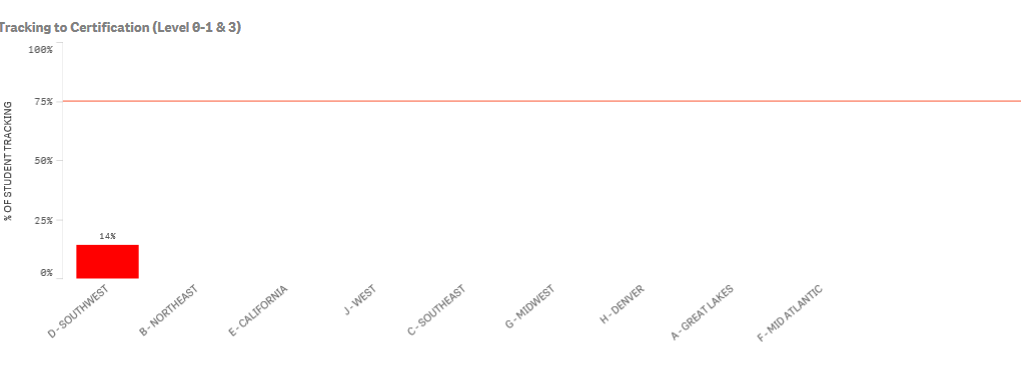
sunny_talwar
- Mark as New
- Bookmark
- Subscribe
- Mute
- Subscribe to RSS Feed
- Permalink
- Report Inappropriate Content
Not sure I understand your question. What is BC here?
- Mark as New
- Bookmark
- Subscribe
- Mute
- Subscribe to RSS Feed
- Permalink
- Report Inappropriate Content
D - Southwest or B - Northeast for example. It's keeping all the dimensions at the bottom instead of just the one with the color that I am filtered on.
sunny_talwar
- Mark as New
- Bookmark
- Subscribe
- Mute
- Subscribe to RSS Feed
- Permalink
- Report Inappropriate Content
What version of Qlik Sense are you using right now?
- Mark as New
- Bookmark
- Subscribe
- Mute
- Subscribe to RSS Feed
- Permalink
- Report Inappropriate Content
2.2.3
sunny_talwar
- Mark as New
- Bookmark
- Subscribe
- Mute
- Subscribe to RSS Feed
- Permalink
- Report Inappropriate Content
I guess the issue should go away if you can upgrade to QS 3 and above.
- Mark as New
- Bookmark
- Subscribe
- Mute
- Subscribe to RSS Feed
- Permalink
- Report Inappropriate Content
Okay. Thanks! Our company won't be doing that for a small period of time. Thanks for your help.
sunny_talwar
- Mark as New
- Bookmark
- Subscribe
- Mute
- Subscribe to RSS Feed
- Permalink
- Report Inappropriate Content
No problem 
- « Previous Replies
-
- 1
- 2
- Next Replies »