Unlock a world of possibilities! Login now and discover the exclusive benefits awaiting you.

- Qlik Community
- :
- Forums
- :
- Analytics & AI
- :
- Products & Topics
- :
- Visualization and Usability
- :
- Re: Concatenate 2 fields (Text and Date)
- Subscribe to RSS Feed
- Mark Topic as New
- Mark Topic as Read
- Float this Topic for Current User
- Bookmark
- Subscribe
- Mute
- Printer Friendly Page

- Mark as New
- Bookmark
- Subscribe
- Mute
- Subscribe to RSS Feed
- Permalink
- Report Inappropriate Content
Concatenate 2 fields (Text and Date)
Hi,
I would like to concatenate 2 fields in Qlik Sense :
1 field [GAME] which is TEXT format
1 field [GAME DATE]which is DATE format (DD/MM/YYYY)
I tried in the script to do this :
[GAME] &' '&text([GAME DATE]) as [GAME AND DATE]
But I doesn't work.
I get for example FRANCE 41939 instead of FRANCE 27/10/2014.
Do you known how could I get the correct result ?
Thank you for your help
Sincerely
Accepted Solutions

 marcus_sommer
- Mark as New
- Bookmark
- Subscribe
- Mute
- Subscribe to RSS Feed
- Permalink
- Report Inappropriate Content
Try:
[GAME] & ' ' & date([GAME DATE], 'DD/MM/YYYY') as [GAME AND DATE]
- Marcus
marcus_sommer
- Mark as New
- Bookmark
- Subscribe
- Mute
- Subscribe to RSS Feed
- Permalink
- Report Inappropriate Content
Try:
[GAME] & ' ' & date([GAME DATE], 'DD/MM/YYYY') as [GAME AND DATE]
- Marcus

 swuehl
- Mark as New
- Bookmark
- Subscribe
- Mute
- Subscribe to RSS Feed
- Permalink
- Report Inappropriate Content
Try
[GAME] &' '& Date([GAME DATE],'DD/MM/YYYY') as [GAME AND DATE]
or
[GAME] &' '&text(Date([GAME DATE],'DD/MM/YYYY ')) as [GAME AND DATE]
 sunny_talwar
- Mark as New
- Bookmark
- Subscribe
- Mute
- Subscribe to RSS Feed
- Permalink
- Report Inappropriate Content
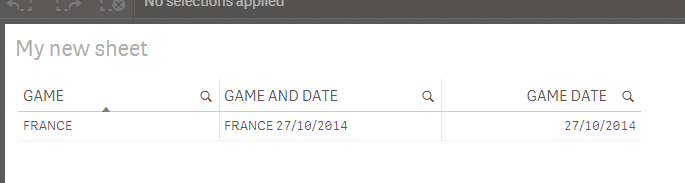
Don't use the text function here.... this should work:
[GAME] & ' ' & [GAME DATE] as [GAME AND DATE] or
[GAME] & ' ' & Date([GAME DATE]) as [GAME AND DATE]
Once you concatenate a non text field with a text field, it automatically converts into a text field.
EDIT: First one seemed to work:
Table:
LOAD *,
GAME & ' ' & [GAME DATE] as [GAME AND DATE];
LOAD * Inline [
GAME, GAME DATE
FRANCE, 27/10/2014
];
Best,
Sunny
- Mark as New
- Bookmark
- Subscribe
- Mute
- Subscribe to RSS Feed
- Permalink
- Report Inappropriate Content
Thank you,
This script works :
[GAME] & ' ' & date([GAME DATE], 'DD/MM/YYYY') as [GAME AND DATE]
Best
Julien