Unlock a world of possibilities! Login now and discover the exclusive benefits awaiting you.

- Qlik Community
- :
- Forums
- :
- Analytics & AI
- :
- Products & Topics
- :
- Visualization and Usability
- :
- Concatenate table fields
- Subscribe to RSS Feed
- Mark Topic as New
- Mark Topic as Read
- Float this Topic for Current User
- Bookmark
- Subscribe
- Mute
- Printer Friendly Page

 jeckstein
- Mark as New
- Bookmark
- Subscribe
- Mute
- Subscribe to RSS Feed
- Permalink
- Report Inappropriate Content
Concatenate table fields
Hi,
I am trying to create a new table from fields in a existing table. The existing table looks like this.
| ID | Andy | Rob | Amanda |
| AB1 | 300 | 200 | |
| AB2 | 400 | ||
| AB3 | 100 | 300 | 500 |
| AB4 | 200 | 100 | |
| AB5 | 500 | ||
| AB6 | 600 | ||
| AB7 | 700 | 300 |
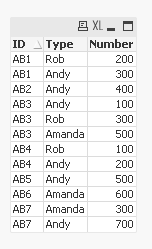
I need the result to look like this:
| ID | Type | Number |
| AB1 | Andy | 300 |
| AB1 | Rob | 200 |
| AB2 | Andy | 400 |
| AB3 | Andy | 100 |
| AB3 | Rob | 300 |
| AB3 | Amanda | 500 |
| AB4 | Andy | 200 |
| AB4 | Rob | 100 |
| AB5 | Andy | 500 |
| AB6 | Amanda | 600 |
| AB7 | Andy | 700 |
| AB7 | Amanda | 300 |
Notice a few things need to be satisfied.
- A additional column "Type" has been created.
- type is equal to the filed name that the "number" has been pulled from
- A additional column "Number" has been created.
- "Number" is the associated number string with each row and type combination
Thanks in advance!!!!
-Jim

- Mark as New
- Bookmark
- Subscribe
- Mute
- Subscribe to RSS Feed
- Permalink
- Report Inappropriate Content
Use cross Load, check this?
 MindaugasBacius
- Mark as New
- Bookmark
- Subscribe
- Mute
- Subscribe to RSS Feed
- Permalink
- Report Inappropriate Content
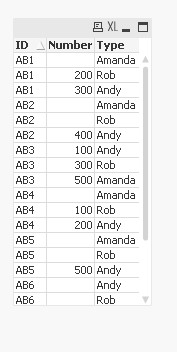
CrossTable(Type, Number)
LOAD ID,
     Andy,
     Rob,
     Amanda
FROM
[https://community.qlik.com/thread/230680]
(html, codepage is 1257, embedded labels, table is @1);
Result:

 sunny_talwar
- Mark as New
- Bookmark
- Subscribe
- Mute
- Subscribe to RSS Feed
- Permalink
- Report Inappropriate Content
You can further add a resident load to remove the rows where Number is null
Table:
CrossTable(Type, Number)
LOAD ID,
Andy,
Rob,
Amanda
FROM
[https://community.qlik.com/thread/230680]
(html, codepage is 1257, embedded labels, table is @1);
FinalTable:
NoConcatenate
LOAD *
Resident Table
Where Len(Trim(Number)) > 0;
DROP Table Table;