Unlock a world of possibilities! Login now and discover the exclusive benefits awaiting you.

- Qlik Community
- :
- Forums
- :
- Analytics & AI
- :
- Products & Topics
- :
- Visualization and Usability
- :
- Re: Condition in straight table
- Subscribe to RSS Feed
- Mark Topic as New
- Mark Topic as Read
- Float this Topic for Current User
- Bookmark
- Subscribe
- Mute
- Printer Friendly Page

- Mark as New
- Bookmark
- Subscribe
- Mute
- Subscribe to RSS Feed
- Permalink
- Report Inappropriate Content
Condition in straight table
Hi I have the table as below. I want this straight table to display only the priority 1 and 2 tickets with status not equal to closed and resolved.. How to achieve this without any filters.
| Date | ID | Priority | Status |
| 20-06-2013 | IN14938 | 4 | Closed |
| 25-06-2013 | IN15350 | 4 | Closed |
| 25-06-2013 | IN15368 | 1 | Open |
| 26-06-2013 | IN15511 | 2 | Hold |
| 26-06-2013 | IN15575 | 4 | Closed |
| 01-07-2013 | IN15876 | 3 | Closed |
| 08-07-2013 | IN16278 | 3 | Closed |
| 09-07-2013 | IN16446 | 4 | Closed |
| 18-07-2013 | IN17223 | 4 | Closed |
| 19-07-2013 | IN17349 | 4 | Closed |
| 19-07-2013 | IN17351 | 4 | Closed |
| 19-07-2013 | IN17355 | 4 | Closed |
| 19-07-2013 | IN17365 | 4 | Closed |
- Tags:
- straight table
Accepted Solutions
- Mark as New
- Bookmark
- Subscribe
- Mute
- Subscribe to RSS Feed
- Permalink
- Report Inappropriate Content
only({<Priority = {1,2}, Status -= {'Closed', 'Resolved'}>} Status) with Priority and Status as Dimensions.
Edit: You can not hide columns in sense.
Solution 2:
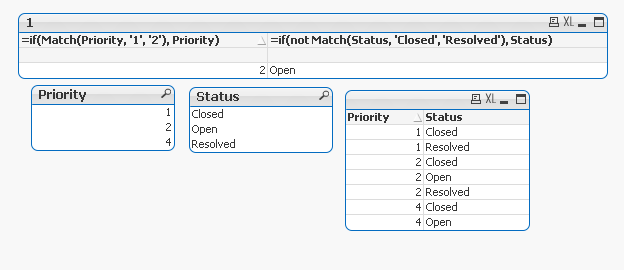
Create two calculated dimensions like below and use an expression as =1. Under presentation-tab you hide the expression.
- Mark as New
- Bookmark
- Subscribe
- Mute
- Subscribe to RSS Feed
- Permalink
- Report Inappropriate Content
only({<Priority = {1,2}, Status -= {'Closed', 'Resolved'}>} Status) with Priority and Status as Dimensions.
Edit: You can not hide columns in sense.
Solution 2:
Create two calculated dimensions like below and use an expression as =1. Under presentation-tab you hide the expression.
- Mark as New
- Bookmark
- Subscribe
- Mute
- Subscribe to RSS Feed
- Permalink
- Report Inappropriate Content
I am able to create 2 calculated dimensions but I dont know how to add the expression as 1. can you please explain more
- Mark as New
- Bookmark
- Subscribe
- Mute
- Subscribe to RSS Feed
- Permalink
- Report Inappropriate Content
You can also try the set analysis expression instead of calculated dimensions.
Othervise:
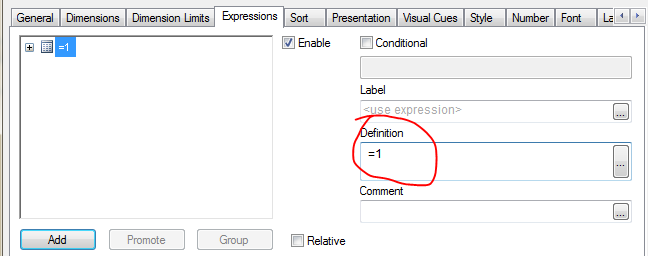
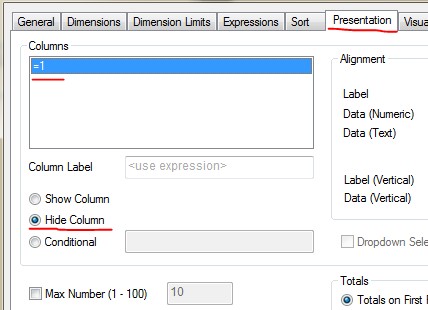
Put the value 1 in your expression as a "dummy expression". Then hide it under presentation tab and "hide column".
- Mark as New
- Bookmark
- Subscribe
- Mute
- Subscribe to RSS Feed
- Permalink
- Report Inappropriate Content
Can we hide the column in QlikSense?
- Mark as New
- Bookmark
- Subscribe
- Mute
- Subscribe to RSS Feed
- Permalink
- Report Inappropriate Content
Oh. sorry I did not see it was in sense. 
Then you can use the set analysis expression, hopefully that will work in sense...
//Micke
- Mark as New
- Bookmark
- Subscribe
- Mute
- Subscribe to RSS Feed
- Permalink
- Report Inappropriate Content
I have tried using expression and it works perfect.. Thanks..