Unlock a world of possibilities! Login now and discover the exclusive benefits awaiting you.

- Qlik Community
- :
- Forums
- :
- Analytics & AI
- :
- Products & Topics
- :
- Visualization and Usability
- :
- Re: Conditional Dimension
- Subscribe to RSS Feed
- Mark Topic as New
- Mark Topic as Read
- Float this Topic for Current User
- Bookmark
- Subscribe
- Mute
- Printer Friendly Page

- Mark as New
- Bookmark
- Subscribe
- Mute
- Subscribe to RSS Feed
- Permalink
- Report Inappropriate Content
Conditional Dimension
Hello,
I am working on building the following chart.
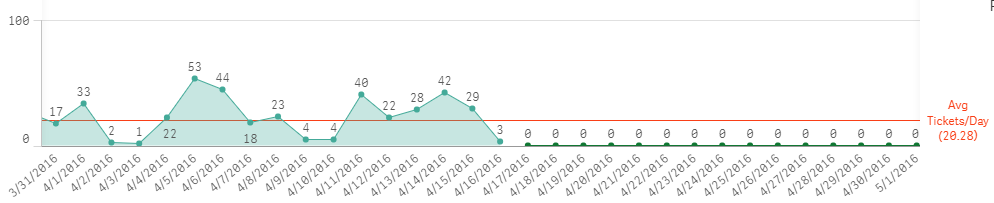
Everything is fine with this chart except that all the dates that don't have any data are showing as 0. I would like this graph to only show data for dates that have data. I update this chart on a Period basis, so there is no need to have all these excess dates that don't yet have data.
Current Dimensions:
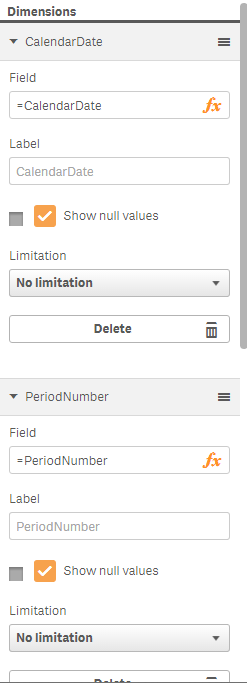
Current Measure:

Can anyone provide any insight on how I might do this?
Thanks!
Randall

 swuehl
- Mark as New
- Bookmark
- Subscribe
- Mute
- Subscribe to RSS Feed
- Permalink
- Report Inappropriate Content
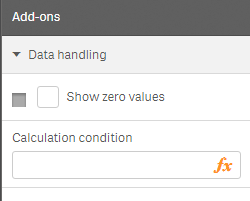
Try disabling the option 'show NULL values' (or similar wording) on you chart properties - add ons - data handling.
- Mark as New
- Bookmark
- Subscribe
- Mute
- Subscribe to RSS Feed
- Permalink
- Report Inappropriate Content
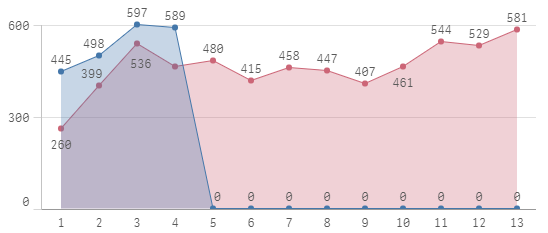
Thanks swuehl. That worked for that particular chart. But I actually have another chart that un-checking that option didn't work for. Any ideas for this one?