Unlock a world of possibilities! Login now and discover the exclusive benefits awaiting you.

- Qlik Community
- :
- Forums
- :
- Analytics & AI
- :
- Products & Topics
- :
- Visualization and Usability
- :
- Consolidate multiple columns and average value
- Subscribe to RSS Feed
- Mark Topic as New
- Mark Topic as Read
- Float this Topic for Current User
- Bookmark
- Subscribe
- Mute
- Printer Friendly Page

 lmc
lmc
- Mark as New
- Bookmark
- Subscribe
- Mute
- Subscribe to RSS Feed
- Permalink
- Report Inappropriate Content
Consolidate multiple columns and average value
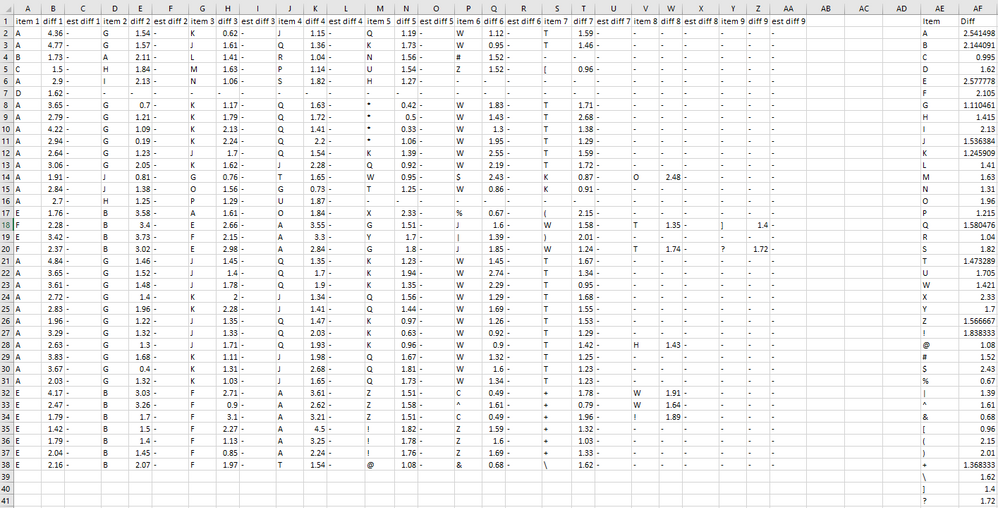
I am trying to combine items 1 thru 9 in to a single column while averaging the value listed in diff 1 thru 9.
some of the items are repeated in multiple columns as well as row.
below is a small snip of what I am working with. and in column AE and AF is what I am trying to get.
Accepted Solutions

 Mauritz_SA
- Mark as New
- Bookmark
- Subscribe
- Mute
- Subscribe to RSS Feed
- Permalink
- Report Inappropriate Content
Hi there
I made a few assumptions, but the following should work (just replace the part in red to point to your data):
OriginalTable:
LOAD
*
FROM [lib://Temp/Consolidate multiple columns.xlsx]
(ooxml, embedded labels, table is Sheet1);
Let vNumberOfFields = NoOfFields('OriginalTable');
Let vMaxNum = 0;
For x = 1 to vNumberOfFields
Let ColumnNumber = Right(FieldName($(x),'OriginalTable'),1);
If Left(FieldName($(x),'OriginalTable'),4) = 'item' and IsNum($(ColumnNumber)) Then
If ColumnNumber > vMaxNum Then
Let vMaxNum = $(ColumnNumber);
End If
End If
Next x
For i = 1 to vMaxNum
FinalTable:
Load
[item $(i)] AS Item,
[diff $(i)] AS Diff
Resident OriginalTable
Where Not IsNull([item $(i)]);
Next i;
Let vNumberOfFields = Null();
Let vMaxNum = Null();
Let ColumnNumber = Null();
Let i = Null();
Let x = Null();
DROP TABLE OriginalTable;
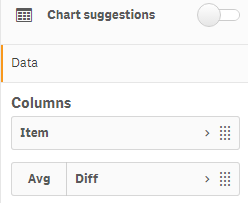
Then you can simply use a table in the front end with Item as a dimension and Avg(Diff) as the measure.
Hope this helps.
Regards,
Mauritz
Mauritz_SA
- Mark as New
- Bookmark
- Subscribe
- Mute
- Subscribe to RSS Feed
- Permalink
- Report Inappropriate Content
Hi there
I made a few assumptions, but the following should work (just replace the part in red to point to your data):
OriginalTable:
LOAD
*
FROM [lib://Temp/Consolidate multiple columns.xlsx]
(ooxml, embedded labels, table is Sheet1);
Let vNumberOfFields = NoOfFields('OriginalTable');
Let vMaxNum = 0;
For x = 1 to vNumberOfFields
Let ColumnNumber = Right(FieldName($(x),'OriginalTable'),1);
If Left(FieldName($(x),'OriginalTable'),4) = 'item' and IsNum($(ColumnNumber)) Then
If ColumnNumber > vMaxNum Then
Let vMaxNum = $(ColumnNumber);
End If
End If
Next x
For i = 1 to vMaxNum
FinalTable:
Load
[item $(i)] AS Item,
[diff $(i)] AS Diff
Resident OriginalTable
Where Not IsNull([item $(i)]);
Next i;
Let vNumberOfFields = Null();
Let vMaxNum = Null();
Let ColumnNumber = Null();
Let i = Null();
Let x = Null();
DROP TABLE OriginalTable;
Then you can simply use a table in the front end with Item as a dimension and Avg(Diff) as the measure.
Hope this helps.
Regards,
Mauritz
