Unlock a world of possibilities! Login now and discover the exclusive benefits awaiting you.

- Qlik Community
- :
- Forums
- :
- Analytics & AI
- :
- Products & Topics
- :
- Visualization and Usability
- :
- Re: Count function
- Subscribe to RSS Feed
- Mark Topic as New
- Mark Topic as Read
- Float this Topic for Current User
- Bookmark
- Subscribe
- Mute
- Printer Friendly Page

 theaokii
- Mark as New
- Bookmark
- Subscribe
- Mute
- Subscribe to RSS Feed
- Permalink
- Report Inappropriate Content
Count function
Hi guys,
Im new to Qlik Sense. And yet, i have met the difficulty about Count function
There is my table data about transactions of customers:
| Day | Cus ID | Trans ID | Trans status |
| 15-08-2018 | 001 | 001A | Transing |
| 16-08-2018 | 001 | 001A | Transing |
| 17-08-2018 | 001 | 001A | Transing |
| 18-08-2018 | 001 | 001A | Transing |
| 16-08-2018 | 001 | 001B | Transing |
| 17-08-2018 | 001 | 001B | Transing |
| 18-08-2018 | 001 | 001B | Transing |
| 15-09-2018 | 002 | 002A | Ordering |
| 16-09-2018 | 002 | 002A | Ordering |
| 17-09-2018 | 002 | 002A | Ordering |
| 18-09-2018 | 002 | 002A | Ordering |
| 16-08-2018 | 002 | 002B | Transing |
| 17-08-2018 | 002 | 002B | Transing |
| 18-08-2018 | 002 | 002B | Transing |
| 15-07-2018 | 003 | 003A | Transing |
| 16-07-2018 | 003 | 003A | Transing |
| 17-08-2018 | 003 | 003A | Transing |
| 17-09-2018 | 004 | 004A | Transing |
| 18-09-2018 | 004 | 004A | Transing |
| 02-08-2018 | 005 | 005A | Transing |
| 03-08-2018 | 005 | 005A | Transing |
| 04-08-2018 | 005 | 005A | Transing |
Im gonna count the number of customer whose all transactions start in only 1 month (who never order again after the ordered month) as:
| Time | Count number of left customer |
| 2018-Jul | 1 (003) |
| 2018-Aug | 2 (001, 005) |
| 2018-Sep | 1 (004) |
In my case, i assume that min({<Transtatus={'Transing'}>} day) is the start day of transaction
Is it possible to make it or may a data table?
There is the sql data
Data:
Load * Inline
[
| 'Day','Cus ID','Trans ID','Trans status' |
| '15-08-2018','001','001A','Transing' |
| '16-08-2018','001','001A','Transing' |
| '17-08-2018','001','001A','Transing' |
| '18-08-2018','001','001A','Transing' |
| '16-08-2018','001','001B','Transing' |
| '17-08-2018','001','001B','Transing' |
| '18-08-2018','001','001B','Transing' |
| '15-09-2018','002','002A','Ordering' |
| '16-09-2018','002','002A','Ordering' |
| '17-09-2018','002','002A','Ordering' |
| '18-09-2018','002','002A','Ordering' |
| '16-08-2018','002','002B','Transing' |
| '17-08-2018','002','002B','Transing' |
| '18-08-2018','002','002B','Transing' |
| '15-07-2018','003','003A','Transing' |
| '16-07-2018','003','003A','Transing' |
| '17-08-2018','003','003A','Transing' |
| '17-09-2018','004','004A','Transing' |
| '18-09-2018','004','004A','Transing' |
| '02-08-2018','005','005A','Transing' |
| '03-08-2018','005','005A','Transing' |
| '04-08-2018','005','005A','Transing' |
]
;
Could anyone enlight me!
Thanks in advance.
theaokii
- Mark as New
- Bookmark
- Subscribe
- Mute
- Subscribe to RSS Feed
- Permalink
- Report Inappropriate Content
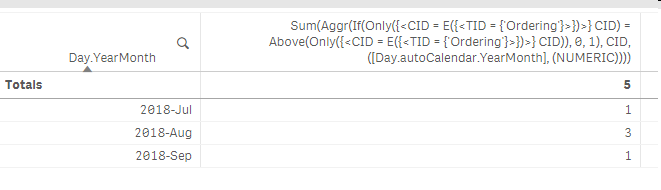
im sorry. The browser crashed when i was pasting the image

 sunny_talwar
- Mark as New
- Bookmark
- Subscribe
- Mute
- Subscribe to RSS Feed
- Permalink
- Report Inappropriate Content
Not sure why, but I see this
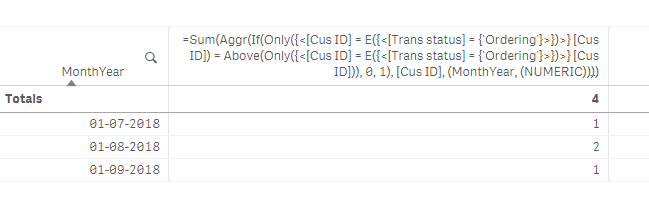
Attaching the qvf file for you to look at
theaokii
- Mark as New
- Bookmark
- Subscribe
- Mute
- Subscribe to RSS Feed
- Permalink
- Report Inappropriate Content
You are really once of a kind.
Generally, it solves my issuse
But, there is a exception for a customer like that:
| 15-07-2018, 009, 009A, Transing | |
| 15-08-2018, 009, 009B, Transing |
The 009 is counted on 01-07-2018 but his 'Transing' transaction excutes once more on Aug so he cant be counted on the table.
i have tried other aggr but nothing happen
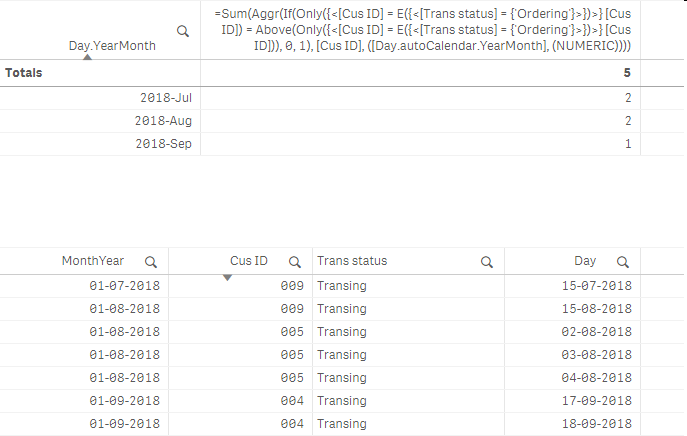
Could u please enlight me a bit more.
Thank you very much.
sunny_talwar
- Mark as New
- Bookmark
- Subscribe
- Mute
- Subscribe to RSS Feed
- Permalink
- Report Inappropriate Content
Wait so, 009 is getting counted twice or not? I mean do you want it to be counted twice? I am not sure I understand the issue?
theaokii
- Mark as New
- Bookmark
- Subscribe
- Mute
- Subscribe to RSS Feed
- Permalink
- Report Inappropriate Content
The 009 cant be counted because the 2nd transaction in on Aug.
Some kinds of our transaction not required customer order, just start transing
sunny_talwar
- Mark as New
- Bookmark
- Subscribe
- Mute
- Subscribe to RSS Feed
- Permalink
- Report Inappropriate Content
I ran just this
Data:
LOAD *,
Month(Day) as Month,
Date(MonthStart(Day)) as MonthYear;
LOAD * INLINE [
Day, Cus ID, Trans ID, Trans status
15-07-2018, 009, 009A, Transing
15-08-2018, 009, 001b, Transing
];
and I am seeing this
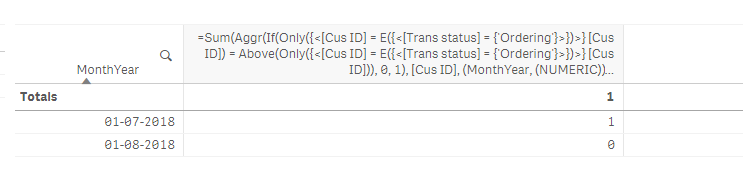
For me, 009 is only getting counted in August.... and that is what you seem to want, right?
theaokii
- Mark as New
- Bookmark
- Subscribe
- Mute
- Subscribe to RSS Feed
- Permalink
- Report Inappropriate Content
Yeah, 009 is counted in August, that it what im looking for.
sunny_talwar
- Mark as New
- Bookmark
- Subscribe
- Mute
- Subscribe to RSS Feed
- Permalink
- Report Inappropriate Content
So, for me the expression is already doing that. I am not sure why it isn't doing the same for you 
theaokii
- Mark as New
- Bookmark
- Subscribe
- Mute
- Subscribe to RSS Feed
- Permalink
- Report Inappropriate Content
In your image
Isnt 009 counted in July instead of August

Im sorry if my issue takes too much time from you.
// Just change Above to Below and done.
Thank you alot Sunny
sunny_talwar
- Mark as New
- Bookmark
- Subscribe
- Mute
- Subscribe to RSS Feed
- Permalink
- Report Inappropriate Content
Oh sorry, I am exhausted... why do you want to see this in August and not July?
