Unlock a world of possibilities! Login now and discover the exclusive benefits awaiting you.

- Qlik Community
- :
- Forums
- :
- Analytics & AI
- :
- Products & Topics
- :
- Visualization and Usability
- :
- Re: Creating visualizations - NO Extension objects
- Subscribe to RSS Feed
- Mark Topic as New
- Mark Topic as Read
- Float this Topic for Current User
- Bookmark
- Subscribe
- Mute
- Printer Friendly Page

- Mark as New
- Bookmark
- Subscribe
- Mute
- Subscribe to RSS Feed
- Permalink
- Report Inappropriate Content
Creating visualizations - NO Extension objects
It may seem a strange question to ask, but what happened to "EXTENSIBLE" and the ability to integrate "Extension Objects"? Is this going to be added to Qlik Sense, or will this remain only a feature of QlikView?
Accepted Solutions

 Michael_Tarallo
- Mark as New
- Bookmark
- Subscribe
- Mute
- Subscribe to RSS Feed
- Permalink
- Report Inappropriate Content
If you would like to see them in action in Sense Desktop - take the extension you wish from:
C:\Users\<user>\Documents\Qlik\Examples\Extensions (complete) folder
and copy to
C:\Users\<user>\Documents\Qlik\Sense\Extensions
and restart Sense Desktop.
So for example - the PeopleChart
Take from
C:\Users\<user>\Documents\Qlik\Examples\Extensions (complete) folder
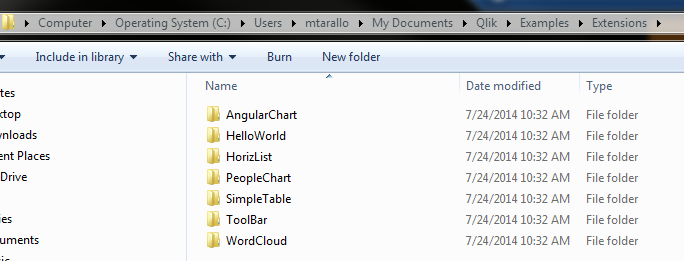
Copy to:
C:\Users\<user>\Documents\Qlik\Sense\Extensions

See it in Desktop:
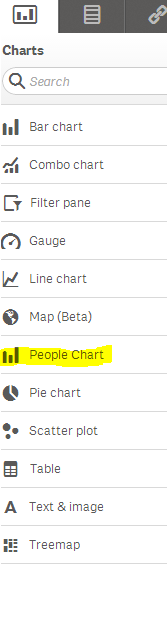
Use as you would by adding measures and dimensions

Enjoy!
Mike Tarallo
Qlik
Michael_Tarallo
- Mark as New
- Bookmark
- Subscribe
- Mute
- Subscribe to RSS Feed
- Permalink
- Report Inappropriate Content
Hi Nick - this is absolutely possible and will become more apparent when the Qlik Sense Server is released. There have been many extension objects built already. I am sure our team and member will be sharing them soon.
Mike T
Mike Tarallo
Qlik

.png "Former Employee") Giuseppe_Novell
Giuseppe_Novell- Mark as New
- Bookmark
- Subscribe
- Mute
- Subscribe to RSS Feed
- Permalink
- Report Inappropriate Content
Nick,
The location to implement extensions is : "C:\Users\<user>\Documents\Qlik\Sense\Extensions"
Gio
Principal Technical Support Engineer @ Qlik
Michael_Tarallo
- Mark as New
- Bookmark
- Subscribe
- Mute
- Subscribe to RSS Feed
- Permalink
- Report Inappropriate Content
Nick - check out this help documentation to learn more:
You can see an example of the tools that can be used here: http://localhost:4848/resources/workbencheditor.html
Mike Tarallo
Qlik
 Lee_Matthews
- Mark as New
- Bookmark
- Subscribe
- Mute
- Subscribe to RSS Feed
- Permalink
- Report Inappropriate Content
And I think you will find some examples installed with Sense Desktop at the following location
C:\Users\[your login]\Documents\Qlik\Examples\Extensions
Michael_Tarallo
- Mark as New
- Bookmark
- Subscribe
- Mute
- Subscribe to RSS Feed
- Permalink
- Report Inappropriate Content
If you would like to see them in action in Sense Desktop - take the extension you wish from:
C:\Users\<user>\Documents\Qlik\Examples\Extensions (complete) folder
and copy to
C:\Users\<user>\Documents\Qlik\Sense\Extensions
and restart Sense Desktop.
So for example - the PeopleChart
Take from
C:\Users\<user>\Documents\Qlik\Examples\Extensions (complete) folder
Copy to:
C:\Users\<user>\Documents\Qlik\Sense\Extensions
See it in Desktop:
Use as you would by adding measures and dimensions
Enjoy!
Mike Tarallo
Qlik
- Mark as New
- Bookmark
- Subscribe
- Mute
- Subscribe to RSS Feed
- Permalink
- Report Inappropriate Content
Thanks.
I couldn’t find any reference to the extension in the Qlik Sense “Help” or in the “Working with Qlik Sense Desktop” pdf document.
The extensions are as I expected them to be, pretty cool!
Nick