Unlock a world of possibilities! Login now and discover the exclusive benefits awaiting you.

- Qlik Community
- :
- Forums
- :
- Analytics & AI
- :
- Products & Topics
- :
- Visualization and Usability
- :
- Re: Data load failed: while using sales analysis p...
- Subscribe to RSS Feed
- Mark Topic as New
- Mark Topic as Read
- Float this Topic for Current User
- Bookmark
- Subscribe
- Mute
- Printer Friendly Page

- Mark as New
- Bookmark
- Subscribe
- Mute
- Subscribe to RSS Feed
- Permalink
- Report Inappropriate Content
Data load failed: while using sales analysis point map
Hi,
I am using Qlik for the first time and was going through the following tutorial:
I started using the files from the following docs:
Qlik Sense 3.0 - Creating a Point Map
I loaded the 'Sales Analysis Map.qvf' and continued with the tutorial, but when I reached 'Data Manager' it is not loading the file and is showing the following error:
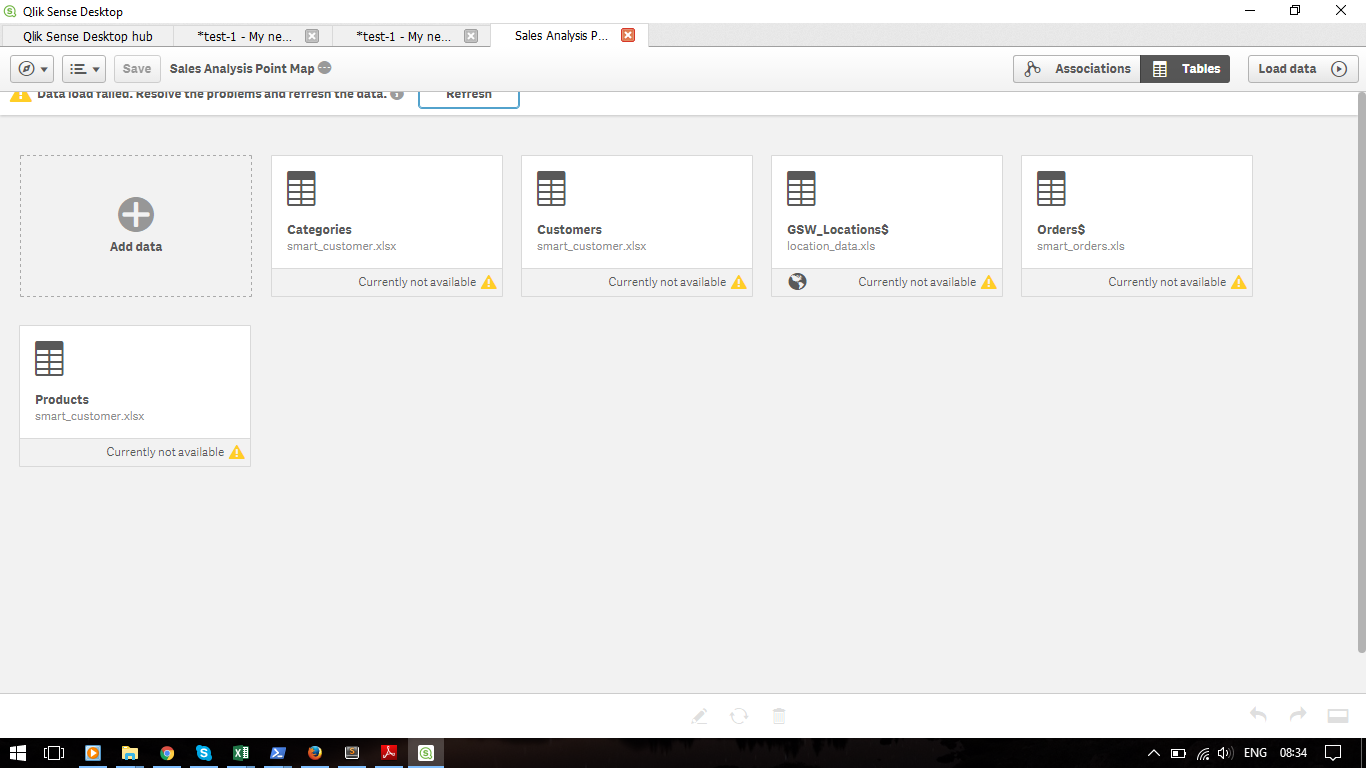
What might be the problem. Kindly help.
- Tags:
- @qlik sense

 OmarBenSalem
- Mark as New
- Bookmark
- Subscribe
- Mute
- Subscribe to RSS Feed
- Permalink
- Report Inappropriate Content
Hi Jeril,
You should upgrade to latest version 3.2.3 and with this version, the creation of Maps is becoming really simple.
In fact, you should only have a field with country/departments/region.. names or code:
Import your file with the data load editor, PREPARE YOUR DATA before reloading to force Qlik to PREPRARE geoData and autoCalendar for you and that's it.
You could use a Map as simple as that: no KML file nore Lon,Lat needed.
- Mark as New
- Bookmark
- Subscribe
- Mute
- Subscribe to RSS Feed
- Permalink
- Report Inappropriate Content
Hi Omar,
Sorry for the late response. I tried using Qlik Sense Desktop version 3.2 SR2. Its giving me the same error. And I am not able to download version 3.2.3. In the Qlik download site its not showing version 2.3.2. What to do? Kindly help.