Unlock a world of possibilities! Login now and discover the exclusive benefits awaiting you.

- Qlik Community
- :
- Forums
- :
- Analytics & AI
- :
- Products & Topics
- :
- Visualization and Usability
- :
- Re: Date range is not working properly
- Subscribe to RSS Feed
- Mark Topic as New
- Mark Topic as Read
- Float this Topic for Current User
- Bookmark
- Subscribe
- Mute
- Printer Friendly Page

 mhmmd_srf
- Mark as New
- Bookmark
- Subscribe
- Mute
- Subscribe to RSS Feed
- Permalink
- Report Inappropriate Content
Date range is not working properly
Hi All,
My source is excel with only one date field. I need to implement From Date and To Date in dashboard.
As per data :
Count(CallTypeID) = 369 in 14th Oct
Count(CallTypeID) = 1 in 15th Oct
Now in Qlik Dashboard if I select :
From Date= 14th and To Date = 14th, then count = 369
From Date= 14th and To Date = 15th, then count = 370 as expected. But if I select
From Date= 15th and To Date = 15th, then count = 370, however it should be 1.
My expression is below:
Count({$<NewDate={'>=$(=$(v_FromDate))'},NewDate={'<=$(=$(v_ToDate))'}>}[CallTypeID]).
Please suggest.
Thanks,
Sarif
Accepted Solutions

 jagan
jagan
- Mark as New
- Bookmark
- Subscribe
- Mute
- Subscribe to RSS Feed
- Permalink
- Report Inappropriate Content
Hi,
You have to create variables in the front end
Document Properties -> Variable Overview and add variables
v_FromDate = Date(Min(From_Date))
v_ToDate = Date(Max(To_Date))
Now in chart use below expression.
Count({$<NewDate={'>=$(=v_FromDate)<=$(v_ToDate)'}>}[CallTypeID])
Hope this help syou.
Regards,
Jagan.
 MindaugasBacius
- Mark as New
- Bookmark
- Subscribe
- Mute
- Subscribe to RSS Feed
- Permalink
- Report Inappropriate Content
Try like this:
Count({$<NewDate={'>=$(=(v_FromDate))'},NewDate={'<=$(=(v_ToDate))'}>}[CallTypeID])
jagan
- Mark as New
- Bookmark
- Subscribe
- Mute
- Subscribe to RSS Feed
- Permalink
- Report Inappropriate Content
Hi,
Try like this
Count({$<NewDate={'>=$(=v_FromDate)'},NewDate={'<=$(v_ToDate)'}>}[CallTypeID])
Note: The date format of variables and the NewDate dimension should be same format. Also the NewDate field should be a date field.
Regards,
Jagan.
mhmmd_srf
- Mark as New
- Bookmark
- Subscribe
- Mute
- Subscribe to RSS Feed
- Permalink
- Report Inappropriate Content
Not working sir,
Yes NewDate and variable is on same date.
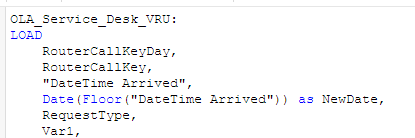
Date_From:
Load
Date(Floor("DateTime Arrived")) as From_Date
Resident OLA_Service_Desk_VRU;
Date_To:
Load
Date(Floor("DateTime Arrived")) as To_Date
Resident OLA_Service_Desk_VRU;
Set v_FromDate = From_Date;
Set v_ToDate = To_Date;
Please help.
Thanks,
Sarif
jagan
- Mark as New
- Bookmark
- Subscribe
- Mute
- Subscribe to RSS Feed
- Permalink
- Report Inappropriate Content
Hi,
You have to create variables in the front end
Document Properties -> Variable Overview and add variables
v_FromDate = Date(Min(From_Date))
v_ToDate = Date(Max(To_Date))
Now in chart use below expression.
Count({$<NewDate={'>=$(=v_FromDate)<=$(v_ToDate)'}>}[CallTypeID])
Hope this help syou.
Regards,
Jagan.
mhmmd_srf
- Mark as New
- Bookmark
- Subscribe
- Mute
- Subscribe to RSS Feed
- Permalink
- Report Inappropriate Content
What is the difference between those variables? If I create in Script and Front End?
jagan
- Mark as New
- Bookmark
- Subscribe
- Mute
- Subscribe to RSS Feed
- Permalink
- Report Inappropriate Content
Hi,
Your statements wont work.
Set v_FromDate = From_Date;
Set v_ToDate = To_Date;
You have to change like this, it is not possible to assign a field value, it just stores as a string.
LET vFromDate = Peek('From_Date');
LET v_ToDate = Peek('To_Date');
Is that front end one working?
Regards,
Jagan.
