Unlock a world of possibilities! Login now and discover the exclusive benefits awaiting you.

- Qlik Community
- :
- Forums
- :
- Analytics & AI
- :
- Products & Topics
- :
- Visualization and Usability
- :
- Date with set analysis
- Subscribe to RSS Feed
- Mark Topic as New
- Mark Topic as Read
- Float this Topic for Current User
- Bookmark
- Subscribe
- Mute
- Printer Friendly Page

 s_santalucia
- Mark as New
- Bookmark
- Subscribe
- Mute
- Subscribe to RSS Feed
- Permalink
- Report Inappropriate Content
Date with set analysis
Hello,
I have a question for you:
why does this formula not work?
count({$<[Data.autoCalendar.Year]={">2016"}>} [Num])
I want count [num] when data is > 2016.
Thanks
Accepted Solutions

 sunny_talwar
- Mark as New
- Bookmark
- Subscribe
- Mute
- Subscribe to RSS Feed
- Permalink
- Report Inappropriate Content
Not sure how you are defining your autoCalendar, but a lot of the time Year field is a Dual field created like this
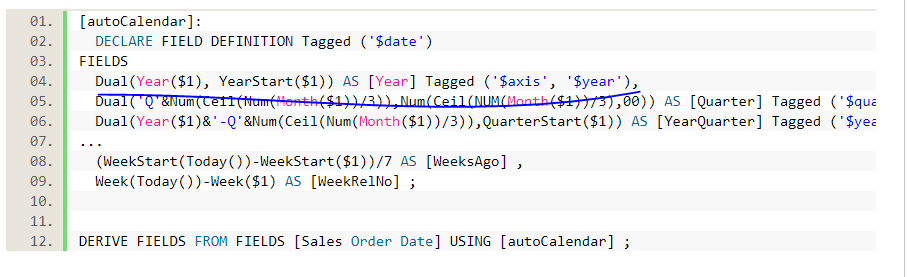
If this is how you create it... then try this and see if this works for you
Count({$<[Data.autoCalendar.Year] = {">$(=YearStart(MakeDate(2016)))"}>} [Num])

 jwjackso
- Mark as New
- Bookmark
- Subscribe
- Mute
- Subscribe to RSS Feed
- Permalink
- Report Inappropriate Content
The formula worked for me. Did you verify that [Data.autoCalendar.Year] is a 4 digit year and that you have data greater than 2016?
s_santalucia
- Mark as New
- Bookmark
- Subscribe
- Mute
- Subscribe to RSS Feed
- Permalink
- Report Inappropriate Content
Yes, I have verified. it's like you say.
sunny_talwar
- Mark as New
- Bookmark
- Subscribe
- Mute
- Subscribe to RSS Feed
- Permalink
- Report Inappropriate Content
Not sure how you are defining your autoCalendar, but a lot of the time Year field is a Dual field created like this
If this is how you create it... then try this and see if this works for you
Count({$<[Data.autoCalendar.Year] = {">$(=YearStart(MakeDate(2016)))"}>} [Num])
s_santalucia
- Mark as New
- Bookmark
- Subscribe
- Mute
- Subscribe to RSS Feed
- Permalink
- Report Inappropriate Content
yes, I have created the calendar in that way!
thanks for your answer!!!!!
