Unlock a world of possibilities! Login now and discover the exclusive benefits awaiting you.

- Qlik Community
- :
- Forums
- :
- Analytics & AI
- :
- Products & Topics
- :
- Visualization and Usability
- :
- Re: Days probelm
- Subscribe to RSS Feed
- Mark Topic as New
- Mark Topic as Read
- Float this Topic for Current User
- Bookmark
- Subscribe
- Mute
- Printer Friendly Page

 smilingjohn
- Mark as New
- Bookmark
- Subscribe
- Mute
- Subscribe to RSS Feed
- Permalink
- Report Inappropriate Content
Days probelm
Hi All,
I am trying to to find the total date from Created and closed date by using the below formula
Num(Created-Closed) but this is somehow not working for 1 day difference as shown in the below screenshot
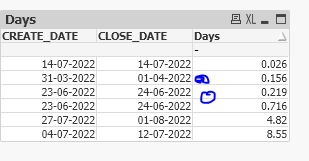
Please let me know how do I correct this to get 1 as a difference. Even I tried
Round(Num(Created-Closed)) but this will consider full 1 when it is greeter than .5 day and below .5 it will consider as 0
Thanks
Accepted Solutions

 marcus_sommer
- Mark as New
- Bookmark
- Subscribe
- Mute
- Subscribe to RSS Feed
- Permalink
- Report Inappropriate Content
I think you couldn't just replace your existing timestamp CREATE_DATE with a real date else you need the date and time information within extra fields and then using the appropriate field as dimension/selection and within the expressions. And the same probably with the closing-date.
Date(Floor(CREATE_DATE), 'DD-MM-YYYY') as Create_DATE
Time(Frac(CREATE_DATE), 'hh:mm:ss') as Create_TIME
Beside this you may skip the rounding and/or adjusting it and also wrapping the difference with interval() might be useful.
- Marcus
 Vegar
Vegar
- Mark as New
- Bookmark
- Subscribe
- Mute
- Subscribe to RSS Feed
- Permalink
- Report Inappropriate Content
My best guess is that your [CREATE_DATE] and [CLOSE_DATE] are in fact not dates, but timestamps formated as dates.
Try this expression:
dayname([CLOSE_DATE]) - dayname( [CREATE_DATE])
Qlik Community MVP
smilingjohn
- Mark as New
- Bookmark
- Subscribe
- Mute
- Subscribe to RSS Feed
- Permalink
- Report Inappropriate Content
Hi Vegar,
My actual date if in the below screenshot and I have converted it to proper date like this Date(CREATE_DATE, 'DD-MM-YYYY') as CREATE_DATE, should I use other format to convert to a proper date ? Please need yo suggestion
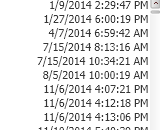
Thanks
marcus_sommer
- Mark as New
- Bookmark
- Subscribe
- Mute
- Subscribe to RSS Feed
- Permalink
- Report Inappropriate Content
Date() is a formatting-function which didn't touch the underlying values. To get a real date from a timestamp you need to fetch just the integer-part from the value. This could be done with:
date(floor(YourTimestamp))
- Marcus
smilingjohn
- Mark as New
- Bookmark
- Subscribe
- Mute
- Subscribe to RSS Feed
- Permalink
- Report Inappropriate Content
Thanks for the response Marcus
I tried with your advice
Date(Floor(CREATE_DATE), 'DD-MM-YYYY') as CREATE_DATE,
But this seems to be suppressing some values
marcus_sommer
- Mark as New
- Bookmark
- Subscribe
- Mute
- Subscribe to RSS Feed
- Permalink
- Report Inappropriate Content
I think you couldn't just replace your existing timestamp CREATE_DATE with a real date else you need the date and time information within extra fields and then using the appropriate field as dimension/selection and within the expressions. And the same probably with the closing-date.
Date(Floor(CREATE_DATE), 'DD-MM-YYYY') as Create_DATE
Time(Frac(CREATE_DATE), 'hh:mm:ss') as Create_TIME
Beside this you may skip the rounding and/or adjusting it and also wrapping the difference with interval() might be useful.
- Marcus
