Unlock a world of possibilities! Login now and discover the exclusive benefits awaiting you.

- Qlik Community
- :
- Forums
- :
- Analytics & AI
- :
- Products & Topics
- :
- Visualization and Usability
- :
- Re: Derive MonthWeek field from the date
- Subscribe to RSS Feed
- Mark Topic as New
- Mark Topic as Read
- Float this Topic for Current User
- Bookmark
- Subscribe
- Mute
- Printer Friendly Page

- Mark as New
- Bookmark
- Subscribe
- Mute
- Subscribe to RSS Feed
- Permalink
- Report Inappropriate Content
Derive MonthWeek field from the date
Hi All,
I have Date field and I want to create Line Chart in qlik sense.
Dimension: "Monthweek"-(MMMW1 )
Measures:1.Current year Sales
2.Previous Year sales
And also want to achieve Proper Month week sort order in Chart
can some one suggest the best way to achieve this.
Thanks,
Raj
Accepted Solutions

 petter
- Mark as New
- Bookmark
- Subscribe
- Mute
- Subscribe to RSS Feed
- Permalink
- Report Inappropriate Content
Week numbers are a bit tricky as they can span years and also that the week numbers aren't calculated the same across different countries.
So for instance in India week #1 of 2016 starts on the 27th of December of 2015 and ends on the 2nd of January 2016 whereas in the UK week#1 of 2016 starts on the 4th of January 2016 and ends on the 10th of January 2016.
However you can use the Week() function will always return a number between 1 and 52 or 53 (depending on country settings). WeekYear() function will indicate which year the week belongs to.
Basically this is what you have to do:
Dual( Month(Date) & 'W' & Week(Date) , WeekYear(Date) & Week(Date) )
petter
- Mark as New
- Bookmark
- Subscribe
- Mute
- Subscribe to RSS Feed
- Permalink
- Report Inappropriate Content
Week numbers are a bit tricky as they can span years and also that the week numbers aren't calculated the same across different countries.
So for instance in India week #1 of 2016 starts on the 27th of December of 2015 and ends on the 2nd of January 2016 whereas in the UK week#1 of 2016 starts on the 4th of January 2016 and ends on the 10th of January 2016.
However you can use the Week() function will always return a number between 1 and 52 or 53 (depending on country settings). WeekYear() function will indicate which year the week belongs to.
Basically this is what you have to do:
Dual( Month(Date) & 'W' & Week(Date) , WeekYear(Date) & Week(Date) )

 ravikumar_iyana
- Mark as New
- Bookmark
- Subscribe
- Mute
- Subscribe to RSS Feed
- Permalink
- Report Inappropriate Content
Hi Rajiv,
post some data in dimension field.
petter
- Mark as New
- Bookmark
- Subscribe
- Mute
- Subscribe to RSS Feed
- Permalink
- Report Inappropriate Content
This site could be helpful in comparing different countries way of calculating week numbers:
- Mark as New
- Bookmark
- Subscribe
- Mute
- Subscribe to RSS Feed
- Permalink
- Report Inappropriate Content
Here is the Sample Data !
- Mark as New
- Bookmark
- Subscribe
- Mute
- Subscribe to RSS Feed
- Permalink
- Report Inappropriate Content
Hi petter,
Thanks For Your Time.
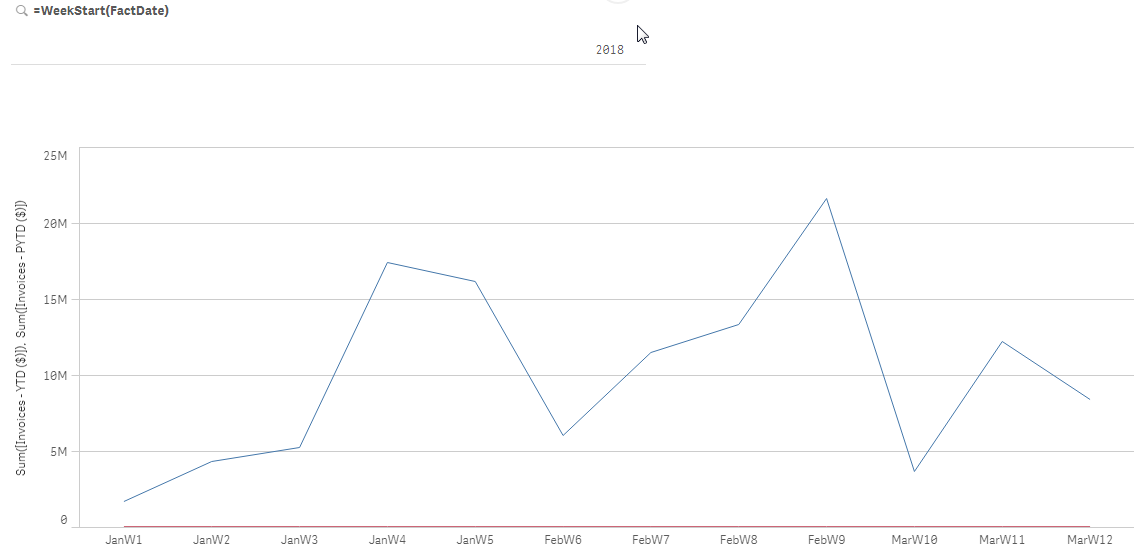
Its working Fine.Showing week trend but where i need to change if client Doesn't want Continuous week Numbers.
Current OutPut:Janw1,janw2,janw3,janw4,Janw5,Febw6,FebW7,FebW8,Febw8,MarW10,Marw11,MarW12
Required OutPut:anw1,janw2,janw3,janw4,Janw5, Febw1,FebW2,febW3,Febw4,Marw1,narw2,Marw3....
Please find attached Current Output Format.
Thanks,
Raj.
,
 petter
- Mark as New
- Bookmark
- Subscribe
- Mute
- Subscribe to RSS Feed
- Permalink
- Report Inappropriate Content
Weeks are not divisible into months. You will most of the time have a week at the beginning and the end of the month that will not be seven days. Comparing the sales numbers for a week containing fewer than seven days with those that have seven days would not be very correct would it? How would you want to resolve that?