Unlock a world of possibilities! Login now and discover the exclusive benefits awaiting you.

- Qlik Community
- :
- Forums
- :
- Analytics & AI
- :
- Products & Topics
- :
- Visualization and Usability
- :
- Re: Dimension limitations
Options
- Subscribe to RSS Feed
- Mark Topic as New
- Mark Topic as Read
- Float this Topic for Current User
- Bookmark
- Subscribe
- Mute
- Printer Friendly Page
Turn on suggestions
Auto-suggest helps you quickly narrow down your search results by suggesting possible matches as you type.
Showing results for

 aminqlik
Contributor
2020-07-13
03:51 AM
- Mark as New
- Bookmark
- Subscribe
- Mute
- Subscribe to RSS Feed
- Permalink
- Report Inappropriate Content
Dimension limitations
Hi All:
Raw data table as below:
| Date | Type | Count |
| 1-Jul | A | 1 |
| 1-Jul | A | 1 |
| 1-Jul | B | 1 |
| 1-Jul | C | 1 |
| 1-Jul | E | 1 |
| 2-Jul | A | 1 |
| 3-Jul | B | 1 |
| 4-Jul | C | 1 |
| 5-Jul | A | 1 |
| 6-Jul | C | 1 |
| 7-Jul | D | 1 |
When I select date, it will show the types and total test count for each date.
Expected data out:
| Date | Type | Total Test Count |
| 3-Jul | B | 2 |
or
| Date | Type | Total Test Count |
| 1-Jul | A | 4 |
| 2-Jul | B | 2 |
| 3-Jul | C | 3 |
| 4-Jul | E | 1 |
Thanks your help.
1,956 Views
1 Solution
Accepted Solutions

 Taoufiq_Zarra
MVP
2020-07-13
05:06 AM
- Mark as New
- Bookmark
- Subscribe
- Mute
- Subscribe to RSS Feed
- Permalink
- Report Inappropriate Content
Hi Amin,
one Solution
In dimension : Date and Type
and in expression :
=aggr(sum({1<Type=p(Type)>} Count),Type)
output :
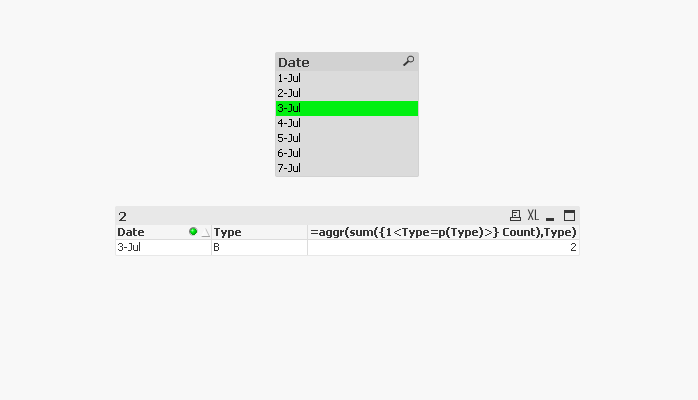
or
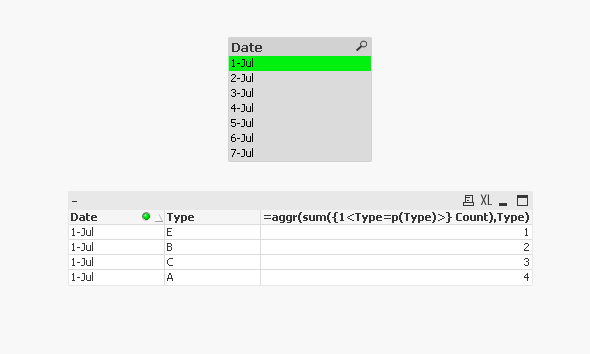
Regards,
Taoufiq ZARRA
"Please LIKE posts and "Accept as Solution" if the provided solution is helpful "
(you can mark up to 3 "solutions") 😉
Taoufiq ZARRA
"Please LIKE posts and "Accept as Solution" if the provided solution is helpful "
(you can mark up to 3 "solutions") 😉
1,908 Views
5 Replies
Taoufiq_Zarra
MVP
2020-07-13
04:47 AM
- Mark as New
- Bookmark
- Subscribe
- Mute
- Subscribe to RSS Feed
- Permalink
- Report Inappropriate Content
Can you develop more?
how you get for example :
| 4-Jul | E | 1 |
Regards,
Taoufiq ZARRA
"Please LIKE posts and "Accept as Solution" if the provided solution is helpful "
(you can mark up to 3 "solutions") 😉
Taoufiq ZARRA
"Please LIKE posts and "Accept as Solution" if the provided solution is helpful "
(you can mark up to 3 "solutions") 😉
1,926 Views
aminqlik
Contributor
2020-07-13
05:02 AM
Author
- Mark as New
- Bookmark
- Subscribe
- Mute
- Subscribe to RSS Feed
- Permalink
- Report Inappropriate Content
Hi Taoufiq ZARRA:
Sorry. Need to correct the second expected result.
Should be:
| Date | Type | Total Test Count |
| 1-Jul | A | 4 |
| 1-Jul | B | 2 |
| 1-Jul | C | 3 |
| 1-Jul | E | 1 |
1,913 Views
Taoufiq_Zarra
MVP
2020-07-13
05:06 AM
- Mark as New
- Bookmark
- Subscribe
- Mute
- Subscribe to RSS Feed
- Permalink
- Report Inappropriate Content
Hi Amin,
one Solution
In dimension : Date and Type
and in expression :
=aggr(sum({1<Type=p(Type)>} Count),Type)
output :
or
Regards,
Taoufiq ZARRA
"Please LIKE posts and "Accept as Solution" if the provided solution is helpful "
(you can mark up to 3 "solutions") 😉
Taoufiq ZARRA
"Please LIKE posts and "Accept as Solution" if the provided solution is helpful "
(you can mark up to 3 "solutions") 😉
1,909 Views
 Kushal_Chawda
MVP
2020-07-13
05:49 AM
- Mark as New
- Bookmark
- Subscribe
- Mute
- Subscribe to RSS Feed
- Permalink
- Report Inappropriate Content
how you get C for 3-Jul?
| 3-Jul | C | 3 |
1,900 Views
aminqlik
Contributor
2020-07-14
09:14 PM
Author
- Mark as New
- Bookmark
- Subscribe
- Mute
- Subscribe to RSS Feed
- Permalink
- Report Inappropriate Content
Hi Taoufiq ZARRA:
Thank you so much for help. The problem has fixed by your suggestion.
Regards,
Shih Min
1,876 Views
