Unlock a world of possibilities! Login now and discover the exclusive benefits awaiting you.

- Qlik Community
- :
- Forums
- :
- Analytics & AI
- :
- Products & Topics
- :
- Visualization and Usability
- :
- Disable filter from dimension in table
- Subscribe to RSS Feed
- Mark Topic as New
- Mark Topic as Read
- Float this Topic for Current User
- Bookmark
- Subscribe
- Mute
- Printer Friendly Page

 Zaidan_as
- Mark as New
- Bookmark
- Subscribe
- Mute
- Subscribe to RSS Feed
- Permalink
- Report Inappropriate Content
Disable filter from dimension in table
As i mentioned in the subject, i want disable the first dimension in my table from selecting a filter.
The table and the disabled dimension is like this
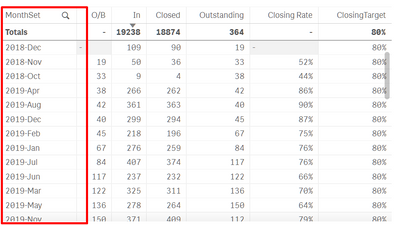
The reason I wanted to disable it because I use "Above" formula in O/B and Outstanding column.
Is there any solution ?

 OmarBenSalem
- Mark as New
- Bookmark
- Subscribe
- Mute
- Subscribe to RSS Feed
- Permalink
- Report Inappropriate Content
2 ways :
1) The hard way : you change your above expression to not change no matter so selection : a combo of aggr and {1}
2) You create ur date field as a measure not a dimension : aggr(only(date),date) => no filter possible
Zaidan_as
- Mark as New
- Bookmark
- Subscribe
- Mute
- Subscribe to RSS Feed
- Permalink
- Report Inappropriate Content
sorry for late response,
for the first solution,
How do I change my code, is it like this
=Sum(InVal) to =Sum({1}aggr(InVal))
for the second solution,
the result is still the same. The table still changed
