Unlock a world of possibilities! Login now and discover the exclusive benefits awaiting you.

- Qlik Community
- :
- Forums
- :
- Analytics & AI
- :
- Products & Topics
- :
- Visualization and Usability
- :
- Re: Discounted cash flow model
- Subscribe to RSS Feed
- Mark Topic as New
- Mark Topic as Read
- Float this Topic for Current User
- Bookmark
- Subscribe
- Mute
- Printer Friendly Page

- Mark as New
- Bookmark
- Subscribe
- Mute
- Subscribe to RSS Feed
- Permalink
- Report Inappropriate Content
Discounted cash flow model
Really new to Qlik Sense.
I am creating a discounted cash flow model. That is, I want to be able to perform this calculation:
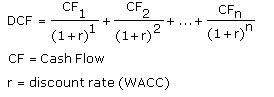
All cash flows are equal and given ,as well as the discount rate.
Example:
| Company Name | Cash flow | Rate | Number of periods (n) | DCF |
|---|---|---|---|---|
| ABC | 10 | 5% | 5 | |
| XYZ | 20 | 3% | 10 | |
| MNP | 15 | 2% | 5 |
How can I apply the formula above to the given information ?
Please help !
- « Previous Replies
-
- 1
- 2
- Next Replies »

 sunny_talwar
- Mark as New
- Bookmark
- Subscribe
- Mute
- Subscribe to RSS Feed
- Permalink
- Report Inappropriate Content
Does that mean a single rate to all transactions regardless of company or any other dimension?
- Mark as New
- Bookmark
- Subscribe
- Mute
- Subscribe to RSS Feed
- Permalink
- Report Inappropriate Content
yes
- Mark as New
- Bookmark
- Subscribe
- Mute
- Subscribe to RSS Feed
- Permalink
- Report Inappropriate Content
How do i do this? I am working on qlik sense.
sunny_talwar
- Mark as New
- Bookmark
- Subscribe
- Mute
- Subscribe to RSS Feed
- Permalink
- Report Inappropriate Content
Oh my god... all this time... why didn't you mention that you were using Qlik Sense 
May be use an extension for input box
- Mark as New
- Bookmark
- Subscribe
- Mute
- Subscribe to RSS Feed
- Permalink
- Report Inappropriate Content
I am sorry.
I did find this extension but I am not knowing how to use it

 OmarBenSalem
- Mark as New
- Bookmark
- Subscribe
- Mute
- Subscribe to RSS Feed
- Permalink
- Report Inappropriate Content
First thing, you put the extension under :
C:\Users\YourUser\Documents\Qlik\Sense\Extensions
and unzip it;
You'll find it here:
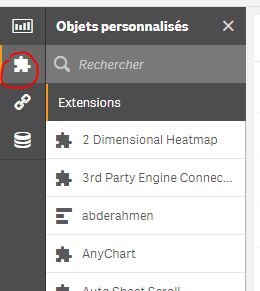
Then create your variable and initiate it with a value :
exp:
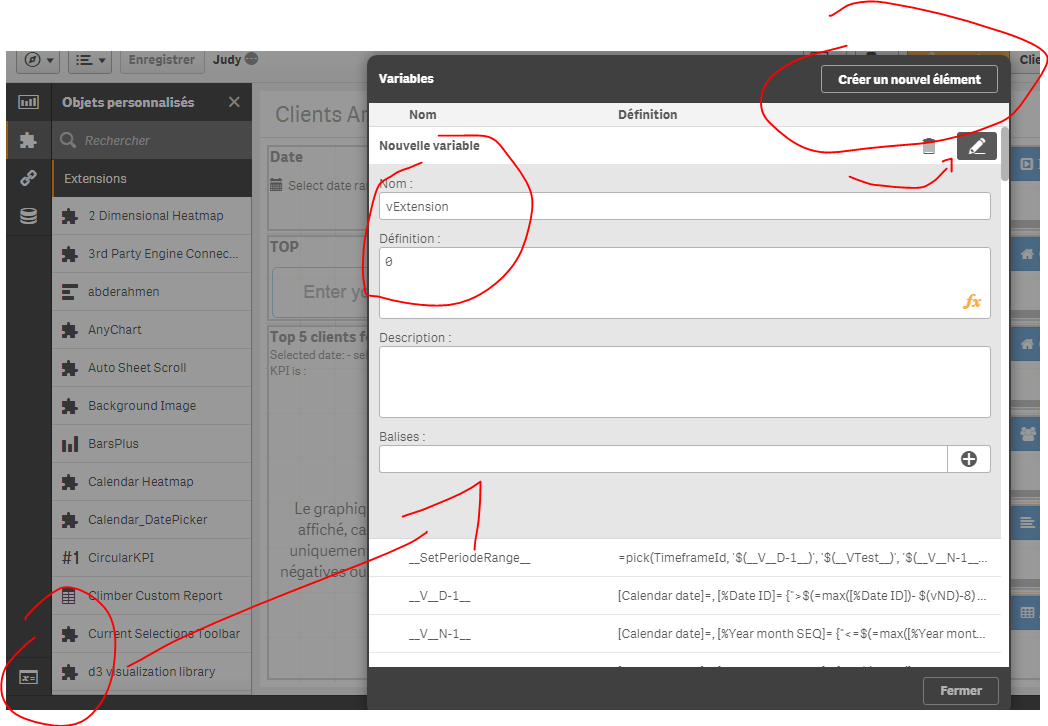
Then choose your extension, and configure it (put the name of your variable you want to update and work with vExtension):
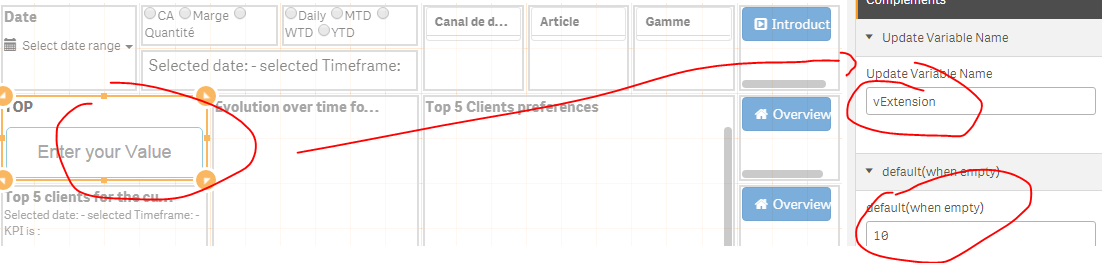

 simondachstr
- Mark as New
- Bookmark
- Subscribe
- Mute
- Subscribe to RSS Feed
- Permalink
- Report Inappropriate Content
Check the forum it has been posted in 
sunny_talwar
- Mark as New
- Bookmark
- Subscribe
- Mute
- Subscribe to RSS Feed
- Permalink
- Report Inappropriate Content
Yes, I should have...
- Mark as New
- Bookmark
- Subscribe
- Mute
- Subscribe to RSS Feed
- Permalink
- Report Inappropriate Content
Thank you for your help. I did figure it out. I have one more question. I am using 3 input box for a table with 3 different columns. Each column is associated with one input box. Only 1 column is being updated when I change the values in the input box. How can I make it so that all of them change when I change the respective input box?
- « Previous Replies
-
- 1
- 2
- Next Replies »